Do New Xbox One Controllers Work with Old Xbox One?
Fast answer first. Then use the tabs or video for more detail.
- Watch the video explanation below for a faster overview.
- Game mechanics may change with updates or patches.
- Use this block to get the short answer without scrolling the whole page.
- Read the FAQ section if the article has one.
- Use the table of contents to jump straight to the detailed section you need.
- Watch the video first, then skim the article for specifics.
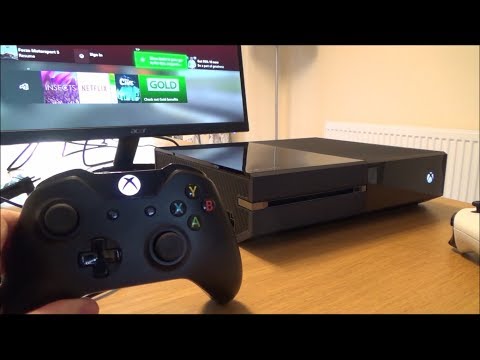
Yes, newer Xbox One controllers are generally compatible with older Xbox One consoles. This means that if you purchase a new Xbox One controller today, it should work seamlessly with your original Xbox One, Xbox One S, or Xbox One X. However, there are a few nuances to consider, primarily regarding connectivity methods and potential firmware updates.
Understanding Xbox One Controller Compatibility
The Xbox One controller ecosystem is designed with backward compatibility in mind. Microsoft aimed to create a unified experience across the Xbox One family, which includes the original Xbox One (released in 2013), the Xbox One S (released in 2016), and the Xbox One X (released in 2017). Therefore, the controllers are largely interchangeable within this console generation.
Connectivity Options: Wireless and Wired
Xbox One controllers utilize two primary connectivity methods:
-
Wireless: The standard method involves a proprietary wireless protocol developed by Microsoft. This allows for a reliable and low-latency connection without the need for cables. All Xbox One consoles are equipped with the necessary wireless receiver to connect to these controllers.
-
Wired: Xbox One controllers can also be connected to the console via a micro-USB cable. This wired connection provides a stable and lag-free experience, which is particularly beneficial for competitive gaming. It also bypasses the need for batteries in the controller.
Potential Firmware Updates
While the basic functionality is compatible out of the box, you might be prompted to update the controller’s firmware when you first connect it to an older Xbox One console. This is because newer controllers might have features or optimizations that require the console to be updated to the latest software version.
- Update Process: The Xbox One console will typically detect the new controller and prompt you to update its firmware. This process is usually straightforward and involves following the on-screen instructions. Ensure your console is connected to the internet during the update.
Xbox Wireless Adapter for PC
While not directly related to console compatibility, it’s worth noting the Xbox Wireless Adapter for PC. This adapter allows you to connect Xbox One controllers wirelessly to a Windows PC. If you plan on using your Xbox One controller with both your console and your PC, this adapter can be a convenient accessory.
Special Edition Controllers
Special edition Xbox One controllers, such as those themed around specific games or franchises, function identically to standard controllers in terms of compatibility. They will work with any Xbox One console, provided they are connected either wirelessly or via a micro-USB cable.
Addressing Specific Scenarios
While the general rule is that newer Xbox One controllers work with older consoles, there are a few specific scenarios to consider:
-
Controller Revisions: There have been minor revisions to the Xbox One controller design over the years. These revisions mainly focus on ergonomics and internal components but do not affect compatibility.
-
Connectivity Issues: In rare cases, you might encounter connectivity issues. This could be due to interference from other wireless devices, low battery levels, or a malfunctioning controller. Troubleshooting steps include moving the console away from other electronic devices, replacing the batteries, and restarting the console.
-
Controller Pairing: Make sure the controller is properly paired with your Xbox One console. This is usually done by pressing the sync button on both the controller and the console.
Frequently Asked Questions (FAQs)
1. Can I use my Elite Series 2 controller on my original Xbox One?
Yes, the Xbox Elite Series 2 controller is fully compatible with all Xbox One consoles, including the original Xbox One, Xbox One S, and Xbox One X. You can connect it wirelessly or via a USB-C cable.
2. Do I need any special adapters to use a new Xbox One controller on an old Xbox One?
No, you do not need any special adapters. As long as your controller is an official Xbox One controller, it will work with any Xbox One console without additional hardware.
3. What if my Xbox One controller is not connecting to my console?
Try the following troubleshooting steps:
- Ensure the controller has fresh batteries or is properly connected via a USB cable.
- Restart both the controller and the Xbox One console.
- Check for wireless interference from other devices.
- Re-sync the controller to the console by pressing the sync button on both.
- Update the controller firmware.
4. How do I update the firmware on my Xbox One controller?
Connect the controller to your Xbox One console via a USB cable. Navigate to Settings > Devices & connections > Accessories. Select the controller, and if an update is available, you will be prompted to install it.
5. Will a wireless headset adapter for the Xbox One controller work on all Xbox One consoles?
Yes, the wireless headset adapter is compatible with all Xbox One consoles. Simply plug the adapter into the bottom of your controller to use a wireless headset.
6. Are there any limitations to using a newer controller on an older console?
The main limitation is that some features introduced in newer controllers might not be fully utilized on older consoles if they lack the necessary software updates. However, the core functionality, such as button inputs and wireless connectivity, will still work as expected.
7. Can I use multiple new Xbox One controllers on my old Xbox One?
Yes, you can use multiple new Xbox One controllers on your old Xbox One console. The number of controllers that can be connected simultaneously depends on the console’s capabilities, but it generally supports up to eight controllers.
8. What do I do if my controller keeps disconnecting?
- Check the battery level.
- Move closer to the console to reduce wireless interference.
- Try using a USB cable for a wired connection.
- Ensure your console and controller are updated to the latest firmware.
- Reset the controller by removing the batteries and holding the Xbox button for 10 seconds.
9. Does the color of the controller affect its compatibility?
No, the color of the controller does not affect its compatibility. Any official Xbox One controller, regardless of its color or design, will work with any Xbox One console.
10. Will a third-party Xbox One controller work on an old Xbox One?
Third-party Xbox One controllers may work on older consoles, but compatibility is not guaranteed. It depends on whether the third-party controller is designed to be fully compatible with the Xbox One ecosystem and if it has received the necessary certifications.
11. What is the range of the Xbox One controller’s wireless connection?
The typical range of the Xbox One controller’s wireless connection is approximately 30 feet (9 meters). However, this range can be affected by obstacles and interference.
12. Can I use an Xbox Series X/S controller on an Xbox One?
No, Xbox Series X/S controllers are not natively compatible with Xbox One consoles. While they use the same basic wireless protocol, there are differences in the hardware and software that prevent seamless compatibility.
13. Is there a way to test if my Xbox One controller is working correctly?
Yes, you can test your Xbox One controller by navigating to Settings > Devices & connections > Accessories on your Xbox One console. Select the controller and then choose “Test Controller” to see if all the buttons and joysticks are functioning correctly.
14. Do rechargeable battery packs affect controller compatibility?
No, rechargeable battery packs do not affect controller compatibility. As long as the battery pack is designed for Xbox One controllers, it will work with any Xbox One console.
15. If I buy a used Xbox One controller, how can I make sure it will work with my console?
Before purchasing a used Xbox One controller, ensure that it is an official Xbox One controller. Visually inspect the controller for any signs of damage. If possible, test the controller on an Xbox One console before buying it to confirm that it connects and functions correctly.
In conclusion, using a new Xbox One controller on an older Xbox One is generally a straightforward process. The Xbox One ecosystem is designed with backward compatibility in mind, ensuring a seamless gaming experience across different console models. By understanding the connectivity options, potential firmware updates, and troubleshooting steps, you can easily connect and use your new controller on your old Xbox One console.