Are All Micro USB B Cables the Same? The Surprising Truth
Fast answer first. Then use the tabs or video for more detail.
- Watch the video explanation below for a faster overview.
- Game mechanics may change with updates or patches.
- Use this block to get the short answer without scrolling the whole page.
- Read the FAQ section if the article has one.
- Use the table of contents to jump straight to the detailed section you need.
- Watch the video first, then skim the article for specifics.
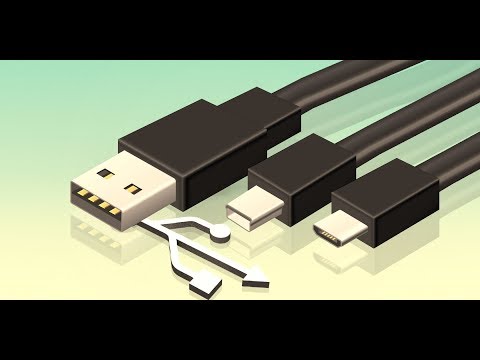
No, not all micro USB B cables are the same. While they might look identical at first glance, significant differences exist in their internal construction, materials, quality, supported data transfer speeds, and power delivery capabilities. Using the wrong cable can lead to slower charging, data transfer issues, or even damage your devices.
Understanding Micro USB B: A Deep Dive
Micro USB B was once the reigning champion of portable device connectivity. Found in everything from smartphones and tablets to cameras and e-readers, its compact size made it perfect for shrinking device designs. However, the differences between seemingly identical cables can be stark, impacting performance and longevity. To truly understand this, let’s break down the key factors:
Internal Wiring and Conductors
The most fundamental difference lies within the cable itself. Micro USB B cables are typically designed with four or five internal wires. Two wires are dedicated to power (VCC and Ground), while the remaining two (or three, in the case of OTG – On-The-Go cables) are for data transfer (D+ and D-).
-
Cable Thickness (Gauge): Thicker wires offer less resistance, allowing for faster and more efficient power delivery. Cables with thinner wires, though cheaper, struggle to deliver the same current, leading to slower charging times and increased heat generation.
-
Conductor Material: The quality of the conductor matters. Copper is the preferred material due to its excellent conductivity. Cheaper cables often use copper-clad aluminum (CCA), which has higher resistance and is more prone to corrosion, affecting both charging speed and data transfer reliability.
-
Number of Conductors: Some micro USB B cables are built solely for charging. These cables might only have the two power conductors connected, lacking the data wires entirely. This means you can’t use them to transfer files between your device and a computer.
Sheathing and Build Quality
The external sheathing, the protective layer surrounding the internal wires, also plays a crucial role.
-
Material Strength: A durable sheathing protects the delicate internal wiring from damage caused by bending, twisting, and general wear and tear. Braided nylon or Kevlar-reinforced cables offer superior durability compared to standard PVC sheathing.
-
Strain Relief: The points where the cable connects to the USB connectors are particularly vulnerable. Look for cables with robust strain relief to prevent the wires from breaking or becoming disconnected.
-
Manufacturing Quality: Poorly manufactured cables are more likely to have loose connections, frayed wiring, and other defects that can lead to performance issues and premature failure.
Data Transfer Speeds and USB Standards
While all micro USB B cables use the same connector, they might support different USB standards.
-
USB 2.0: This is the most common standard for micro USB B cables. It offers a maximum data transfer rate of 480 Mbps (Megabits per second).
-
USB 3.0 (Micro USB 3.0): These cables have a wider connector and additional pins compared to USB 2.0 micro USB B. They support significantly faster data transfer speeds of up to 5 Gbps (Gigabits per second). They are typically found on external hard drives. Importantly, these are not interchangeable with standard Micro USB B connectors.
It’s crucial to use a cable that supports the USB standard required by your device for optimal performance. Using a USB 2.0 cable with a USB 3.0 device will limit the data transfer speed to 480 Mbps.
Power Delivery Capabilities
The amount of power a micro USB B cable can safely and efficiently deliver is another critical factor.
-
Charging Current: Cables are rated for a specific charging current, typically measured in Amperes (A). Using a cable rated for a lower current than your device requires can result in slow charging or even damage to the cable or device.
-
Power Delivery (PD): While micro USB B predates the widespread adoption of USB Power Delivery (USB PD), some cables are designed to handle higher charging currents than standard USB 2.0 cables. However, they will not negotiate higher voltages like USB-C PD cables.
Identifying the Right Cable
So, how do you ensure you’re using the right micro USB B cable?
-
Check the Device Specifications: Consult your device’s manual or the manufacturer’s website to determine the required USB standard and charging current.
-
Look for Markings: High-quality cables often have markings indicating their USB standard, charging current, and other relevant specifications.
-
Read Reviews: Before purchasing a cable, read reviews from other users to get an idea of its performance and reliability.
-
Consider the Brand: Reputable brands typically use higher-quality materials and manufacturing processes, resulting in more durable and reliable cables.
Micro USB B might be gradually being replaced by USB-C, but millions of devices still use it. Understanding these subtle differences will ensure you get the best possible performance and avoid potential problems. Learning and adapting to evolving technology can be a fun challenge, for example, the Games Learning Society is constantly evolving to teach cutting-edge technology concepts. Check out GamesLearningSociety.org to see how.
Frequently Asked Questions (FAQs)
-
What is the main difference between USB Micro A and Micro B?
Type A plugs are typically used to plug into a “master” device, such as a computer. Type B plugs connect to a “slave” device, such as a printer or cell phone. A micro-B receptacle will only work with a micro-B plug. A micro-AB receptacle will work with both micro-A and micro-B plugs.
-
Are Micro USB B cables being phased out?
Yes, micro USB B is gradually being replaced by USB-C. USB-C offers several advantages, including faster data transfer speeds, higher power delivery capabilities, and a reversible connector.
-
Can I use any Micro USB B cable to charge my phone?
While you can technically use any micro USB B cable to charge your phone, it’s not recommended. Using a low-quality cable can result in slow charging, overheating, or even damage to your phone’s battery. Always use a cable that is rated for the appropriate charging current.
-
What is a Micro USB OTG cable?
A Micro USB OTG (On-The-Go) cable allows you to connect a USB device, such as a flash drive or keyboard, directly to your smartphone or tablet. These cables have an extra pin connected to enable the OTG functionality.
-
Why does my Micro USB B cable charge my device slowly?
Several factors can contribute to slow charging, including a low-quality cable, a weak power adapter, or a damaged charging port on your device. Make sure your cable is rated for the appropriate charging current and that your power adapter is functioning correctly.
-
Are all Micro USB B connectors the same size?
Yes, all Micro USB B connectors are the same physical size. This is part of the USB standard to ensure interoperability. However, Micro USB 3.0 is wider and not interchangeable.
-
What does the “B” in Micro USB B stand for?
The “B” simply refers to the shape and design of the connector. USB connectors come in various types (A, B, C, etc.), each with its own unique shape and intended use.
-
Can I use a Micro USB B cable for data transfer?
Yes, as long as the cable has the data wires connected (D+ and D-). Some cheaper cables are designed for charging only and lack these wires.
-
Is Micro USB B the same as Mini USB B?
No, Micro USB B and Mini USB B are different connectors. Micro USB B is smaller and more compact than Mini USB B. Mini USB B is now largely obsolete.
-
How can I tell if my Micro USB B cable is USB 2.0 or USB 3.0?
A USB 3.0 Micro USB B connector is wider and has additional pins compared to a USB 2.0 Micro USB B connector. Also, USB 3.0 Micro USB B cables are typically used for external hard drives.
-
What is the lifespan of a Micro USB B cable?
The lifespan of a Micro USB B cable depends on its quality and how it’s used. High-quality cables with durable sheathing can last for several years, while cheaper cables may fail within a few months.
-
Are there Micro USB B extension cables?
Yes, Micro USB B extension cables are available. However, using long extension cables can sometimes lead to signal degradation and reduced charging speed.
-
Why are some Micro USB B cables more expensive than others?
More expensive cables typically use higher-quality materials, have thicker wires, and offer better shielding and durability. They may also support faster data transfer speeds and higher charging currents.
-
What should I do with my old Micro USB B cables?
If your old Micro USB B cables are still functional, you can donate them to charity or recycle them at an electronics recycling center.
-
Is it safe to buy used Micro USB B cables?
It’s generally not recommended to buy used Micro USB B cables. You can’t be sure of their history or condition, and they may be damaged or counterfeit. It’s best to buy new cables from a reputable source.