Can High FPS Damage Your GPU? The Expert’s Guide
Fast answer first. Then use the tabs or video for more detail.
- Watch the video explanation below for a faster overview.
- Game mechanics may change with updates or patches.
- Use this block to get the short answer without scrolling the whole page.
- Read the FAQ section if the article has one.
- Use the table of contents to jump straight to the detailed section you need.
- Watch the video first, then skim the article for specifics.
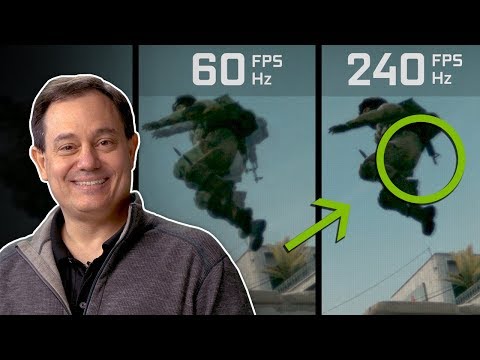
The short answer is: Not directly, but potentially indirectly. High FPS (frames per second) itself isn’t the culprit that damages your GPU (graphics processing unit). Instead, the sustained high load and heat generated when pushing for those high frame rates can accelerate wear and tear and expose underlying cooling issues, ultimately leading to damage over time.
Let’s delve deeper into how this works and explore the factors that contribute to the longevity of your prized graphics card.
Understanding the Relationship Between FPS, GPU Load, and Temperature
A GPU works tirelessly to render each frame you see on your monitor. The higher the FPS, the more frames it needs to generate per second. This translates to a higher workload, increased power consumption, and, most importantly, higher temperatures.
Modern GPUs are designed to handle these demanding tasks. They come equipped with sophisticated cooling solutions, including heat sinks, fans, and sometimes even liquid cooling. However, even the best cooling systems have their limits.
When you push your GPU to its maximum potential to achieve high FPS, you’re essentially running it at or near its thermal limits. While manufacturers build in safety mechanisms like thermal throttling (reducing performance to prevent overheating), prolonged exposure to high temperatures can degrade the components over time.
Key Factors Influencing GPU Health at High FPS
Several factors determine whether striving for high FPS will shorten your GPU’s lifespan:
1. Cooling Efficiency:
This is the single most crucial factor. A well-cooled GPU can withstand sustained high loads without issues. Ensure your case has adequate airflow, and the GPU cooler is free of dust and debris. Consider reapplying thermal paste if you suspect it’s dried out (typically after a couple of years).
2. Ambient Temperature:
The temperature of your room significantly impacts your GPU’s operating temperature. A hot room means the cooling system has to work harder to maintain safe temperatures.
3. Overclocking:
Overclocking pushes your GPU beyond its factory settings, potentially increasing its performance but also significantly raising its temperature. While tempting for higher FPS, overclocking without adequate cooling is a recipe for disaster.
4. Game Settings:
Demanding games with maxed-out settings will naturally put more strain on your GPU. Experiment with different settings to find a balance between visual quality and frame rate, especially if your cooling isn’t top-notch.
5. Power Supply (PSU):
A weak or failing PSU can cause voltage fluctuations, which can damage your GPU and other components. Ensure your PSU provides sufficient power and is of good quality.
6. Age of the GPU:
Like any electronic component, a GPU ages over time. Its ability to dissipate heat may diminish, and its components become more susceptible to damage.
The Role of Refresh Rate and the Pursuit of High FPS
One crucial point to consider is your monitor’s refresh rate. If you have a 60Hz monitor, rendering frames beyond 60 FPS won’t provide any visual benefit. In fact, it’s just making your GPU work harder for no discernible gain. Consider setting an FPS cap to match your monitor’s refresh rate to reduce the load on your GPU.
However, if you have a high refresh rate monitor (144Hz, 240Hz, or higher), pursuing higher FPS becomes more relevant, as it can lead to a smoother and more responsive gaming experience. In this case, managing temperatures becomes even more critical. You can read more about the importance of gaming and education at the Games Learning Society website.
Monitoring GPU Health
Regularly monitor your GPU’s temperature using software like MSI Afterburner, GPU-Z, or the monitoring tools provided by your GPU manufacturer. Aim to keep your GPU’s temperature below 80°C (176°F) under heavy load. If it consistently exceeds this threshold, investigate your cooling setup and make necessary adjustments.
Addressing Common Concerns: Debunking Myths
Many misconceptions surround the relationship between FPS and GPU health. Let’s address a few common ones:
-
Myth: Higher FPS always damages your GPU.
- Reality: It’s the resulting heat and load, not the FPS itself, that can cause damage.
-
Myth: Capping FPS completely eliminates the risk.
- Reality: It reduces the load and temperature but doesn’t eliminate other potential issues like a failing PSU.
-
Myth: All GPUs are created equal when it comes to temperature tolerances.
- Reality: Different models and manufacturers have varying thermal thresholds and cooling capabilities.
Final Thoughts
While high FPS itself doesn’t directly damage your GPU, pushing your card to its limits consistently can expose underlying cooling issues and accelerate wear and tear. Prioritize proper cooling, monitor temperatures, and adjust settings as needed to ensure your GPU stays healthy for years to come. Always aim for a balance between performance and longevity. Now that we’ve covered the topic thoroughly, let’s dive into some frequently asked questions:
Frequently Asked Questions (FAQs)
1. Does high FPS make my GPU hotter?
Yes, it generally does. A higher FPS means your GPU is working harder to render more frames per second. This increased workload translates to higher power consumption and, consequently, higher temperatures.
2. Does high FPS affect my CPU?
Yes, but indirectly. While the GPU does the heavy lifting of rendering, the CPU is responsible for preparing the data for each frame. A very high FPS can strain the CPU, potentially leading to a bottleneck if it can’t keep up with the GPU.
3. Does FPS affect graphics quality?
Not directly. FPS is about the smoothness of motion. Graphics quality is determined by the game’s settings (textures, shadows, etc.). You often need to balance them; higher graphics settings can reduce FPS, and vice versa.
4. Can gaming damage my GPU?
Yes, if you don’t have adequate cooling. Modern hardware is designed for high loads, but sustained high temperatures can degrade components. Keep your GPU and CPU temperatures within safe limits.
5. What can damage my GPU?
Overheating is a primary culprit. Other factors include dust buildup, faulty installation, frequent overclocking without sufficient cooling, power surges, and general wear and tear over time.
6. Is it bad to use 100% of my GPU?
Not necessarily. Modern GPUs are designed to handle 100% utilization. However, prolonged use at 100% can lead to higher temperatures and potential hardware degradation if cooling is inadequate.
7. Is 300 FPS overkill?
For most people, yes. Most monitors have a refresh rate of 60Hz or 144Hz, meaning they can only display 60 or 144 frames per second, respectively. Rendering frames beyond that offers no visual benefit.
8. How much FPS is too much?
It depends on your monitor’s refresh rate. There’s little point in rendering frames beyond your monitor’s capability, as you won’t see the difference.
9. Is 90 FPS better than 60 FPS?
Yes, assuming your monitor has a refresh rate of 90Hz or higher. A higher FPS generally results in smoother gameplay. However, the difference may not be noticeable to everyone.
10. How do I know if my CPU is bottlenecking my GPU?
Monitor your GPU utilization while gaming. If it’s consistently below 95%, and your CPU is at or near 100%, your CPU is likely bottlenecking your GPU.
11. Does high FPS use CPU or GPU more?
Primarily the GPU. The GPU is responsible for rendering the frames, which is the most demanding task. The CPU plays a supporting role in preparing the data for each frame.
12. Does a 144Hz monitor make my GPU hotter?
Yes, if you allow your games to run at a high FPS (close to or above 144). The GPU will work harder to render more frames, generating more heat. Limiting the FPS can reduce the load and temperature.
13. Does a GPU bottleneck affect FPS?
Absolutely. A GPU bottleneck means the GPU is the limiting factor in your system’s performance, and it can’t render frames as fast as it should. This results in lower FPS.
14. Does capping FPS reduce GPU heat?
Yes. Capping FPS limits the workload on your GPU, reducing power consumption and, consequently, heat generation. This is an effective way to keep your GPU cooler.
15. Can a 144Hz monitor run 300 FPS?
No. A 144Hz monitor can only display a maximum of 144 frames per second. Rendering frames beyond that is pointless, as you won’t see them.
By understanding these factors and taking the necessary precautions, you can enjoy high FPS gaming without compromising the health and longevity of your GPU. Good luck and happy gaming! Visit GamesLearningSociety.org to explore how games and learning intersect and contribute to educational advancements.