Can I Play Both a Physical and Digital Nintendo Switch Game? Absolutely!
Fast answer first. Then use the tabs or video for more detail.
- Watch the video explanation below for a faster overview.
- Game mechanics may change with updates or patches.
- Use this block to get the short answer without scrolling the whole page.
- Read the FAQ section if the article has one.
- Use the table of contents to jump straight to the detailed section you need.
- Watch the video first, then skim the article for specifics.
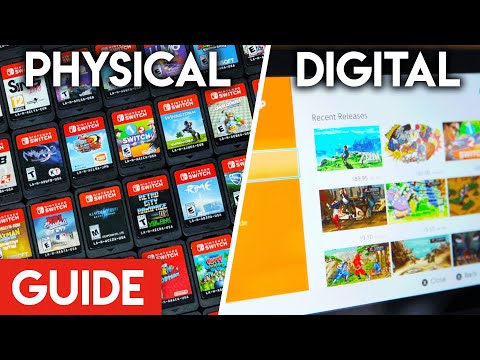
Yes, you can absolutely play both physical and digital versions of the same game on your Nintendo Switch. The Switch is designed to handle both formats seamlessly, offering a flexible gaming experience tailored to your preferences. The console prioritizes the game cartridge when inserted, so if you own both versions, inserting the physical cartridge will launch that version of the game. Your save data is stored separately on the console’s internal memory, ensuring your progress is maintained regardless of which version you play.
Understanding How the Switch Handles Physical and Digital Games
The Nintendo Switch’s operating system is designed to be user-friendly when it comes to managing both physical and digital game libraries. Here’s a breakdown of how it works:
-
Cartridge Priority: When a game cartridge is inserted into the Switch, the console will automatically prioritize launching the game from the cartridge. This allows you to quickly switch between games without navigating through menus.
-
Save Data Independence: All save data for Nintendo Switch games is stored on the console’s internal memory, not on the game cartridge or digital download. This means that whether you play a physical or digital version of a game, your progress will be saved and accessible. The only way you’re losing your saved progress if your console breaks down and is not repairable.
-
Digital Downloads: If you choose to purchase a digital copy of a game, it will be downloaded and stored on the Switch’s internal memory (or an inserted microSD card). You can then launch the game directly from the home screen.
-
No Free Digital Copies: Owning a physical copy of a game does not grant you a free digital copy, and Nintendo has no plans to offer such a service. You must purchase the digital version separately if you want to own both.
Maximizing Your Gaming Experience
Understanding these features can help you optimize your gaming experience. For example, if you prefer the convenience of having a game readily available without switching cartridges, you can purchase the digital version. If you value the ability to resell or lend your games, the physical version is the better option.
FAQs: All Your Nintendo Switch Game Questions Answered
Here are 15 frequently asked questions about playing physical and digital games on the Nintendo Switch, designed to provide you with a comprehensive understanding of the system’s capabilities.
1. Can I Use Save Data from a Physical Game on a Digital Version?
Yes, absolutely! Because save data is stored on the console’s internal memory, you can seamlessly transition between playing a physical and digital version of the same game. Your progress will be retained, allowing you to pick up where you left off regardless of the format.
2. Can I Play Two Different Games at the Same Time on a Nintendo Switch?
No, like all video game consoles, a Switch can only run one game at a time. You can save progress in multiple games, but you can’t play them simultaneously. If two people want to play different games, they will need to take turns or use separate consoles.
3. Can I Have My Games on Two Switches?
Yes, purchases made using a Nintendo Account can be redownloaded and played on any Nintendo Switch console linked to that account. However, only one console can be designated as the primary console for your Nintendo Account. This impacts how other users on the console can access your digital games.
4. Do Physical and Digital Nintendo Switch Games Share the Same Save File?
Yes! Game save data is stored on the console’s System Memory, irrespective of whether you’re playing a digital or physical version.
5. Do I Need to Buy Two Games If I Have Two Switches?
Yes, to play the same game simultaneously on two separate consoles, you typically need two copies of the game. However, digital games can be “shared” to other Switches under certain conditions, such as designating one console as the primary console.
6. Is It Better to Have a Physical Copy of a Game Switch?
It depends on your preferences. Physical copies allow you to resell, lend, or collect games, while digital copies offer convenience and instant access. Physical games tend to decrease in price faster after release.
7. Can You Play Mario Kart on Two Switches with One Game?
Yes, but with caveats. For local multiplayer, you generally need a copy of the game for each console. However, digitally purchased games can be “shared” if you log into the second Switch with the account that purchased the game and set it as the primary console.
8. Can 2 Accounts Have the Same Primary Switch?
No, each Nintendo Account can only have one primary console at a time. The first console you use to connect to the Nintendo eShop becomes your primary console. On the primary console, any user can play downloadable content purchased by any account.
9. Can I Share My Digital Switch Games with Family?
Yes, digital games are tied to the Nintendo Account that purchased them. All users on a system registered as the primary console can play games purchased by any Nintendo Account that has designated that system as their primary console.
10. How Do I Use Two Switches on One Account?
To add your Nintendo Account to another Switch, create a new local account and link it to your Nintendo Account using your login credentials. An internet connection is required for this process.
11. How Many Games Can You Have on a Switch at Once?
The standard Nintendo Switch has 32 GB of storage, allowing you to store roughly 4-8 games, depending on their size. A Switch with 64 GB of storage can hold double that amount. You can also expand storage using a microSD card.
12. Are Switch Digital Games Tied to Your Account?
Yes, purchases on the Nintendo Switch eShop are tied to the Nintendo Account used to make the purchase. You can register one primary console per account, allowing anyone on that console to play your digital games.
13. Can I Get a Digital Copy of a Game I Already Own Physically?
No, Nintendo does not offer a service to convert physical games into digital licenses. You would need to purchase the digital version separately from the Nintendo eShop.
14. How Many Times Can You Make a Switch Primary?
You can change the primary console for your Nintendo Account as needed. To do so, you must first deregister your current primary console and then designate the new console as the primary one.
15. What Happens to My Digital Games If My Switch Breaks?
If your Switch breaks, you can redownload your digital games on a new or repaired console, provided it’s linked to your Nintendo Account. However, you may lose save data unless you have a Nintendo Switch Online subscription and have enabled cloud saves.
The Best of Both Worlds
Ultimately, the Nintendo Switch offers a versatile gaming experience that accommodates both physical and digital game formats. Understanding how the console handles these formats allows you to make informed decisions about your game purchases and maximize your enjoyment. Whether you prefer the tangible feel of a game cartridge or the convenience of digital downloads, the Switch has you covered.
Want to learn more about the educational aspects of gaming? Explore the Games Learning Society and discover how games are revolutionizing education at GamesLearningSociety.org.