Unleash Cloud Gaming on Your TV: A Deep Dive into Amazon Luna on Firestick
Fast answer first. Then use the tabs or video for more detail.
- Watch the video explanation below for a faster overview.
- Game mechanics may change with updates or patches.
- Use this block to get the short answer without scrolling the whole page.
- Read the FAQ section if the article has one.
- Use the table of contents to jump straight to the detailed section you need.
- Watch the video first, then skim the article for specifics.
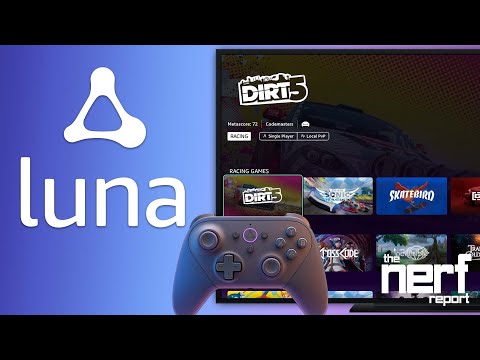
Yes, you absolutely can play Amazon Luna games on a Firestick! In fact, the Fire TV Stick is one of the easiest and most popular ways to bring cloud gaming to your big screen with Amazon Luna. Transform your living room into a gaming haven without the need for expensive consoles. Let’s delve into the specifics of how to set up and enjoy Luna games on your Firestick.
Setting Up Luna on Your Firestick: A Step-by-Step Guide
Getting Amazon Luna up and running on your Fire TV Stick is a straightforward process. Here’s a breakdown:
- Power Up and Navigate: Turn on your Fire TV. Using your remote, navigate to the “Find” tab on the Fire TV Home screen.
- Search for Luna: Type “Luna” into the search bar. You can use the on-screen keyboard or voice search via Alexa.
- Download and Install: Select the Luna app from the search results. Click “Get” or the shopping cart icon to begin the download.
- Launch the App: Once the download is complete, select “Open” to launch the Luna app.
- Controller Connection: The app will prompt you to connect a controller. You have several options:
- Luna Controller: Amazon’s dedicated controller offers seamless integration.
- Compatible Bluetooth Controller: Pair your existing PlayStation DualShock 4 or Xbox One controller.
- Virtual Controller: Use your smartphone as a virtual controller via the Luna Controller app.
- Login and Dive In: Log in to the Amazon account associated with your Luna subscription.
With these steps, you will be ready to explore the world of cloud gaming right on your TV. Now, let’s explore more.
Understanding Luna’s Subscription Model and Game Availability
Amazon Luna operates on a subscription-based model. While Prime members can play ‘Fortnite’ and a rotating selection of games every month at no additional cost, access to the full Luna game library requires a subscription to Luna+, priced at $9.99 per month.
Subscribers, including Prime members, can link their Ubisoft account to Luna. This allows them to play select Ubisoft PC games that they already own directly on their Fire TV or other supported devices.
FAQs: Your Questions About Luna on Firestick Answered
Let’s tackle some common questions about using Amazon Luna on a Firestick.
How do I ensure my Firestick is compatible with Amazon Luna?
Amazon Luna is compatible with most modern Fire TV devices. To ensure compatibility, check the Amazon Luna support page for a list of supported devices. Typically, any Fire TV Stick released in the last few years should work without issue. Make sure your device runs FireOS 5 or higher.
What internet speed is required for optimal Luna gameplay on Firestick?
Amazon recommends a sustained internet speed of at least 10Mbps for the best gaming experience. For higher resolutions and smoother gameplay, a faster connection is advisable. Test your internet speed to ensure it meets the minimum requirements.
Can I use any Bluetooth controller with Luna on my Firestick?
While the Luna Controller is designed for seamless integration, Luna also supports other Bluetooth controllers, including the PlayStation DualShock 4 and Xbox One Controller. Make sure your controller is in pairing mode, then add it through the Fire TV’s Bluetooth settings.
Can I use my phone as a controller for Luna on Firestick?
Yes, you can. The Luna Controller app allows you to use your smartphone as a virtual controller. Download the app on your phone and follow the on-screen instructions to connect it to your Firestick.
Are all Luna games free with a Prime membership?
No, not all Luna games are free with Prime. Prime members get access to a rotating selection of games each month, as well as the popular game Fortnite. To access the full library of Luna games, you will need a Luna+ subscription.
Can I play my existing Ubisoft games on Luna through my Firestick?
Yes, if you have a Luna+ subscription, you can link your Ubisoft account to Luna and play select Ubisoft PC games that you already own. Note that this only applies to PC games, not console versions.
How much does Amazon Luna cost per month?
The Luna+ subscription costs $9.99 per month. This provides access to a vast library of games that are included with that service.
Can I download games directly to my Firestick for offline play with Luna?
No, Luna is a cloud gaming service, meaning games are streamed and not downloaded to your device. This eliminates the need for storage space and updates.
What type of games are available on Amazon Luna?
Amazon Luna offers a diverse library of games, including AAA titles, indie games, family-friendly games, and retro classics. The selection is constantly updated, ensuring there is always something new to play. Visit the Games Learning Society website to know more about the impact of new games.
Can I use a keyboard and mouse with Luna on my Firestick?
While primarily designed for controllers, Luna does support keyboard and mouse input. You can connect these peripherals via USB or Bluetooth to your Firestick.
Does Luna support 4K gaming on Firestick?
Yes, Luna supports 4K gaming on compatible Fire TV devices and TVs. However, you will need a fast and stable internet connection to stream games at this resolution.
What are the advantages of using Luna on Firestick compared to a gaming console?
Luna on Firestick offers several advantages:
- No upfront hardware costs: You don’t need to buy an expensive console.
- Accessibility: Instantly access a library of games without downloads or updates.
- Portability: Play your games on any compatible device.
- Cost-effective: Subscription-based model can be cheaper than buying individual games.
How do I cancel my Amazon Luna subscription?
You can cancel your Amazon Luna subscription through your Amazon account settings. Simply navigate to the subscriptions section and follow the instructions to cancel your Luna membership.
Can I play Luna games on multiple Firesticks with one subscription?
Yes, you can play Luna games on multiple Firesticks with a single subscription. However, you can only stream on one device at a time.
Is Amazon Luna available outside of the United States?
Currently, Amazon Luna is primarily available in the United States. Amazon may expand availability to other regions in the future. Check the Amazon Luna website for the latest information on regional availability.
With Amazon Luna and a Firestick, transforming your TV into a cloud gaming powerhouse has never been easier. Whether you are a casual gamer or a hardcore enthusiast, Luna offers a convenient and affordable way to enjoy a wide range of games without the constraints of traditional hardware.