Can I Power a Nintendo Switch Dock with USB? The Definitive Guide
Fast answer first. Then use the tabs or video for more detail.
- Watch the video explanation below for a faster overview.
- Game mechanics may change with updates or patches.
- Use this block to get the short answer without scrolling the whole page.
- Read the FAQ section if the article has one.
- Use the table of contents to jump straight to the detailed section you need.
- Watch the video first, then skim the article for specifics.
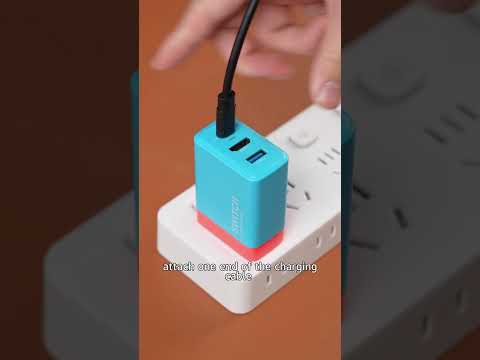
Yes, you can technically power a Nintendo Switch dock with a USB-C charger, but it’s not as straightforward as plugging in any old cable. The crucial factor is whether the USB-C charger supports Power Delivery (PD) and can provide the required voltage and amperage to operate the dock and charge the Switch effectively. The official Nintendo Switch AC adapter outputs 15V/2.6A, and any alternative charger should ideally match or exceed these specifications to ensure optimal performance. Let’s delve into the details and explore the nuances of this topic.
Understanding the Nintendo Switch Dock’s Power Requirements
The Nintendo Switch dock isn’t just a simple stand; it’s a device that allows the Switch to output video to a TV while simultaneously charging and providing USB connectivity. This functionality requires a specific amount of power, which is why the included AC adapter (HAC-002) is designed to deliver 15V at 2.6A (39W) to the dock (HEG-007)/(HAC-007).
Power Delivery (PD) is Key
The USB-C Power Delivery (PD) standard allows devices to negotiate a higher voltage and current for faster and more efficient charging. If you intend to use a USB-C charger other than the official Nintendo one, ensure it supports USB-C PD and can output at least 15V/2.6A. Many modern USB-C PD chargers, especially those rated at 45W or higher, can meet these requirements. These chargers intelligently communicate with the Switch dock to provide the necessary power.
Risks of Insufficient Power
Using a charger that doesn’t meet the power requirements can lead to several issues:
- Slow Charging: The Switch might charge very slowly, or not at all, while docked and in use.
- Battery Drain: If the charger provides insufficient power, the Switch could even drain its battery while docked, despite being connected to a power source.
- Docking Problems: The dock might not function correctly, failing to output video to the TV or support USB devices.
- Potential Damage: While less likely with modern devices, using an underpowered or poorly made charger could potentially damage the Switch or the dock.
Alternative Power Options and Considerations
While the official charger and compatible USB-C PD chargers are the most reliable options, other power sources can be used in a pinch.
USB-C Power Banks
USB-C power banks with Power Delivery (PD) capabilities are excellent for portable docking. Look for power banks that can deliver at least 45W of power and support the 15V/2.6A profile. These power banks can effectively power the dock and charge the Switch while on the go.
Laptop Chargers
Many USB-C laptop chargers are also compatible with the Nintendo Switch dock, provided they support Power Delivery and can output the required voltage and amperage. Chargers rated at 45W, 60W, or even 65W are generally safe to use. However, always verify the output specifications on the charger label to ensure compatibility.
Using Standard USB-A Chargers
While it’s possible to charge the Switch directly with a USB-A to USB-C cable, it cannot power the dock. Standard USB-A chargers typically output 5V, which is insufficient to power the dock’s functions. These chargers can still charge the Switch, but at a slower rate and only when the Switch is not docked.
Third-Party Docks and Chargers
Numerous third-party docks and chargers are available for the Nintendo Switch. While these can be more affordable, it’s crucial to choose products from reputable brands that are licensed by Nintendo or have a proven track record of safety and reliability. Unlicensed or low-quality chargers may not meet the required specifications and could potentially damage your Switch.
Nintendo Licensed Third-Party Chargers guarantee compatibility and performance. Licensed products offer Switch owners a way to use an accessory not made by Nintendo, assuring safe charging.
FAQs: Powering Your Nintendo Switch Dock
1. Can I use a phone charger to power the Switch dock?
No, phone chargers typically do not provide enough power to operate the Switch dock. They usually output 5V, while the dock requires 15V to function correctly.
2. What happens if I use an underpowered charger with the dock?
The dock may not function correctly, failing to output video to the TV or charge the Switch properly. The Switch could also drain its battery while docked.
3. Is it safe to use a 65W charger with the Switch dock?
Yes, it is safe. The Switch will only draw the power it needs, and a 65W charger will provide ample power without overcharging or damaging the device.
4. Can I power the Switch dock with a USB-C power bank?
Yes, but only if the power bank supports USB-C Power Delivery (PD) and can output at least 15V/2.6A (39W).
5. Will a laptop charger work with the Switch dock?
Many USB-C laptop chargers will work, provided they support Power Delivery and can output the required voltage and amperage.
6. Can I use a USB-A to USB-C cable to power the dock?
No, USB-A chargers typically do not provide enough power to operate the dock.
7. Is it better to use the official Nintendo charger?
The official Nintendo charger is the safest and most reliable option, as it is specifically designed for the Switch and dock.
8. What voltage is needed for the Switch dock?
The Switch dock requires an input of 15V at 2.6A.
9. Can I use a non-Nintendo charger for the dock?
Yes, if it meets the required voltage and amperage specifications (15V/2.6A) and supports USB-C Power Delivery (PD).
10. What are the risks of using third-party chargers?
Low-quality or unlicensed chargers may not meet the required specifications and could potentially damage your Switch or the dock.
11. Can I charge the Switch directly with a USB-C charger without the dock?
Yes, you can charge the Switch directly with a USB-C charger that supports Power Delivery, even without the dock.
12. What happens if I plug a phone into the Switch dock’s USB port?
The phone will charge, as the dock transfers power to its USB ports.
13. Can the Switch work in the dock with a dead battery?
Yes, as long as it is plugged into the charger adapter in dock mode. The dock bypasses the battery and powers the Switch directly from the AC adapter.
14. Can I put my Switch in someone else’s dock?
Yes, the Switch doesn’t care what dock it’s in, as long as the dock is functioning correctly.
15. Is it OK to leave the charger plugged in when the Switch is fully charged?
It won’t hurt the charger, but it will continue to draw a small amount of electricity. It’s best to unplug the charger when not in use.
Conclusion
While it’s technically possible to power a Nintendo Switch dock with a USB-C charger, it’s crucial to ensure the charger supports Power Delivery (PD) and meets the required voltage and amperage specifications (15V/2.6A). Using the official Nintendo charger is always the safest and most reliable option, but compatible USB-C PD chargers and power banks can also be used. Understanding the power requirements and risks associated with different charging options will help you keep your Nintendo Switch powered up and ready for action.
To further your knowledge and connect with a community passionate about games and learning, explore the Games Learning Society at https://www.gameslearningsociety.org/.