Can I Use 70% Alcohol to Clean My Controller? The Definitive Guide
Fast answer first. Then use the tabs or video for more detail.
- Watch the video explanation below for a faster overview.
- Game mechanics may change with updates or patches.
- Use this block to get the short answer without scrolling the whole page.
- Read the FAQ section if the article has one.
- Use the table of contents to jump straight to the detailed section you need.
- Watch the video first, then skim the article for specifics.
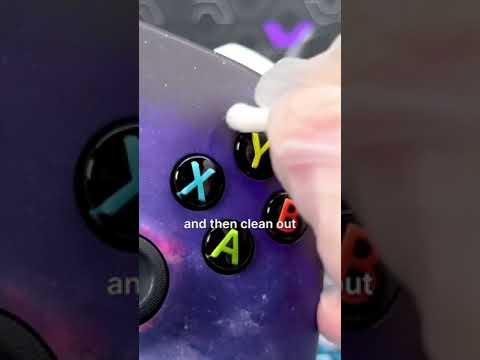
Yes, you can generally use 70% isopropyl alcohol to clean your controller, but with precautions. It’s effective at disinfecting and removing grime, but improper use can damage sensitive electronics. Using the right technique and understanding potential risks is crucial. Avoid direct spraying and always use a microfiber cloth or cotton swab dampened with alcohol.
Why Clean Your Controller?
Gaming controllers are magnets for dirt, oil, sweat, and germs. Regular use leaves behind residue that can affect performance and hygiene. Sticky buttons, unresponsive joysticks, and simply the unpleasant thought of handling a germ-ridden device are compelling reasons to clean your controller regularly. Cleaning not only enhances your gaming experience but also prolongs the lifespan of your valuable gaming hardware.
The Role of Isopropyl Alcohol (IPA)
Isopropyl alcohol (IPA), also known as rubbing alcohol, is a common household disinfectant. Its properties make it suitable for cleaning electronics due to its ability to evaporate quickly, reducing the risk of short circuits. However, not all concentrations are ideal. 70% IPA is often preferred over higher concentrations like 90% or 99% for cleaning controllers because it contains a small amount of water. This water helps to dissolve dirt and grime more effectively than pure alcohol, while still evaporating quickly enough to prevent damage.
Precautions to Take When Using 70% Alcohol
Despite its effectiveness, using 70% alcohol requires caution:
- Never spray alcohol directly onto the controller. This can force liquid into crevices and damage internal components.
- Always dampen a microfiber cloth or cotton swab with the alcohol. This allows you to control the amount of liquid applied.
- Avoid getting alcohol inside the controller. Focus on cleaning the exterior surfaces, buttons, and joysticks.
- Power off and disconnect the controller before cleaning. Remove batteries if applicable.
- Allow the controller to dry completely before using it again. This prevents potential short circuits.
- Test on an inconspicuous area first. This helps ensure the alcohol doesn’t damage the controller’s finish.
Step-by-Step Cleaning Guide
- Gather your supplies: You’ll need 70% isopropyl alcohol, a microfiber cloth, cotton swabs, and optionally, compressed air.
- Power off and disconnect the controller. Remove any batteries if necessary.
- Dampen the microfiber cloth with 70% alcohol. Ensure the cloth is not dripping wet.
- Wipe down the exterior surfaces of the controller. Pay attention to areas that come into frequent contact with your hands.
- Use cotton swabs dampened with alcohol to clean around buttons, joysticks, and seams. Be gentle and avoid applying excessive pressure.
- Use compressed air to blow out any dust or debris from hard-to-reach areas. This is particularly useful around buttons and joysticks.
- Allow the controller to air dry completely before reconnecting and using it. This may take 15-30 minutes.
Alternative Cleaning Methods
While 70% alcohol is a popular choice, other cleaning methods are available:
- Electronic wipes: Specifically designed for cleaning electronic devices, these wipes are pre-moistened and formulated to be safe for delicate components.
- Mild soap and water: A diluted solution of mild dish soap and water can be used for cleaning, but ensure the cloth is only slightly damp and avoid getting any liquid inside the controller. Dry thoroughly.
- UV sanitizers: These devices use ultraviolet light to kill bacteria and viruses without the use of liquids.
Signs of Potential Damage
Overuse or improper use of alcohol can lead to damage. Watch out for these signs:
- Discoloration or fading of the controller’s finish.
- Sticky or unresponsive buttons.
- Joystick drift.
- Corrosion on metal components.
- Malfunctioning of internal components.
If you notice any of these signs, stop using alcohol and consider alternative cleaning methods or professional repair.
Maintaining Controller Cleanliness
Preventative measures are key to keeping your controller clean:
- Wash your hands before gaming. This reduces the amount of dirt and oil transferred to the controller.
- Avoid eating or drinking while gaming. Spills and crumbs can easily get into the controller.
- Store your controller in a clean, dry place when not in use.
- Clean your controller regularly, even if it doesn’t appear dirty. A quick wipe-down every few days can prevent buildup.
FAQs About Cleaning Controllers with Alcohol
1. Can I use 90% or 99% alcohol instead of 70%?
While higher concentrations of alcohol evaporate faster, 70% is generally preferred for cleaning controllers. The small amount of water in 70% IPA aids in dissolving dirt and grime, making it more effective. Higher concentrations can also potentially damage certain plastics or finishes. If you do use a higher concentration, be extra careful to use a minimal amount and ensure complete drying.
2. How often should I clean my controller?
The frequency depends on your usage. If you game frequently, clean it at least once a week. If you only game occasionally, cleaning it once a month may suffice. If multiple people use the same controller, more frequent cleaning is recommended.
3. Is it safe to use alcohol on all types of controllers?
Most modern controllers can be safely cleaned with 70% alcohol, following the precautions outlined above. However, some older controllers may have finishes that are more susceptible to damage. Always test on an inconspicuous area first.
4. What if alcohol gets inside the controller?
Immediately power off and disconnect the controller. Do not attempt to turn it on. Allow the controller to dry completely upside down for several days in a well-ventilated area. If the controller still malfunctions after drying, professional repair may be necessary.
5. Can I use alcohol to fix joystick drift?
Alcohol can sometimes temporarily alleviate joystick drift by cleaning out dirt and debris that may be interfering with the sensor. However, joystick drift is often caused by wear and tear and may require more extensive repairs or replacement. Carefully apply a very small amount of alcohol around the base of the joystick and move it in all directions to work it in. Allow to dry completely.
6. What’s the best type of cloth to use?
A microfiber cloth is ideal because it’s gentle, absorbent, and doesn’t leave lint behind. Avoid using paper towels, as they can scratch the controller’s surface.
7. Can I use disinfectant wipes instead of alcohol?
Disinfectant wipes designed for electronics can be used, but check the label to ensure they are safe for plastics and electronics. Avoid wipes that contain harsh chemicals or bleach.
8. Is it okay to use alcohol on rubber grips?
Yes, 70% alcohol can be used on rubber grips, but avoid prolonged exposure or excessive rubbing, as it can dry out the rubber over time.
9. Can I use alcohol to clean the charging port?
Be extremely careful when cleaning the charging port. Use a dry cotton swab to gently remove any visible debris. If necessary, lightly dampen the cotton swab with alcohol, ensuring no liquid drips into the port. Allow the port to dry completely before connecting a charging cable.
10. What about cleaning the controller’s buttons?
Cotton swabs dampened with alcohol are perfect for cleaning around buttons. Gently scrub the edges of the buttons to remove any accumulated grime. Avoid pressing too hard, as this can damage the buttons or internal mechanisms.
11. How do I clean a controller that has sticky residue from stickers?
Use a small amount of adhesive remover designed for electronics. Apply it sparingly to a cotton swab and gently rub the residue until it dissolves. Clean the area with alcohol to remove any remaining adhesive remover.
12. What if my controller has a strong odor?
Cleaning with alcohol can help remove odors, but you may need to repeat the process several times. If the odor persists, consider using an odor-absorbing product or placing the controller in a sealed bag with baking soda for a few days.
13. Is it safe to use alcohol on a limited edition or custom-painted controller?
Exercise extreme caution when cleaning limited edition or custom-painted controllers. The finish may be more delicate and susceptible to damage from alcohol. Test on an inconspicuous area first and use a minimal amount of alcohol. Consider using a specialized cleaning solution designed for sensitive surfaces.
14. How do I store my controller after cleaning?
Store your controller in a clean, dry place, away from direct sunlight and extreme temperatures. Consider using a controller stand or case to protect it from dust and damage.
15. What if I accidentally spill alcohol on my controller?
Immediately power off and disconnect the controller. Blot up the excess alcohol with a clean cloth. Allow the controller to dry completely upside down in a well-ventilated area for several days. If the controller malfunctions after drying, professional repair may be necessary.