Can I Use Lens Wipes on My Switch? A Comprehensive Guide to Nintendo Switch Cleaning
Fast answer first. Then use the tabs or video for more detail.
- Watch the video explanation below for a faster overview.
- Game mechanics may change with updates or patches.
- Use this block to get the short answer without scrolling the whole page.
- Read the FAQ section if the article has one.
- Use the table of contents to jump straight to the detailed section you need.
- Watch the video first, then skim the article for specifics.
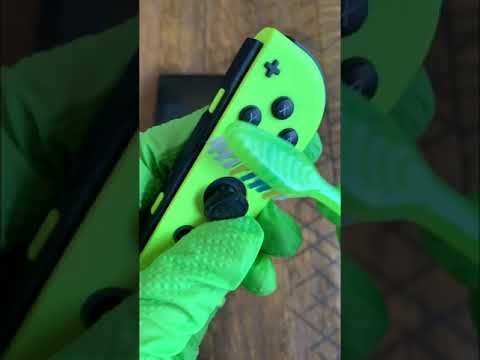
The short answer is: yes, you can use lens wipes on your Nintendo Switch screen, but with careful consideration. While generally safe for the screen itself, due to their gentle nature and design for sensitive optics, you need to be mindful of the wipe’s ingredients and application technique to avoid potential damage to the surrounding plastic and coatings. This article will delve deeper into the nuances of cleaning your Nintendo Switch, exploring safe practices, common mistakes, and answering frequently asked questions.
Understanding the Nintendo Switch’s Delicate Surfaces
The Nintendo Switch, a beloved hybrid console, is a marvel of portable gaming. Its versatility, however, comes with a price: its surfaces, particularly the screen and Joy-Cons, are surprisingly delicate. The screen itself, depending on the model, can be either glass or plastic, both susceptible to scratches and damage from harsh chemicals. The surrounding plastic is also vulnerable to discoloration and degradation from certain cleaning agents. Therefore, choosing the right cleaning method is paramount to preserving the integrity of your console.
Why Lens Wipes are Generally a Good Option
Lens wipes are designed for cleaning sensitive optical surfaces like camera lenses, eyeglasses, and screens. They are typically pre-moistened with a solution that’s gentle, non-abrasive, and formulated to evaporate quickly, leaving no streaks or residue. This makes them a generally safe option for the Nintendo Switch screen. However, not all lens wipes are created equal.
Potential Hazards and Considerations
Here’s what you need to watch out for:
- Alcohol Content: Some lens wipes contain alcohol, often isopropyl alcohol. While a small amount of alcohol can be effective at disinfecting, Nintendo themselves advise against using alcohol on the Switch, stating that it may cause the plastic parts to fade in color or deform. Check the ingredients list carefully. Look for alcohol-free alternatives or wipes with a very low alcohol concentration.
- Abrasive Fibers: Ensure the wipe is truly lint-free and non-abrasive. Even seemingly soft materials can cause micro-scratches over time.
- Excess Moisture: Avoid oversaturating the screen. Excess moisture can seep into the console’s crevices and potentially damage internal components. Wring out excess moisture if necessary.
- Pressure: Apply gentle pressure when wiping. Excessive force can damage the screen, especially if there are any small particles present.
The Best Practices for Using Lens Wipes on Your Switch
Follow these steps for safe and effective cleaning:
- Read the Label: Always check the ingredients list to ensure the lens wipe is alcohol-free or contains a very low concentration of alcohol.
- Dust Removal: Before wiping, use a dry microfiber cloth to gently remove any loose dust or debris from the screen. This prevents scratching.
- Gentle Wiping: Gently wipe the screen in a circular motion. Avoid excessive pressure.
- Drying: If necessary, use a clean, dry microfiber cloth to gently dry the screen.
- Testing: Before cleaning the entire screen, test the wipe on a small, inconspicuous area of the plastic surround to ensure it doesn’t cause any discoloration or damage.
Alternative Cleaning Methods
If you’re hesitant to use lens wipes, here are some alternative cleaning methods:
- Microfiber Cloth: A dry microfiber cloth is often sufficient for removing fingerprints and smudges.
- Distilled Water: Dampen a microfiber cloth with distilled water, wring it out thoroughly, and gently wipe the screen.
- Screen Cleaning Solutions: Use a commercially available screen cleaning solution specifically designed for electronics. Ensure it’s alcohol-free.
Maintaining Your Switch: Proactive Measures
Prevention is always better than cure. Here are some tips for keeping your Switch clean:
- Wash Your Hands: Wash your hands before using your Switch to minimize the transfer of oils and dirt to the screen and controllers.
- Screen Protector: Consider using a screen protector to shield the screen from scratches and damage.
- Storage: Store your Switch in a case or pouch when not in use to protect it from dust and dirt.
- Regular Cleaning: Wipe down your Switch regularly with a dry microfiber cloth to prevent the buildup of grime.
Frequently Asked Questions (FAQs)
Here are 15 frequently asked questions to further clarify the best practices for cleaning your Nintendo Switch:
1. Can I use alcohol wipes on my Nintendo Switch?
No, it’s generally not recommended. Nintendo advises against using alcohol as it may cause the plastic parts to fade in color or deform.
2. What’s the best way to clean my Nintendo Switch screen?
A dry microfiber cloth is often sufficient. If needed, dampen the cloth with distilled water, wring it out well, and gently wipe the screen.
3. Are baby wipes safe to use on my Nintendo Switch?
No, baby wipes often contain moisturizing agents that can leave a residue on your electronics.
4. Can I use window cleaner (Windex) to clean my Nintendo Switch?
No, never use window cleaner or any cleaning solutions containing ammonia. These can cause irreparable harm to the Nintendo Switch’s display.
5. How often should I clean my Nintendo Switch?
There’s no official guideline, but cleaning your Switch every few months is a good practice. Clean more frequently if you notice it getting dirty or overheating.
6. How do I remove fingerprints from my Nintendo Switch screen?
Gently rub the smudge with a soft, clean cloth, such as a lens or eyeglass cleaning cloth, until it is gone.
7. Is it safe to use disinfectant wipes on my Nintendo Switch?
Some disinfectant wipes marketed for electronics are safe, but always check the ingredients list and test on an inconspicuous area first. Avoid wipes with high alcohol content.
8. What should I do if something gets stuck in the charging port?
Only attempt to clean the charging port if something is trapped inside or the Switch isn’t charging. Use a can of compressed air to gently blow out any debris.
9. How do I clean the Joy-Cons?
Wipe the flat surfaces of the Joy-Cons with a dry cloth. Use a dry toothbrush to clean around the buttons and joysticks.
10. Is it okay to use compressed air to clean my Nintendo Switch?
Yes, compressed air can be used to clean out ports and vents, but use it in short bursts and hold the can upright to avoid spraying liquid propellant.
11. What type of cloth should I use to clean my Nintendo Switch?
A microfiber cloth is ideal. It’s soft, lint-free, and won’t scratch the screen.
12. Can I submerge my Nintendo Switch in water for cleaning?
Absolutely not! Never submerge your Nintendo Switch in water or any other liquid.
13. How do I prevent my Nintendo Switch from getting dirty?
Wash your hands before use, store it in a case when not in use, and consider using a screen protector.
14. Is it safe to use isopropyl alcohol on my Nintendo Switch?
While isopropyl alcohol is often used for cleaning electronics, Nintendo advises against it as it may damage the plastic parts. If you choose to use it, use a very small amount of 90% or higher concentration on a microfiber cloth, avoiding the plastic parts.
15. Where can I learn more about the best practices for gaming and learning?
You can explore valuable resources and insights on Games Learning Society at GamesLearningSociety.org, which dives deep into how games can enhance education and cognitive skills.
Conclusion: Cleanliness is Key to Longevity
Cleaning your Nintendo Switch requires a delicate balance. While lens wipes can be a convenient option, it’s crucial to be aware of their potential drawbacks and use them cautiously. By following the guidelines outlined in this article and exercising common sense, you can keep your Nintendo Switch clean and functioning optimally for years to come. Remember, a little preventative maintenance goes a long way in preserving your beloved gaming companion.