Can I Use Windex to Clean My Xbox? A Deep Dive
Fast answer first. Then use the tabs or video for more detail.
- Watch the video explanation below for a faster overview.
- Game mechanics may change with updates or patches.
- Use this block to get the short answer without scrolling the whole page.
- Read the FAQ section if the article has one.
- Use the table of contents to jump straight to the detailed section you need.
- Watch the video first, then skim the article for specifics.
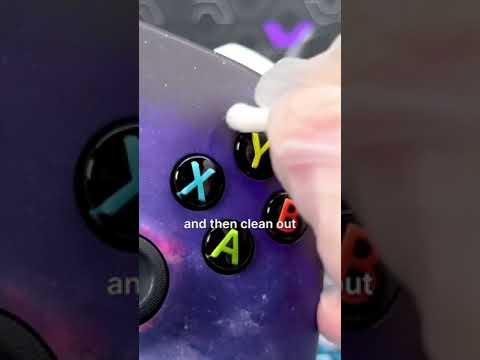
The short answer is a resounding no. While Windex might seem like a convenient, all-purpose cleaner, using it on your Xbox console, controllers, or game discs is generally a bad idea. The chemicals in Windex, while effective for cleaning glass, can be harmful to the sensitive materials used in your gaming equipment. Let’s delve into the details of why you should avoid Windex and explore safer, more effective cleaning alternatives.
Why Windex is a No-Go for Your Xbox
Windex contains ingredients like ammonia, alcohol, and various detergents. These chemicals can react negatively with the plastics, coatings, and electronic components of your Xbox. Here’s a breakdown of the potential problems:
- Surface Damage: The harsh chemicals in Windex can degrade the finish on your console and controllers, leading to discoloration, clouding, or even cracking.
- Component Corrosion: If Windex seeps into the vents or openings of your Xbox, it can corrode internal electronic components, potentially causing malfunctions or permanent damage.
- Residue Buildup: Windex can leave a film or residue on surfaces, especially on game discs. This residue can interfere with the disc reader’s ability to properly read the disc, leading to game errors.
- Screen Damage: Never, ever use Windex on your TV or gaming monitor screen. The chemicals can permanently damage the screen’s coating.
Safe and Effective Cleaning Alternatives
Instead of Windex, opt for these safer and more effective cleaning methods:
- Microfiber Cloth: A dry microfiber cloth is your best friend for routine dusting and cleaning. The soft fibers gently lift away dust, fingerprints, and smudges without scratching surfaces.
- Isopropyl Alcohol (IPA): A solution of 70% isopropyl alcohol or less is ideal for disinfecting and cleaning surfaces. Use it sparingly on a lint-free cloth, and avoid getting it inside vents or openings.
- Mild Soap and Water: For more stubborn dirt or grime, a slightly damp cloth with a mild soap and water solution can be used. Be sure to wring out the cloth thoroughly to prevent excess moisture.
- Compressed Air: Use compressed air to blow dust out of vents and ports. Hold the can upright and use short bursts to avoid damaging internal components.
Specific Cleaning Instructions for Your Xbox
- Console Exterior: Unplug the console. Gently wipe down the exterior with a dry microfiber cloth. For stubborn spots, use a slightly damp cloth with a mild soap and water solution or a 70% isopropyl alcohol solution.
- Controllers: Wipe down the controller with a microfiber cloth. For sticky buttons or analog sticks, use a cotton swab dipped in isopropyl alcohol. Be sure to avoid getting moisture inside the battery compartment.
- Game Discs: Use a microfiber cloth to gently wipe the disc from the center outwards. If needed, dampen the cloth slightly with water.
- Vents: Use compressed air or a soft brush to remove dust from the vents.
Preventative Maintenance
Regular cleaning is essential to keep your Xbox running smoothly and extend its lifespan. Here are some tips for preventative maintenance:
- Dust Regularly: Wipe down your console and controllers at least once a week to prevent dust buildup.
- Ventilation: Ensure that your Xbox has proper ventilation. Don’t place it in an enclosed space where it can overheat.
- Avoid Food and Drinks: Keep food and drinks away from your gaming area to prevent spills and crumbs from getting into your console or controllers.
Frequently Asked Questions (FAQs) About Cleaning Your Xbox
Here are 15 frequently asked questions to help you keep your Xbox clean and in top condition:
-
Can I use rubbing alcohol to clean my Xbox One?
Yes, you can use isopropyl alcohol (IPA) solution or prep pad that’s 70% or less with a soft, lint-free cloth. Avoid getting alcohol inside the console or controller.
-
How often should I clean my Xbox?
Ideally, wipe down the exterior weekly and do a more thorough cleaning (including vents) every 1-3 months, depending on your environment.
-
What happens if dust gets inside my Xbox?
Dust can cause overheating, reduced performance, and potentially damage internal components like the cooling fan and disc drive.
-
Is it safe to use a vacuum cleaner to clean the Xbox vents?
Yes, but use a vacuum cleaner with a brush attachment and be very careful not to push any dust further inside.
-
Can I take my Xbox apart to clean it thoroughly?
While possible, disassembling your Xbox can void the warranty and potentially damage it if you’re not experienced. Consider professional cleaning services if needed.
-
Will cleaning my Xbox make it run faster?
Cleaning can improve performance by preventing overheating, which can cause the system to throttle performance to cool down.
-
Can I use disinfecting wipes on my Xbox controller?
Yes, certain disinfectant wipes have been tested and deemed safe for use on Xbox controllers, but always check the product label first and avoid getting moisture in the battery compartment.
-
What’s the best way to clean sticky buttons on my Xbox controller?
Use a cotton swab lightly dampened with isopropyl alcohol (70% or less) to gently clean around the buttons.
-
Can I use a screen cleaner on my Xbox console?
No, stick to the recommended cleaning methods mentioned above. Screen cleaners often contain chemicals that are not safe for the console’s plastic surfaces.
-
Is it okay to use hydrogen peroxide to clean my Xbox?
No, avoid using hydrogen peroxide, bleach, or ammonia-based cleaners, as they can damage the console.
-
How do I clean a game disc that has fingerprints?
Gently wipe the disc from the center outwards with a clean, dry microfiber cloth. If necessary, lightly dampen the cloth with water.
-
Can I use Windex on my gaming monitor?
Absolutely not! As with the console itself, using Windex will permanently damage your gaming monitor.
-
Where can I find more information about game console maintenance?
You can learn a lot from online gaming communities, repair guides, and even educational organizations dedicated to gaming. For instance, the Games Learning Society at https://www.gameslearningsociety.org/ offers research and insights on gaming and education. You can also visit GamesLearningSociety.org for details about the organization.
-
What should I do if I accidentally spill liquid on my Xbox?
Immediately unplug the console and allow it to dry completely (at least 24-48 hours) before attempting to turn it on. If it doesn’t power on, it may need professional repair.
-
How much does it cost to have my Xbox professionally cleaned?
The cost varies depending on the service, but a professional cleaning service can range from $50 to $100, depending on the level of cleaning and any necessary repairs.
Final Thoughts
Taking proper care of your Xbox will not only keep it looking its best but also ensure optimal performance and longevity. Ditch the Windex and stick to the safe, recommended cleaning methods outlined above. Happy gaming!