Can Nintendo Friends See Your Email? Understanding Nintendo Account Privacy
Fast answer first. Then use the tabs or video for more detail.
- Watch the video explanation below for a faster overview.
- Game mechanics may change with updates or patches.
- Use this block to get the short answer without scrolling the whole page.
- Read the FAQ section if the article has one.
- Use the table of contents to jump straight to the detailed section you need.
- Watch the video first, then skim the article for specifics.
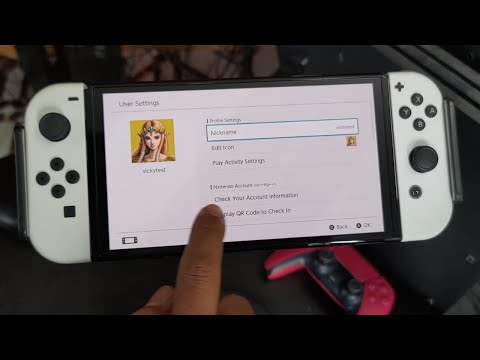
No, your Nintendo friends cannot see your email address. Nintendo prioritizes user privacy, and email addresses are never made public or directly shared with other users on the platform. The primary use of your email address is for account verification, password recovery, and important notifications from Nintendo. Sharing your gameplay experiences through screenshots and videos is permitted via social media, but your personal email remains confidential.
Nintendo Account Privacy: A Detailed Overview
The Nintendo ecosystem is designed with privacy in mind, particularly concerning your personal information. While connecting with friends and sharing gaming moments is a central part of the experience, Nintendo implements measures to ensure that your email address, a key piece of personally identifiable information, remains protected. Understanding these measures is essential for all Nintendo users, especially parents concerned about their children’s online safety.
The main functions of a Nintendo Account relating to privacy:
- Account Identification: Your email is primarily used as a unique identifier for your account. It’s how Nintendo confirms you are who you say you are.
- Communication from Nintendo: Nintendo uses your email to send important information, such as security alerts, password reset instructions, and promotional offers (which you can opt out of).
- Social Networking Sign-In: Nintendo may use social networking services like Google or Apple solely for the purpose of signing in, and it does not share your email address with your Nintendo friends.
- Safeguarding Personal Data: Nintendo does not display your email address to other users. It is not visible on your profile or shared in any communication channels with friends or other players.
It’s also important to know how Nintendo handles linked accounts:
- Single Email per Account: Only one email address can be linked to a single Nintendo Account. This prevents confusion and ensures that all communications related to that account are directed to the correct person.
- User Account Linking: Each individual player on a Nintendo Switch can create their own user account. Linking a Nintendo Account to a user account grants access to online features like multiplayer and social media posting.
- Account Sharing Limitations: While you can have multiple user profiles on a single Nintendo Switch console (up to 8), sharing a single Nintendo Account across multiple users is not recommended, as game save data is tied to individual user accounts.
Common Misconceptions about Nintendo Privacy
Many users have questions and sometimes misconceptions about how Nintendo handles their data. Here are a few of the most common misunderstandings:
- Social Media Integration: Some users fear that linking their Nintendo Account to social media might expose their email address. However, Nintendo only uses social media for sharing content that you explicitly choose to share, like screenshots or videos. Your email address remains private.
- Friend Requests: Adding friends on Nintendo does not grant them access to your email address or other personal information. Friend requests are managed through the Nintendo system, which keeps your details confidential.
- Online Games and Forums: While some online games may have chat features, Nintendo does not expose your email address to other players in these environments.
Steps You Can Take to Enhance Your Privacy
While Nintendo takes steps to protect your email address, there are also things you can do to further safeguard your privacy:
- Strong Passwords: Use a strong, unique password for your Nintendo Account and avoid reusing passwords from other services.
- Two-Factor Authentication: Enable two-factor authentication (2FA) for an added layer of security. This requires a verification code from your phone or email in addition to your password.
- Be Cautious of Phishing: Be wary of suspicious emails or messages asking for your Nintendo Account information. Always access the Nintendo Account website directly instead of clicking on links in emails.
- Review Your Privacy Settings: Regularly review your Nintendo Account privacy settings to ensure they are configured to your liking.
- Educate Children: If children use your Nintendo Switch, teach them about online safety and the importance of protecting their personal information.
Nintendo Account Management: Changing Your Email Address
Need to change the email address associated with your Nintendo Account? Here’s how:
- Access Nintendo Account Website: Go to the official Nintendo Account website and sign in.
- User Information: Select “User info.”
- Edit Email: Scroll down to the “E-mail” section and click “Edit.”
- Verification: You’ll likely be asked to verify your identity via password, passkey, or email verification.
- Enter New Email: Enter your new email address and submit. You may need to verify the new email address.
Understanding the Implications of Account Linking and Unlinking
Linking a Nintendo Account to a user account on your Switch provides access to online features. However, unlinking can have implications. Once a Nintendo Account is linked to a user account, it cannot be undone without deleting the user account itself. This is a crucial point to remember when setting up accounts for multiple users on a single Switch.
Understanding how to set up and manage your Nintendo Account is essential for a safe and enjoyable gaming experience. By being informed and proactive about your privacy, you can confidently explore the world of Nintendo and enjoy its many features without compromising your personal information. You can further enhance your knowledge about the Nintendo world through educational platforms such as the Games Learning Society, where research and discussions about gaming and its impact are explored. Visit GamesLearningSociety.org to explore further.
Frequently Asked Questions (FAQs)
1. Can two Nintendo accounts share an email address?
No, only a single email address can be linked to one Nintendo Account. This is to ensure proper account management and prevent conflicts.
2. How do I remove my email from Nintendo?
You can’t entirely remove your email address while keeping the Nintendo Account active. However, you can change it: Go to the Nintendo Account website, sign in, select “User information,” then scroll down to “E-mail address” and click “Edit.” You will need to verify the new email address.
3. What happens when you link a Nintendo Account to a user?
Linking a Nintendo Account to a user account on Nintendo Switch provides access to online features, such as online multiplayer, global rankings, DLC, friend-related features, and the ability to post screenshots/videos on social media.
4. Can 2 users share the same Nintendo Account?
While technically possible, it’s not recommended. Game save data is stored by user account, so sharing an account can lead to conflicts. It’s better to create separate user profiles for each person on the console.
5. Can you change your Nintendo email?
Yes, you can change your Nintendo email. Follow the steps outlined above in the section “Nintendo Account Management: Changing Your Email Address”.
6. Is it possible to unlink a Nintendo Account?
You cannot directly unlink a Nintendo Account from a user profile on a Switch. To remove the link, you must delete the user profile on the Switch.
7. How do I see my Nintendo email?
On the Nintendo Switch HOME Menu, select your user icon, then User Settings. Select Check Nintendo Account Settings and enter your password when prompted to view the full email associated with your Nintendo Account.
8. What happens if you link 2 Nintendo Accounts?
You cannot merge two Nintendo Accounts. However, you can link up to 8 Nintendo Accounts to a single Nintendo Switch console. Games purchased are playable by everyone on the active primary console for your Nintendo Account.
9. Can you have two profiles under one Nintendo Account?
Nintendo lets you add up to eight unique user profiles on a Switch. Each profile can save settings and progress independently. However, the Nintendo Account is separate from the user profile.
10. Can a Nintendo be tracked if lost or stolen?
Unfortunately, the Nintendo Switch doesn’t have a built-in tracking system. Without a third-party Bluetooth tracking device, locating a lost or stolen system can be very difficult.
11. Is Nintendo Online shared between users?
Purchasing a Nintendo Switch Online Family membership provides the Nintendo Switch Online service to everyone in the purchaser’s Nintendo Account family group (up to 8 Nintendo Account users).
12. Does deleting a Nintendo Account unlink it from Switch?
Deleting a Nintendo Account will remove it from your Switch. All purchases will remain associated with that account, but will no longer be accessible.
13. Will I lose my games if I delete a user on Switch?
You will lose game save data not backed up to the cloud. Games purchased on the eShop and your Online Membership remain associated with your Nintendo Account and can be accessed on any console where that account is active.
14. Can you reuse an email after deleting a Nintendo Account to create a new Nintendo Account?
Yes, you can reuse an email address after deleting a Nintendo Account to create a new one.
15. What is the difference between a Nintendo Account and a Switch account?
A Nintendo Account is used for online services, eShop purchases, and smart device applications. A Switch account (user profile) is a local profile on the Nintendo Switch console that stores save data and settings for individual players.