Can PlayStation Gift Cards Be Redeemed? A Comprehensive Guide
Fast answer first. Then use the tabs or video for more detail.
- Watch the video explanation below for a faster overview.
- Game mechanics may change with updates or patches.
- Use this block to get the short answer without scrolling the whole page.
- Read the FAQ section if the article has one.
- Use the table of contents to jump straight to the detailed section you need.
- Watch the video first, then skim the article for specifics.
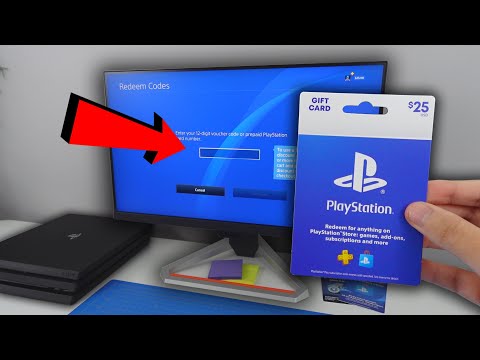
Yes, PlayStation gift cards can indeed be redeemed! These cards are designed to add funds to your PlayStation Network (PSN) wallet, which can then be used to purchase a wide range of digital content, including games, add-ons, PlayStation Plus subscriptions, movies, and TV shows, directly from the PlayStation Store. However, several factors can influence your ability to redeem them successfully. This guide will walk you through the entire process, troubleshoot common issues, and answer frequently asked questions.
Understanding PlayStation Gift Cards
What is a PlayStation Gift Card?
A PlayStation gift card is a prepaid card containing a specific monetary value that can be used to add funds to your PlayStation Network (PSN) wallet. Think of it as digital cash for the PlayStation ecosystem. These cards come in both physical and digital formats, making them a convenient gift or a way to manage your spending on the PlayStation Store.
What Can You Buy With a PlayStation Gift Card?
Once the funds are added to your PSN wallet, you can use them to purchase:
- Digital Games: Download full games directly to your PlayStation console.
- Game Add-ons: Purchase downloadable content (DLC) such as new levels, characters, or items for your games.
- PlayStation Plus Subscriptions: Subscribe to PlayStation Plus for online multiplayer access, monthly free games, and exclusive discounts.
- Movies and TV Shows: Rent or purchase digital movies and TV shows from the PlayStation Store.
How to Redeem a PlayStation Gift Card
The redemption process is relatively straightforward, but it’s crucial to follow the steps accurately.
Redeeming on Your PlayStation Console
- Sign In: Ensure you are signed into your PlayStation account on your PlayStation 4 or PlayStation 5 console.
- Navigate to the PlayStation Store: From the home screen, go to the PlayStation Store.
- Find the Redeem Codes Section: Scroll to the bottom of the PlayStation Store menu and select “Redeem Codes”.
- Enter the Code: Carefully enter the 12-digit code printed on the gift card. Double-check each character to avoid errors.
- Confirm Redemption: Follow the on-screen prompts to confirm the redemption and add the funds to your PSN wallet.
Redeeming Via a Web Browser
- Visit the PlayStation Website: Go to the official PlayStation website.
- Sign In: Click “Sign In” in the top right corner and log in to your PlayStation Network account.
- Account Settings: Hover over your avatar in the top right corner and select “Account Settings”.
- Wallet: In the account management menu, find and select “Wallet”.
- Add Funds: Click “Add Funds” and then choose “Redeem PlayStation Gift Card”.
- Enter the Code: Enter the 12-digit code from your gift card.
- Confirm Redemption: Confirm the redemption to add the funds to your wallet.
Redeeming on the PlayStation App
- Open the PlayStation App: Launch the PlayStation App on your smartphone or tablet.
- Sign In: Sign in to your PlayStation Network account.
- Access the PlayStation Store: Tap the PlayStation Store icon at the bottom.
- Find the Menu: Tap the menu icon (usually three lines) in the top left corner.
- Redeem Codes: Select “Redeem Codes”.
- Enter the Code: Enter the 12-digit code from your gift card.
- Confirm Redemption: Follow the prompts to confirm the redemption and add the funds to your PSN wallet.
Troubleshooting Common Redemption Issues
Even with careful execution, you might encounter issues when trying to redeem a PlayStation gift card. Here are some common problems and their solutions:
- Invalid Code: Double-check that you’ve entered the code correctly. Pay close attention to characters that can be easily confused, such as 0 (zero) and O (the letter O), or 1 (one) and I (the letter I).
- Code Already Redeemed: If you see this error, it means the code has already been used on another account. Contact PlayStation Support if you believe this is an error.
- Region Lock: PlayStation gift cards are region-locked. This means a card purchased in the US can only be redeemed on a US PSN account. Ensure the region of the card matches the region of your account.
- Network Issues: Check your internet connection. A stable internet connection is required to redeem the code.
- PlayStation Network Status: Visit the PlayStation Network Status page to see if there are any ongoing service outages. If the network is down, wait until it’s restored before trying to redeem the code.
- Account Restrictions: Some accounts, especially child accounts, may have restrictions that prevent them from redeeming codes. Check your account settings or contact PlayStation Support for assistance.
- Expired Code: Although PlayStation gift cards generally do not expire, some promotional cards might have an expiry date. Check the terms and conditions printed on the card.
Alternative Uses and Considerations
Selling Unwanted PlayStation Gift Cards
If you have an unwanted PlayStation gift card, you might consider selling it. Platforms like Gameflip allow you to sell unused gift cards for cash.
Converting Gift Cards to Cash
While you can’t directly convert a PlayStation gift card to cash, you can use platforms like Gameflip to sell the card for a reduced amount. Additionally, some Gift Card Exchange kiosks may offer cash for gift cards, but typically at a lower value.
Gifting Options
PlayStation gift cards make excellent gifts for gamers. You can purchase them in various denominations to suit different budgets and needs. You can find these cards at major retailers, online stores like Amazon, and directly from the PlayStation Store. Remember to inform the recipient about region restrictions!
The Games Learning Society emphasizes the importance of understanding the mechanics and ecosystems surrounding games. To further explore the world of games and their impact on learning, visit GamesLearningSociety.org.
Frequently Asked Questions (FAQs)
1. What happens if my PlayStation gift card code doesn’t work?
First, double-check the code for any errors. Ensure your internet connection is stable and that the PlayStation Network is online. If the problem persists, contact PlayStation Support for assistance.
2. Can I use a PlayStation gift card to pay for PlayStation Plus?
Yes, you can use a PlayStation gift card to add funds to your PSN wallet, which can then be used to purchase a PlayStation Plus subscription.
3. Do PlayStation gift cards expire?
Generally, PlayStation gift cards do not expire. However, it’s always a good idea to redeem them as soon as possible to avoid any potential issues.
4. Can I redeem a PlayStation gift card from another country?
No, PlayStation gift cards are region-locked. You must use a card that matches the region of your PlayStation Network account.
5. Where can I buy PlayStation gift cards?
You can buy PlayStation gift cards at major retailers, online stores like Amazon, and directly from the PlayStation Store.
6. Can I return a PlayStation gift card?
According to most retailers’ policies, including Walmart’s, gift cards are generally not eligible for returns.
7. What is the difference between a PlayStation gift card and a PlayStation Plus gift card?
A PlayStation gift card adds funds to your PSN wallet for general purchases, while a PlayStation Plus gift card directly grants you a subscription to PlayStation Plus.
8. How do I check my PlayStation wallet balance?
You can check your wallet balance on your console, through a web browser via the PlayStation website, or on the PlayStation App.
9. Can I use a PlayStation gift card on multiple accounts?
No, once a PlayStation gift card code has been redeemed on an account, it cannot be used again on another account.
10. How long does it take for the funds to appear in my wallet after redeeming a gift card?
The funds typically appear in your wallet immediately after successfully redeeming the code.
11. What do I do if I lose my PlayStation gift card?
Unfortunately, lost or stolen gift cards will not be replaced. Treat them like cash and keep them in a safe place.
12. Can I use a Visa gift card to add funds to my PlayStation wallet?
No, you cannot directly use a Visa gift card. You must redeem a PlayStation gift card to add funds to your PlayStation wallet.
13. Is it safe to buy PlayStation gift cards from third-party sellers?
It is generally safer to purchase PlayStation gift cards from authorized retailers to avoid the risk of receiving invalid or fraudulent codes.
14. How do I activate a PlayStation gift card?
Most PlayStation gift cards are activated at the point of purchase. If you purchased a physical card, ensure the cashier scans it properly. Digital cards are usually activated automatically upon purchase.
15. What are PlayStation Stars Rewards?
PlayStation Stars is a rewards program where you can earn points by completing campaigns and activities. These points can be redeemed for various rewards, including wallet funds and exclusive digital collectibles.