Can You Connect Old Xbox Controllers to Series S? A Comprehensive Guide
Fast answer first. Then use the tabs or video for more detail.
- Watch the video explanation below for a faster overview.
- Game mechanics may change with updates or patches.
- Use this block to get the short answer without scrolling the whole page.
- Read the FAQ section if the article has one.
- Use the table of contents to jump straight to the detailed section you need.
- Watch the video first, then skim the article for specifics.
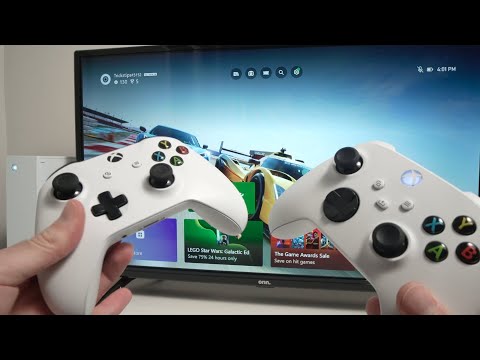
Yes, you absolutely can connect old Xbox controllers to your Xbox Series S console. The good news for gamers is that Microsoft has ensured backward compatibility for many of its accessories, meaning you don’t have to immediately discard your trusty old controllers when upgrading to the latest generation. This article provides a deep dive into the compatibility of Xbox controllers, exploring the nuances, answering frequently asked questions, and ensuring you have all the information you need to maximize your gaming experience with both your old and new hardware.
Understanding Xbox Controller Compatibility
Microsoft’s approach to console generations has often been considerate of its user base. In the case of controllers, this means that most Xbox One controllers are fully compatible with the Xbox Series X|S. This allows players to bring their existing setups to the new generation without a forced and costly equipment overhaul. The Xbox ecosystem is designed to be flexible, accommodating, and above all, enjoyable for gamers of all kinds.
Why is this good news?
For many, the investment in gaming peripherals can be significant. Being able to use Xbox One controllers on Xbox Series S means:
- Cost Savings: No need to purchase new controllers right away.
- Familiarity: Continue using controllers you’re already accustomed to.
- Multiplayer Flexibility: Easily accommodate more players with multiple controllers.
- Less Waste: Reduces electronic waste by extending the lifespan of existing hardware.
Connecting Old Xbox Controllers to Your Series S
Connecting your old Xbox controllers to your Series S is usually a simple and straightforward process. Here’s how to go about it:
- Turn on your Xbox Series S console.
- Turn on the Xbox One controller by pressing and holding the Xbox button.
- Locate the Pair button on your Xbox Series S. This button is usually on the front-left of the console, near the USB port.
- Press the Pair button on the console.
- Press and hold the Pair button on the top of the controller (as you hold the controller normally), until the Xbox button on the controller starts flashing rapidly.
- Wait for the Xbox button on the controller to stay lit, indicating that the pairing process is complete.
Connection Methods
There are two primary methods for connecting your old Xbox controller:
- Wireless Connection: Using the pairing process described above.
- Wired Connection: Using a USB to micro-USB (or USB-C if it’s a newer controller) cable to connect the controller directly to the console.
Both methods are reliable and offer a seamless gaming experience.
Differences Between Old and New Controllers
While older controllers are compatible, there are a few differences to note. The Xbox Series X|S controller features several upgrades over the older Xbox One controllers:
- Share Button: Allows for easy capture and sharing of gameplay.
- Improved D-Pad: A more refined and accurate D-pad for precise controls.
- Textured Grips: Enhanced grip on the handles, triggers, and bumpers for improved comfort.
- Hybrid D-Pad: Offers more responsive and accurate directional inputs.
- Dynamic Latency Input: Reduces controller lag for more responsive gameplay.
- USB-C Port: Newer models feature a USB-C port instead of a micro-USB port.
While these features may enhance the gaming experience, the absence of them doesn’t prevent older controllers from working perfectly well on the Series S.
Identifying Bluetooth-Enabled Controllers
Not all Xbox One controllers have Bluetooth capabilities. Here’s how to identify if your controller does:
- Model Numbers: Look for the model numbers 1537, 1697, and 1708.
- Bluetooth Symbol: The 1708 model has a built-in Bluetooth connection.
- “Day One 2013” Etching: If your controller is labeled “Day One 2013,” it is the 1537 model.
Only model 1708 comes with a built-in Bluetooth connection allowing for easy pairing with other devices such as smart phones, computers, and tablets.
Frequently Asked Questions (FAQs)
1. Can I use my Xbox One controller on my Xbox Series S wirelessly?
Yes, most Xbox One controllers can be connected wirelessly to the Xbox Series S using the console’s pairing button.
2. Do all Xbox One controllers work on the Xbox Series S?
Yes, all Xbox One controllers are compatible with the Xbox Series S.
3. Is there a limit to how many old Xbox controllers I can connect to my Series S?
The Xbox Series S supports connecting up to eight wireless controllers at once.
4. My Xbox controller won’t connect. What should I do?
Try power cycling your controller: press and hold the Xbox button for 5-10 seconds until the controller turns off. Wait a few seconds, then press the Xbox button again to turn it back on. You may also need to ensure you are in pairing mode, or check for console updates.
5. Are older Xbox controllers Bluetooth compatible?
Yes, some Xbox One controller models (1537, 1697, and 1708) have Bluetooth capabilities. However, only the 1708 model has a built-in BT connection that makes it easy to connect to other Bluetooth enabled devices.
6. Can I use an Xbox 360 controller on my Xbox Series S?
No, Xbox 360 controllers are not compatible with the Xbox Series S or Xbox One consoles.
7. What are the key differences between Xbox One and Series S controllers?
The Series S controller has added features like a Share button, an improved Hybrid D-pad, textured grips, and uses a USB-C port. The controllers are also designed with Dynamic Latency Input, for more responsive gameplay.
8. Do Xbox One controllers have a lifespan?
Microsoft estimates that Xbox controllers have a lifespan of over 10 years, so a controller can theoretically last through a console generation cycle.
9. Can I use my old Xbox controller on my PC?
Yes, you can connect your old Xbox controller to a PC using a USB cable, the Xbox Wireless Adapter for Windows, or Bluetooth.
10. Can I use an Xbox Series S controller on an Xbox One console?
Yes, the Xbox Series S controller is fully compatible with all Xbox One consoles.
11. Are Xbox One and Series S controllers the same?
While Xbox One controllers are compatible, the Xbox Series S controller has added features and improvements making them not exactly the same.
12. How do I connect an old Xbox controller to a Bluetooth device like my Android phone?
Turn on your controller, press the pairing button, and pair it through your Android device’s Bluetooth settings. Be sure your controller has the Bluetooth connection. Model 1708 is the only model that has a built-in Bluetooth connection.
13. Can any Xbox controller connect to any Xbox console?
Yes, all Xbox One and Xbox Series controllers are compatible and interchangeable between all Xbox One, Series S, and Series X consoles.
14. What if my older controller is not working?
Ensure it’s charged, try using a wired connection, or power cycle the controller. If problems persist, you may need to replace the controller.
15. Does using an old controller on the Series S negatively impact gameplay?
No, using an older controller does not negatively impact gameplay. However, you might miss out on some of the newer features of the latest controller.
Conclusion
The compatibility of old Xbox controllers with the Series S is a significant benefit for gamers. It not only saves money but also allows for continued use of familiar and trusted peripherals. Understanding the nuances of these connections and the few feature differences will help you navigate your gaming setup effectively. As gaming technology advances, it is encouraging that console manufacturers such as Microsoft continue to prioritize user convenience and offer greater flexibility for players using both older and newer technologies. Enjoy your games with the peace of mind that your controllers will work seamlessly across different console generations.