Can You Have Mods on a Non-Dedicated ARK Server? A Comprehensive Guide
Fast answer first. Then use the tabs or video for more detail.
- Watch the video explanation below for a faster overview.
- Game mechanics may change with updates or patches.
- Use this block to get the short answer without scrolling the whole page.
- Read the FAQ section if the article has one.
- Use the table of contents to jump straight to the detailed section you need.
- Watch the video first, then skim the article for specifics.
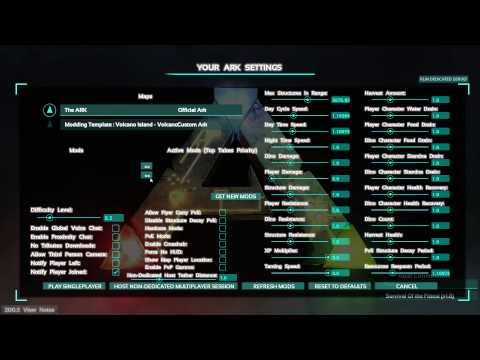
Yes, absolutely! You can have mods on a non-dedicated ARK: Survival Evolved server. This capability is one of the reasons why many players opt for non-dedicated servers when playing with a small group of friends. The process of adding mods is relatively straightforward, but it’s important to understand how it works to ensure a smooth and enjoyable gaming experience. Non-dedicated servers, while more limited in scope than dedicated servers, offer a great way for friends to enjoy the game together with customized content.
Understanding Non-Dedicated Servers and Mods
Before we delve deeper into the modding process, it’s important to clarify what non-dedicated servers are and how they interact with mods in the game. A non-dedicated server is hosted by one of the players on their own machine, meaning one player is both playing the game and running the server for the others. This setup is ideal for a small group of friends, typically up to four, who are physically close together and can join the same local network.
Importantly, mods in ARK are handled at the server level, not at the player level. This means that if you, as the host, want to play with mods, you must add them to your server instance. This also means that the other players joining your game will need to download the same mods in order to connect to your server and join the world correctly. This is a crucial point for anyone looking to use mods on their non-dedicated ARK server.
How to Add Mods to Your Non-Dedicated Server
The process of adding mods to your non-dedicated ARK server is quite simple, leveraging the Steam Workshop.
Step 1: Subscribing to Mods on Steam Workshop
- Open the Steam application.
- Go to the ARK: Survival Evolved game page.
- Click on “Workshop” on the game page.
- Browse through the available mods, selecting the ones you want to use.
- Click the “Subscribe” button for each mod you choose. Steam will then automatically download the necessary files.
Step 2: Activating Mods In-Game
- Launch ARK: Survival Evolved.
- Select “Host/Local” to set up your non-dedicated server.
- In the server setup menu, you will see a list of available mods on the right-hand side.
- Activate mods by clicking them and moving them to the active section which is indicated by two right-facing arrows.
- Once you’ve selected your mods, launch your server.
Step 3: Joining the Game
- Your friends can now join your non-dedicated server. The game will prompt them to download and install the mods that are active on your server before they can play.
Considerations
- Download Time: The download time for mods can vary depending on internet speed, mod size, and the machine specifications of your friends. Be patient, as this process can sometimes take a while.
- Mod Compatibility: Some mods might not be compatible with each other. It’s essential to check user feedback and mod descriptions to avoid conflicts. Sometimes loading mods in a different order can resolve some issues.
- Performance: Running too many or poorly optimized mods can impact your game’s performance. Start with a few mods and gradually add more to see how your system handles them.
- Updates: When mods are updated, all players will need to ensure that the mods they have are up to date to continue playing. It’s important to stay up to date with the mod authors to make sure no mod updates have been released.
Frequently Asked Questions (FAQs) About Mods on Non-Dedicated ARK Servers
Here are some commonly asked questions to further clarify the nuances of using mods on non-dedicated ARK servers:
1. Do all players need the same mods as the host?
Yes, all players joining a non-dedicated ARK server must have the same mods installed and active as the host. The game automatically forces players to download the required mods before they can join your session, but it is best practice to share the mod list and ensure everyone is on the same page.
2. Can I add mods mid-game?
Technically, you can add mods mid-session by restarting your server, however, doing so can cause issues and it is best practice to load your mods before anyone joins.
3. Are there any limitations on the types of mods I can use?
Generally, you can use most mods available on the Steam Workshop. However, it’s essential to check for compatibility with other mods and potential performance impacts. Some more complex mods could cause issues with non-dedicated hosting, so it’s best to start with simple mods and work your way up to complex ones.
4. How do I troubleshoot mod issues?
If you encounter problems, start by verifying the integrity of game files through Steam. Also, ensure that your mods are up to date and check for any user reports of mod conflicts, and try testing different mod load orders.
5. Can I use admin commands with mods?
Yes, you can use admin commands, sometimes also referred to as cheat commands, with mods enabled on non-dedicated servers. This allows you to configure your server environment more effectively.
6. What’s the difference between a non-dedicated and a dedicated server when it comes to mods?
Both types of servers can utilize mods. The primary difference lies in their hosting capabilities: Non-dedicated servers are hosted on a player’s machine and have a limited player count and player range, while dedicated servers offer more resources and can host larger player numbers with greater range, and often provide a more stable experience with better performance.
7. Will mods affect the game’s performance on a non-dedicated server?
Yes, mods can impact game performance. The extent of the impact depends on the mods’ complexity and your computer’s specifications. Try to choose mods that are lightweight and well-optimized to improve performance.
8. How do I update mods on my server?
Steam automatically updates subscribed mods. However, you may need to restart your server after updating to apply the changes. Make sure that your friends are updated on their side as well, or they will not be able to connect to the game.
9. Can I change the mod load order?
Yes, you can change the mod load order within the server settings before starting the session. Sometimes moving mods up or down in the load order can resolve mod compatibility issues.
10. Is there a limit to the number of mods I can use on a non-dedicated server?
While there is no hard limit, using too many mods can heavily impact performance, and sometimes mods can have conflicts that could render the game unplayable. It’s recommended to start with a few mods and add more gradually, while monitoring your performance.
11. Do mods work on all maps?
Most mods are designed to work on all standard maps. However, some maps have unique content that mods might not interact with properly, always check the mod description and user feedback before use. Some mods are map-specific, so be mindful of those when planning your mod list.
12. Can I move my modded non-dedicated server save to a dedicated server?
Yes, you can transfer your modded non-dedicated server save to a dedicated server. However, you must make sure that the mods are the same on both servers to prevent issues.
13. What if a mod isn’t working correctly?
If a mod isn’t working correctly, try unsubscribing and resubscribing to it, or try disabling all other mods and enabling them one by one to isolate the issue. Also, make sure that all the players who connect to the server have the mod in the correct state as well.
14. Can I enable cheats on my modded non-dedicated server?
Yes, admin commands, or “cheat” commands, are available for use on a modded non-dedicated server. This feature is the same whether or not you have mods active, so you can still have complete control of your server.
15. Is it better to use non-dedicated or dedicated servers for mods?
It depends on your needs. Non-dedicated servers are easier to set up for small groups, but dedicated servers offer better performance and stability, especially with multiple mods. If you plan on playing with more than four people, you will need a dedicated server to achieve this. Dedicated servers also require you to rent the server as the server needs to stay online even when nobody is playing on the server, whereas the non-dedicated server will go offline when the host goes offline.
By understanding these points, you’ll be better equipped to enjoy a heavily modded and customized ARK experience with your friends on a non-dedicated server. Enjoy the game and have fun exploring all the unique content that mods can offer!