Can You Listen to PS4 Through Bluetooth Headphones? The Definitive Guide
Fast answer first. Then use the tabs or video for more detail.
- Watch the video explanation below for a faster overview.
- Game mechanics may change with updates or patches.
- Use this block to get the short answer without scrolling the whole page.
- Read the FAQ section if the article has one.
- Use the table of contents to jump straight to the detailed section you need.
- Watch the video first, then skim the article for specifics.
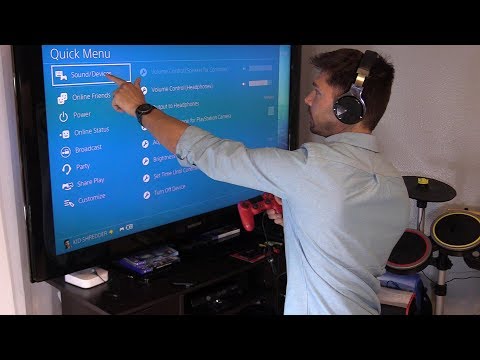
The simple answer? It’s complicated. While the PS4 technically can connect to Bluetooth headphones, it’s not a straightforward, native experience like you might expect. Sony, in their infinite wisdom, didn’t fully embrace Bluetooth audio for the PS4, leading to a bit of a workaround situation for gamers wanting a wireless audio experience. Let’s dive into the details and explore all the options, limitations, and solutions.
Why the PS4 Doesn’t Play Nice with Bluetooth Headphones (Out of the Box)
The primary reason for the PS4’s limited Bluetooth headphone support boils down to a couple of technical factors, bandwidth and latency.
- Bandwidth: Bluetooth, especially older versions, has limitations in the amount of data it can transmit. The PS4 prioritizes controller input and other essential data, leaving less bandwidth for high-quality audio.
- Latency: This is the big one. Bluetooth introduces a delay (latency) between the audio source and the headphones. In gaming, even a slight delay can be incredibly disruptive, throwing off your timing and immersion. Imagine hearing the gunshot a split-second after you pull the trigger! This is often due to something called A2DP (Advanced Audio Distribution Profile) of the console lagging.
Sony’s official stance has always been to ensure a smooth, lag-free gaming experience. Therefore, they opted to limit native Bluetooth headphone support to specific, licensed devices that meet their performance standards.
The Workarounds: Getting Wireless Audio on Your PS4
So, what are your options if you want to ditch the wires and use your favorite Bluetooth headphones with your PS4?
1. Bluetooth Adapters: Your Best Bet
The most common and reliable solution is to use a Bluetooth adapter. These small USB dongles plug into your PS4’s USB port and act as a bridge between your console and your Bluetooth headphones.
- How they work: The adapter essentially bypasses the PS4’s limited Bluetooth capabilities, providing a dedicated connection for your headphones.
- Choosing an adapter: Look for adapters specifically designed for gaming consoles. These adapters typically feature low-latency technology (like aptX Low Latency) to minimize audio delay. Read reviews carefully to ensure compatibility with your specific Bluetooth headphone model.
- Pairing: Pairing is usually straightforward. Plug in the adapter, put your headphones into pairing mode, and follow the adapter’s instructions.
2. Using the PS Remote Play App
This is a slightly more convoluted but potentially free method if you already own a smartphone or tablet.
- How it works: The PS Remote Play app allows you to stream your PS4 gameplay to your mobile device. You can then connect your Bluetooth headphones to your phone or tablet and listen to the game audio through the app.
- Limitations: This method requires a stable internet connection and may introduce some visual lag depending on your network speed. Additionally, the audio quality might not be as good as a direct connection. It also requires using a secondary account set as primary on the console.
3. Connecting Through Your TV (If Applicable)
Some modern TVs have Bluetooth capabilities. You might be able to connect your PS4 to your TV via HDMI and then connect your Bluetooth headphones to the TV.
- Limitations: This depends entirely on your TV’s capabilities and audio output options. There may be audio delay issues, and you might not be able to control the headphone volume independently from the TV volume.
4. Officially Licensed Bluetooth Headsets
Sony does offer officially licensed Bluetooth headsets for the PS4. These headsets are designed to work seamlessly with the console and provide a lag-free audio experience.
- Considerations: While these headsets offer the best compatibility, they might not be your preferred brand or style. They can also be more expensive than standard Bluetooth headphones.
5. Wired Connection to the Controller
Don’t underestimate the humble wired connection! The PS4 controller has a 3.5mm headphone jack. You can simply plug your headphones (wired) directly into the controller for instant audio.
- Limitations: This isn’t technically “Bluetooth,” but it’s a reliable and low-latency option. The cable can be a bit cumbersome, but it’s a simple solution if you don’t want to deal with adapters.
Understanding Audio Settings on Your PS4
Regardless of your chosen connection method, it’s essential to configure your PS4’s audio settings correctly.
- Go to Settings > Devices > Audio Devices.
- Input Device: Select your microphone (if applicable).
- Output Device: Choose the correct output device (e.g., your Bluetooth adapter or the headset connected to the controller).
- Output to Headphones: Select “All Audio” to hear everything through your headphones.
- Volume Control (Headphones): Adjust the headphone volume to your liking.
The Future of Bluetooth Audio on Consoles
While the PS4’s Bluetooth implementation is a bit clunky, the trend is toward better wireless audio support. The PS5, while still not natively supporting all Bluetooth headphones, offers improvements and more officially licensed wireless options. As Bluetooth technology continues to evolve with lower latency codecs, future consoles will likely embrace wireless audio more fully.
Learning how to connect gaming to education and learning can be difficult for some teachers, but the Games Learning Society has resources that can teach educators how to connect their students to new educational opportunities. Visit GamesLearningSociety.org for more information.
Frequently Asked Questions (FAQs)
1. Can I connect AirPods to my PS4?
Yes, you can connect AirPods to your PS4 using a Bluetooth adapter. Simply plug the adapter into the PS4’s USB port and follow the adapter’s pairing instructions. Remember that chatting with other players might not be possible using this method.
2. Why won’t my Bluetooth headphones connect to my PS4?
The most likely reason is that the PS4 doesn’t natively support your specific Bluetooth headphone model. Try using a Bluetooth adapter specifically designed for gaming consoles. Also, ensure your headphones are in pairing mode.
3. Does the PS4 have Bluetooth audio output?
Technically, yes, but with limitations. The PS4 supports Bluetooth audio output, but only for officially licensed headsets and specific devices. It’s not a universal Bluetooth connection for all headphones.
4. Can I use a Bluetooth speaker with my PS4?
Generally, no. Sony doesn’t allow users to connect Bluetooth speakers directly to the PS4. You’ll likely need to use a wired connection or an audio extractor.
5. How do I connect my PS4 to Bluetooth audio?
Go to Settings > Devices > Bluetooth Devices. Your PS4 will search for nearby Bluetooth devices. If your headphones don’t appear, they might not be compatible or need to be paired via a Bluetooth adapter.
6. Is there a way to use Discord on PS4 with Bluetooth headphones?
There’s no official Discord app for PS4, but you can access Discord through the PS4 web browser. To use Bluetooth headphones, you’ll still need a compatible connection method (adapter or PS Remote Play).
7. Why doesn’t PS4 support all Bluetooth headphones?
The PS4’s Bluetooth implementation has limitations in bandwidth and latency. Sony prioritized a stable gaming experience and limited native support to devices that met their performance standards.
8. What Bluetooth adapter is best for PS4?
Look for adapters specifically designed for gaming consoles and that support low-latency codecs like aptX Low Latency. Read online reviews to find adapters compatible with your specific headphones.
9. Can I listen to my PS4 through my phone using Bluetooth headphones?
Yes, by using the PS Remote Play app. Stream your PS4 gameplay to your phone and connect your Bluetooth headphones to your phone.
10. Will Sony ever add full Bluetooth headphone support to PS4?
It’s unlikely at this point. The PS4 is an older console, and Sony is focusing on the PS5. However, using a Bluetooth adapter continues to be a viable alternative.
11. Does using a Bluetooth adapter affect audio quality?
The impact on audio quality depends on the adapter and your headphones. High-quality adapters with low-latency codecs should provide excellent audio.
12. Can I connect multiple Bluetooth devices to my PS4 simultaneously?
The PS4 has limited Bluetooth capabilities. Connecting multiple devices simultaneously might cause connection issues or increased latency.
13. What audio output settings should I use on my PS4 for Bluetooth headphones?
Set Output to Headphones to “All Audio” to hear all game audio through your headphones.
14. Are there any downsides to using a Bluetooth adapter for PS4?
Potential downsides include the cost of the adapter, the need for a USB port, and the possibility of compatibility issues with certain headphone models.
15. Is it better to use wired headphones with PS4 than Bluetooth headphones?
Wired headphones offer the most reliable and lowest-latency audio experience. If lag is a major concern, wired is often the best option. However, if you value wireless freedom and choose the right Bluetooth adapter, you can find a satisfying wireless experience.