Can You Oil An Analog Stick? A Controller Care Guide
Fast answer first. Then use the tabs or video for more detail.
- Watch the video explanation below for a faster overview.
- Game mechanics may change with updates or patches.
- Use this block to get the short answer without scrolling the whole page.
- Read the FAQ section if the article has one.
- Use the table of contents to jump straight to the detailed section you need.
- Watch the video first, then skim the article for specifics.
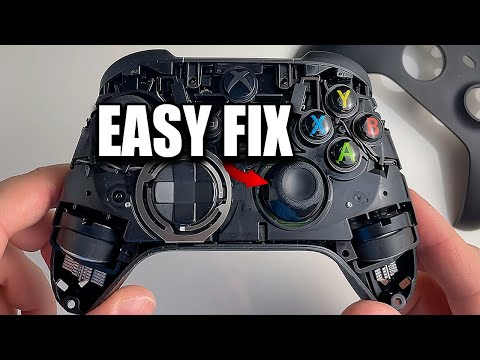
Yes, you can oil an analog stick, but the real question is should you? And if so, what kind of “oil” or lubricant should you use? The answer, as with most things in life, is nuanced. Applying the right lubricant, in the correct amount, can temporarily alleviate issues like stick drift or squeaking. However, using the wrong lubricant or applying too much can cause more harm than good, potentially damaging your controller in the long run. Let’s dive deep into the world of analog stick lubrication, exploring the do’s, don’ts, and best practices for keeping your gaming controllers in top shape.
Understanding Analog Stick Problems
Before grabbing a can of something slippery, it’s crucial to understand why your analog stick is acting up in the first place. Common problems include:
-
Stick Drift: This is when your character or cursor moves on screen even when you aren’t touching the analog stick. It’s often caused by wear and tear on the internal components, dirt or debris interfering with the sensors, or electrical issues.
-
Squeaking: Annoying squeaks usually stem from friction between the plastic parts of the stick mechanism. This can be due to a lack of lubrication, slight imperfections in the plastic, or general wear.
-
Stiffness: A sticky or stiff analog stick can hinder your movement and aiming, making gaming a frustrating experience. This is usually caused by a buildup of grime, grease, or dried residue.
Choosing the Right Lubricant
The type of lubricant you use is critical. Not all lubricants are created equal, and some can actively damage your controller’s delicate components. Here’s a breakdown of some common options and why they might (or might not) be suitable:
-
Silicone Lubricant: This is generally considered a safe and effective option for lubricating analog sticks. It’s plastic-safe, doesn’t attract dust or debris, and provides a smooth, long-lasting lubrication. Look for 100% silicone oil or a silicone-based spray lubricant.
-
White Lithium Grease: This is another lubricant that’s often recommended. It provides good lubrication and is relatively plastic-safe. However, it can be a bit thicker than silicone lubricant, so use it sparingly.
-
Electrical Contact Cleaner: This is designed to clean and lubricate electrical contacts. It can be effective for resolving stick drift caused by electrical issues or grime buildup. Make sure to choose a residue-free cleaner to prevent further problems. WD-40 Specialist Electrical Contact Cleaner Spray has been reported as effective by some users.
-
WD-40 (Original Formula): While some gamers swear by using WD-40, it’s generally not recommended for analog sticks. WD-40 is primarily a solvent and can dissolve some plastics over time. It can also attract dust and grime, making the problem worse in the long run. It is designed for loosening stuck parts and preventing rust.
-
Other Oils and Greases: Avoid using household oils, automotive grease, or other lubricants not specifically designed for electronics. These can damage the plastic, attract dust, and even conduct electricity, causing short circuits.
The Application Process
Before you start lubricating, power off your controller and remove the batteries. A little preparation goes a long way:
-
Disassembly (Optional but Recommended): If you’re comfortable taking your controller apart, this will allow you to apply the lubricant directly to the affected areas. There are numerous tutorials on YouTube specific to each controller type (PS4, PS5, Xbox, etc.). If you aren’t comfortable, do not disassemble. Only do what you are comfortable with.
-
Cleaning: Use a cotton swab or microfiber cloth to clean the area around the analog stick. Remove any visible dirt, dust, or grime. For stubborn residue, dampen the swab with isopropyl alcohol.
-
Application: Apply a very small amount of lubricant to the analog stick mechanism. If using a spray lubricant, spray a small amount onto a cotton swab and then apply it to the stick. If using a grease, apply a tiny dab with a toothpick or small brush.
-
Movement: Gently move the analog stick in a circular motion and in all directions to distribute the lubricant evenly.
-
Reassembly: If you disassembled the controller, carefully reassemble it.
-
Testing: Test the analog stick in a game to see if the issue is resolved. If the stick is still drifting or squeaking, you may need to repeat the process or consider replacing the analog stick entirely.
Prevention is Key
Regular maintenance can prevent analog stick problems from occurring in the first place. Keep your controllers clean by wiping them down with a damp cloth or alcohol wipe after each gaming session. Avoid eating or drinking while gaming to prevent spills and crumbs from getting into the controller. Also, store your controllers in a clean, dry place when not in use. Consider learning more about controller design and haptics through resources like the Games Learning Society at https://www.gameslearningsociety.org/, which explores the intersection of gaming and education.