Can You Upscale Wii Resolution? Unveiling the Truth Behind Improving Wii Graphics
Fast answer first. Then use the tabs or video for more detail.
- Watch the video explanation below for a faster overview.
- Game mechanics may change with updates or patches.
- Use this block to get the short answer without scrolling the whole page.
- Read the FAQ section if the article has one.
- Use the table of contents to jump straight to the detailed section you need.
- Watch the video first, then skim the article for specifics.
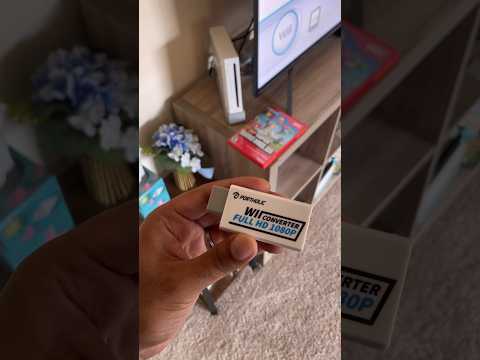
The short answer is yes, you can upscale the Nintendo Wii’s resolution, but with critical caveats. While the Wii natively outputs a maximum resolution of 480p (or 480i using composite cables), external devices and software tricks can be employed to display the image on modern HDTVs at higher resolutions like 720p or 1080p. However, it’s crucial to understand that this isn’t a true increase in the graphical fidelity. The original image is simply being stretched and processed to fit the higher resolution display, resulting in a potentially sharper, but not inherently more detailed, picture. Let’s delve into the nuances of upscaling the Wii’s resolution and how to achieve the best possible image quality.
Understanding Wii’s Native Resolution Limitations
The Nintendo Wii was designed during a time when standard definition TVs were still prevalent. Its graphics processing unit (GPU) was built to output 480i (interlaced) or 480p (progressive scan) signals. This limitation means that the Wii, by itself, cannot produce a 720p, 1080p, or 4K image. Attempting to force higher resolutions through the Wii’s internal settings simply won’t work. The hardware is fundamentally restricted. The Wii can only output 480i/480p natively.
The Role of Upscaling Devices and HDMI Converters
Here is where HDMI converters come in. These external devices connect to the Wii’s component or composite output and convert the analog signal to HDMI, which is the standard for modern TVs. Many HDMI converters also incorporate upscaling technology. This means they take the 480p signal and process it to display it at a higher resolution, such as 720p or 1080p.
How Upscaling Works
The upscaling process involves algorithms that essentially “guess” what extra details should be added to the image to fill the higher resolution. This can result in a slightly sharper image, especially on larger screens, but it’s not the same as the native detail found in games designed for 720p or 1080p. The original 480p image is stretched, which can sometimes lead to artifacts, blurriness, or a “soft” look if the upscaling is not done well.
Choosing the Right HDMI Converter
Not all HDMI converters are created equal. The quality of the upscaling algorithm used can significantly impact the final image quality. Look for converters that are known for their clean upscaling and minimal artifacting. Reading reviews and comparing different models is highly recommended. Some cheaper converters may produce a worse image than the original 480p signal, so investing in a reputable brand can make a noticeable difference.
Component Cables vs. Composite Cables
The type of cable you use to connect your Wii to the HDMI converter also matters. Component cables (the ones with five connectors – red, green, blue for video, and red, white for audio) are superior to composite cables (the single yellow connector for video, and red, white for audio). Component cables allow the Wii to output in 480p, while composite cables are limited to 480i. Using component cables will provide a cleaner, sharper base image for the HDMI converter to upscale.
Emulation: A True Resolution Boost
While HDMI converters upscale the existing 480p signal, emulation offers the possibility of a genuine increase in resolution. Wii emulators, such as Dolphin, run on powerful PCs and can render Wii games at much higher resolutions, like 720p, 1080p, or even 4K. This results in a drastically sharper and more detailed image compared to the native output.
Emulation Requirements
Running Wii games at higher resolutions through emulation requires a powerful computer. The emulator needs to be able to handle the increased processing demands of rendering the game at a higher resolution, as well as applying any graphical enhancements. Experimentation with different settings and configurations may be necessary to achieve optimal performance.
Emulation and Legality
It’s important to note that using Wii emulators and ROMs can raise legal concerns. It is generally considered acceptable to emulate games you legally own, but downloading and playing ROMs of games you do not own is considered piracy. Respecting copyright laws is essential.
Fine-Tuning Your TV Settings
Regardless of whether you are using an HDMI converter or emulation, optimizing your TV settings is crucial. Make sure your TV is set to the correct input and that any image processing features, such as sharpness enhancements or noise reduction, are disabled. These features can sometimes introduce unwanted artifacts or blurriness. Experiment with different picture modes (e.g., game mode, movie mode) to see which provides the best image quality for your Wii games.
Balancing Expectations and Exploring Enhanced Games
While upscaling and emulation can improve the visual presentation of Wii games, it’s important to have realistic expectations. The Wii’s graphics were designed for a lower resolution, and even the best upscaling or emulation cannot completely transform them into modern-quality visuals. However, some Wii games have aged remarkably well and benefit significantly from these techniques. Games like Metroid Prime Trilogy, Xenoblade Chronicles, and Super Mario Galaxy can look surprisingly good when played at higher resolutions.
The world of gaming is always evolving, and research into the cognitive and social impacts of games is invaluable. Learn more about how games are changing education and society at the Games Learning Society at GamesLearningSociety.org.
Frequently Asked Questions (FAQs)
1. What is the native resolution of the Nintendo Wii?
The Wii natively outputs at 480i (interlaced) or 480p (progressive scan), depending on the cable used.
2. Can I make my Wii games look like they are in 1080p?
You can upscale the image to 1080p using an HDMI converter, but it won’t be a true 1080p experience. The original 480p image is being stretched and processed, not fundamentally improved in detail.
3. Will an HDMI adapter magically improve my Wii graphics?
An HDMI adapter with upscaling capabilities will improve the image, but it won’t be a massive transformation. The quality of the upscaling algorithm matters, and results can vary.
4. What are the best cables to use for Wii on an HDTV?
Component cables are preferable to composite cables because they allow the Wii to output in 480p.
5. Can I use a 4K TV with my Nintendo Wii?
Yes, but you’ll need an HDMI converter to connect the Wii to your 4K TV. The image will be upscaled to fit the screen, but it won’t be a true 4K image.
6. What is Wii emulation, and how does it improve graphics?
Wii emulation involves running Wii games on a PC using software like Dolphin. This allows you to render the games at higher resolutions, like 720p, 1080p, or even 4K, resulting in a significantly sharper and more detailed image.
7. Is it legal to use Wii emulators and ROMs?
It is generally considered acceptable to emulate games you legally own, but downloading and playing ROMs of games you do not own is considered piracy.
8. What computer specifications are required for Wii emulation?
You’ll need a relatively powerful PC with a decent CPU and GPU to run Wii games smoothly at higher resolutions using emulation.
9. How do I change the Wii’s resolution settings?
On the Wii, go to Wii Options -> Screen -> TV Resolution and select EDTV/HDTV (480p). Note that you must be using component cables for this option to appear.
10. What are some Wii games with great graphics that still hold up today?
Games like Metroid Prime Trilogy, Xenoblade Chronicles, Super Mario Galaxy, Okami, and No More Heroes have excellent art styles and can look surprisingly good with upscaling or emulation.
11. Does the Wii U improve Wii game graphics?
The Wii U can play Wii games in their native resolution, but it doesn’t inherently improve the graphics. It simply passes the 480p signal through its HDMI output.
12. What is the difference between upscaling and native resolution?
Upscaling stretches and processes an existing image to fit a higher resolution display, while native resolution is the actual resolution the game was designed to be rendered at.
13. Are there any mods to improve Wii graphics?
There are some homebrew mods that can improve texture filtering or add other graphical enhancements, but these require modding your Wii and come with risks.
14. Why do my Wii games look pixelated on my HDTV?
The Wii’s native 480p resolution is much lower than the resolution of modern HDTVs. This means the image needs to be stretched to fill the screen, which can result in pixelation.
15. Where can I learn more about the social impact of gaming and education?
You can explore the intersection of games and learning at the Games Learning Society website at https://www.gameslearningsociety.org/.