Charging Your 3DS with USB: A Comprehensive Guide
Fast answer first. Then use the tabs or video for more detail.
- Watch the video explanation below for a faster overview.
- Game mechanics may change with updates or patches.
- Use this block to get the short answer without scrolling the whole page.
- Read the FAQ section if the article has one.
- Use the table of contents to jump straight to the detailed section you need.
- Watch the video first, then skim the article for specifics.
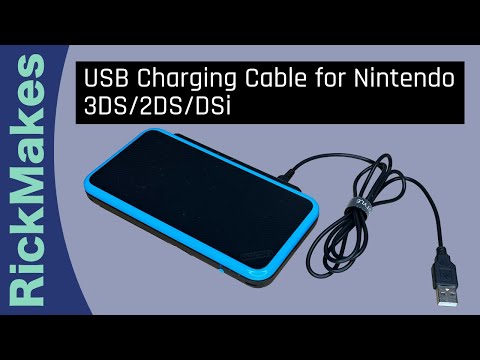
Yes, absolutely! You can use a USB to charge your Nintendo 3DS. The 3DS family of handhelds (including the original 3DS, 3DS XL, 2DS, New 3DS, and New 3DS XL) can all be charged via USB. This opens up a world of charging possibilities beyond the standard AC adapter. It’s a handy feature, letting you power up your beloved handheld from your computer, a power bank, or even a car charger with a USB port. Let’s delve into the details and answer some common questions surrounding this convenient charging method.
USB Charging: The Basics
The Nintendo 3DS family primarily used a proprietary charging port. However, USB charging became possible using a USB charging cable specifically designed for the 3DS. These cables have the standard USB-A connector on one end (to plug into a USB port) and the proprietary 3DS connector on the other.
Why is USB charging so useful?
- Convenience: You’re not tethered to a wall outlet. Charge from your laptop while traveling, or use a power bank on the go.
- Versatility: USB is a universal standard. Many devices, from computers to car chargers, have USB ports.
- Replacement for Lost Chargers: If you’ve lost or damaged your original AC adapter, a USB cable is a readily available and often cheaper alternative.
Considerations for USB Charging
While USB charging is generally safe and convenient, there are a few things to keep in mind:
- Charging Speed: USB charging may be slower than using the original AC adapter. A standard USB-A port typically delivers 5V/0.5A (2.5W), which is less powerful than the 3DS AC adapter (4.6V/0.9A, about 4.14W).
- Cable Quality: Use a reputable USB charging cable. Poorly made cables can be unreliable or even damage your device.
- Power Source: Ensure your USB power source can provide sufficient power. Some older USB ports may not deliver enough current to charge the 3DS effectively. Newer USB ports, especially those supporting USB Power Delivery (USB-PD), can provide more power, but the 3DS itself won’t necessarily utilize it, as it’s limited by its internal charging circuitry.
3DS Charging Alternatives
Besides USB charging and the standard AC adapter, you have a few other options:
- Nintendo DSi/DSi XL Charger: The AC adapters for the Nintendo DSi and DSi XL are compatible with the 3DS family.
- Power Banks: Portable power banks designed for charging smartphones and tablets can also be used to charge your 3DS via a USB cable.
- Car Chargers: Car chargers with USB ports allow you to charge your 3DS while on the road.
FAQs: Charging Your 3DS with USB and Alternatives
Is it safe to charge a 3DS with a phone charger?
It depends on the phone charger. If the charger outputs a voltage and amperage similar to the original 3DS charger (around 4.6V and 900mA), it’s generally safe. However, using a charger with significantly higher voltage or amperage could potentially damage the 3DS. It’s always best to use a charger specifically designed for the 3DS or a standard USB port.
Can I use an iPhone charger for my 3DS?
As long as your Apple charger is 110-240v, like a travel charger, then yes it will work. Keep in mind it may be too much for the 3DS, and it’s advisable that, depending on the 3DS USB cable’s quality, you may have to charge while the system is off. Playing while charging with an unauthorized charger can lead to damage.
Can I charge my 3DS with a laptop?
Yes, you can charge your 3DS with a laptop using a USB charging cable. Simply plug the USB end of the cable into a USB port on your laptop and the other end into the charging port on your 3DS.
How long does a 3DS take to charge from dead using USB?
Charging time can vary depending on the USB port’s power output and the battery’s condition. Generally, it takes longer to charge a 3DS via USB than with the original AC adapter. Expect it to take around 4-6 hours to fully charge a completely drained battery using a standard USB port.
Can I use a USB-C charger with my 3DS?
Not directly. The 3DS uses a proprietary charging port, not USB-C. You would need a USB-C to 3DS adapter or a USB-C power bank with a USB-A port to which you can connect a USB-A to 3DS charging cable.
Is it okay to play my 3DS while it’s charging via USB?
Yes, it is okay to play your 3DS while it is charging. However, this will increase the charging time, and if the USB port doesn’t provide enough power, the battery may even discharge slightly while you’re playing.
Will GameStop take my 3DS without a charger?
They may accept it, but the trade-in value will likely be reduced. It’s best to include a charger if possible.
Is it okay to charge my 3DS in sleep mode?
Yes, charging your 3DS in sleep mode is a good practice. It’s similar to having the system turned off, allowing the battery to charge fully without being used simultaneously.
Can I use a US charger on a Japanese 3DS?
Yes, you can use the original charger that came with your NA 3DS to charge your JP 3DS.
Is it safe to leave my 3DS charging overnight via USB?
While the 3DS has built-in charging circuitry to prevent overcharging, it’s generally not recommended to leave it charging for extended periods after it’s fully charged. Prolonged charging can potentially degrade the battery over time.
What voltage and amperage should my USB power source provide for charging a 3DS?
A standard USB port provides 5V and 0.5A (2.5W). While this will charge the 3DS, it will be slower. Ideally, your USB power source should provide at least 5V and 1A (5W) for faster charging.
Can I use a power bank to charge my 3DS while playing Pokémon Go?
Yes! A power bank is an excellent way to extend your playtime while playing Pokémon Go on your 3DS. Just connect the power bank to your 3DS using a USB charging cable.
What’s the lifespan of a 3DS battery?
The lifespan of a 3DS battery can vary depending on usage and charging habits. Following the guidelines, you could expect your battery to gradually decrease to around 50% capacity after 5 years. Total battery failure is usually caused by mechanical damage or charging past maximum voltage, or fully depleting the charge to past minimum voltage.
Can I use a damaged USB cable to charge my 3DS?
No! A damaged USB cable can be dangerous and could potentially damage your 3DS or even cause a fire. Always use a cable in good condition.
Where can I learn more about the educational benefits of gaming?
The Games Learning Society is dedicated to exploring the intersection of games and education. You can find valuable resources and research on their website: https://www.gameslearningsociety.org/.