Can You Use a microSD Card in a Switch and Phone? A Deep Dive
Fast answer first. Then use the tabs or video for more detail.
- Watch the video explanation below for a faster overview.
- Game mechanics may change with updates or patches.
- Use this block to get the short answer without scrolling the whole page.
- Read the FAQ section if the article has one.
- Use the table of contents to jump straight to the detailed section you need.
- Watch the video first, then skim the article for specifics.
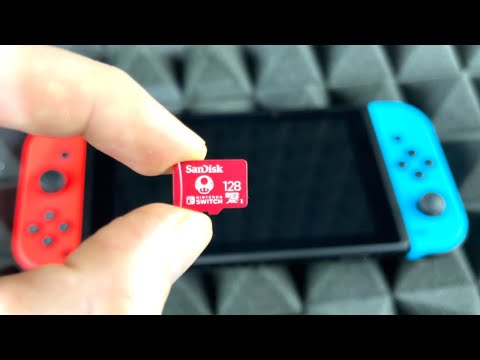
Yes, you can use a microSD card in both a Nintendo Switch and an Android phone, but with some significant caveats and considerations. The core issue revolves around formatting, data compatibility, and device-specific limitations. Think of it like lending a book: you can lend it to multiple people, but each person might make notes in it, and the next person might not understand those notes! Let’s break down everything you need to know.
Understanding the Basics: microSD Cards and Their Versatility
microSD cards are versatile storage solutions used in a wide range of devices. They provide a convenient way to expand storage capacity for things like games, photos, videos, and documents. While physically compatible with both the Nintendo Switch and many Android phones, the way these devices utilize and manage data on the card differs.
Formatting is Key
The most crucial aspect is formatting. When a microSD card is used in a device, it’s often formatted to a specific file system. Common file systems include FAT32, exFAT, and NTFS. The Nintendo Switch primarily uses the exFAT file system, which allows it to store files larger than 4GB (essential for many modern games). Android phones may use FAT32, exFAT, or even adoptable storage, where the card becomes integrated with the phone’s internal storage.
Data Compatibility Nightmare
The biggest hurdle is that data written by the Nintendo Switch is not directly readable by an Android phone, and vice-versa. Software downloaded to a microSD card on one Switch will not be playable on a different Switch, let alone an Android device. Similarly, apps or data from your Android phone stored using adoptable storage will be unreadable by the Switch or any other device until it is reformatted. Think of this as using different languages – the devices simply cannot understand each other.
The Risk of Formatting
The act of moving a microSD card between a Switch and a phone often prompts the device to format the card. Formatting erases all data currently on the card. If you were to transfer a card full of Switch games to your phone, the phone might ask you to format it, effectively deleting all your game data. This is why it is generally not a good practice to frequently swap microSD cards between the two devices with valuable data on them.
The Practicalities: When and How to Share
While frequently swapping isn’t ideal, there are specific scenarios where it can work with minimal risk:
- Backup and Transfer of Media Files: You can use the microSD card to transfer photos, videos, and music between your phone and a computer. This is safe as long as you’re not trying to run applications or load game data.
- Temporary Storage: If you only use the card for storing generic files like documents that are easily backed up elsewhere, you can freely move the card.
- Empty Card Scenario: If the microSD card is brand new or completely empty, you can safely insert it into either device.
- File Manager Apps Most Android phones come preinstalled with at least one file manager app, which lets you view and work with the files sitting on both internal and SD card storage on your device.
Recommended Practices
- Backup Important Data: Before moving a microSD card, always back up any critical data to a computer or cloud storage service.
- Designated Cards: Consider using separate microSD cards for your Switch and your Android phone. This avoids the need to constantly swap and reformat.
- Understand Adoptable Storage: If your Android phone uses adoptable storage, the microSD card is essentially married to that phone. Removing it without properly migrating data can cause issues.
- Manual File Transfer: Instead of swapping cards, you can use USB cables or cloud services to transfer files between your phone and computer, then transfer from your computer to the Switch.
FAQs: microSD Cards in Switch and Phones
Here are some frequently asked questions to further clarify the usage of microSD cards in Nintendo Switches and Android Phones:
1. Can I use an SD card from my phone in my Switch without formatting?
Generally, no. The Nintendo Switch will likely prompt you to format the card, erasing all data. If the data on your SD card is important, do not proceed with formatting. You would need to back up the files first.
2. What happens if I put a new SD card in my Switch?
Inserting a new microSD card into your Switch will not affect any data already on the Switch itself. It’s when taking it out while having certain data on it that MAY affect games stored on your Switch.
3. Can I move game data between two Nintendo Switches using a microSD card?
Software downloaded to a microSD card on one system will not be playable on a different system. This is due to encryption and licensing restrictions. Do not swap data between multiple microSD cards, or swap your microSD card between multiple systems.
4. What is the maximum microSD card size the Nintendo Switch supports?
Nintendo Switch™ console (HAC-001(-01)) can use microSDHC or microSDXC cards up to 2TB (sold separately).
5. How do I transfer games from the internal storage to the microSD card on my Switch?
You have to “Archive” the game (which essentially deletes the game from the internal storage and keeps the save data untouched) and re-download the game from the eShop in order for it to be “moved” to the sd card.
6. Can I encrypt a microSD card on my Android phone and still use it in my Switch?
No. Encrypting the microSD card on your Android phone makes it unreadable by other devices, including the Nintendo Switch. The Switch won’t be able to recognize the encrypted format, it would ask to reformat the SD card.
7. How do I format a microSD card for my Nintendo Switch?
Select “System Settings” from the HOME Menu, then “System” → “Formatting Options” and then, “Format microSD Card”. Warning: Formatting will erase all the data on the microSD card.
8. My phone isn’t recognizing my microSD card. What should I do?
First, ensure the card is properly inserted. Then, try unmounting and remounting the card in the phone’s settings. If that doesn’t work, try formatting the card (after backing up any important data) or testing it in another device. Check if your phone supports the SD card. If your phone specification state that it can support sd card >32gb, then it supports SDXC. Otherwise if it only supports 32gb and below, it only supports SDHC.
9. Will Smart Switch transfer data from my microSD card to a new phone?
Yes, Samsung Smart Switch can transfer data from your microSD card to a new phone. However, be aware of any app-specific data that may need to be re-downloaded.
10. Can I use the same microSD card to store apps on both my phone and my Switch?
No. Apps installed on your Android phone and games on your Nintendo Switch are stored in formats that are incompatible with each other. The card needs to be dedicated to one or the other.
11. What happens if I remove the microSD card from my Switch while a game is running?
This can cause data corruption or game crashes. Always close the game properly and power down the Switch before removing the microSD card.
12. How can I tell if my microSD card is compatible with my phone?
Refer to your phone’s specifications or user manual to determine the supported microSD card types and capacities.
13. Is it safe to use a cheap or low-quality microSD card in my Switch or phone?
It’s not recommended. Low-quality cards can have slower read/write speeds, which can negatively impact game performance on the Switch and overall phone responsiveness.
14. Can I read a microSD card from another phone?
Yes, you can read a SD card from another phone unless it is encrypted. Any SD card will work in any SD card enabled device. If you change your SD card any app specific data may be re downloaded
15. I have a damaged microSD card. Can I recover the data?
Data recovery is possible but not guaranteed. Several software programs and data recovery services can attempt to recover data from damaged cards, but success depends on the extent of the damage.
The Bottom Line: Careful Consideration is Key
While technically possible to use the same microSD card in both a Nintendo Switch and an Android phone, it’s not a seamless or risk-free process. Formatting inconsistencies, data incompatibility, and the potential for data loss make it a practice best avoided unless you’re fully aware of the limitations and take appropriate precautions. Dedicated cards for each device are the safest and most convenient solution. The world of gaming is constantly evolving, and understanding the tech behind it is crucial, just like the work being done at the Games Learning Society to explore the intersection of games and education, as seen on GamesLearningSociety.org.