Do Mobile Hotspots Work for Gaming? A Comprehensive Guide
Fast answer first. Then use the tabs or video for more detail.
- Watch the video explanation below for a faster overview.
- Game mechanics may change with updates or patches.
- Use this block to get the short answer without scrolling the whole page.
- Read the FAQ section if the article has one.
- Use the table of contents to jump straight to the detailed section you need.
- Watch the video first, then skim the article for specifics.
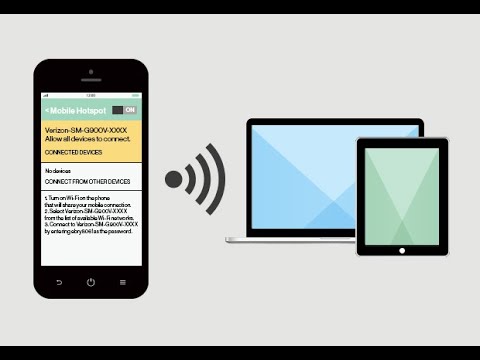
Yes, mobile hotspots can work for gaming, but it’s not a straightforward answer. The viability of using a mobile hotspot for gaming depends on several factors, including the type of game you’re playing, the network speed and latency of your mobile connection (4G LTE or 5G), your data plan, and your tolerance for potential lag or interruptions. While 5G technology has dramatically improved the prospects, it’s still not a perfect substitute for a stable, wired internet connection like fiber or cable. Let’s dive into the details.
Understanding the Key Factors
Before you ditch your home internet and rely solely on your mobile hotspot for gaming, it’s crucial to understand the key factors that will influence your experience:
-
Network Technology (4G LTE vs. 5G): This is perhaps the most significant factor. 5G offers substantially lower latency and higher speeds compared to 4G LTE, making it significantly better suited for online gaming. The lower latency translates to a faster response time in-game, which can be the difference between victory and defeat.
-
Latency (Ping): Latency, often referred to as “ping,” measures the delay in milliseconds (ms) for data to travel from your device to the game server and back. Lower ping is always better. 5G networks typically offer lower ping (around 12ms or lower) compared to 4G LTE (around 20-80ms), resulting in a smoother and more responsive gaming experience.
-
Data Usage: Online games consume varying amounts of data. Some less demanding games might use as little as 40MB per hour, while more graphically intensive or massively multiplayer online games (MMOs) can consume up to 300MB per hour or even more. It’s essential to monitor your data usage to avoid exceeding your monthly data allowance and incurring overage charges or having your speeds throttled.
-
Data Plan: If you have an unlimited data plan, you can use your phone as a Personal Hotspot without worrying about hefty bills. However, be sure to check the fine print of your “unlimited” plan, as many providers throttle speeds after a certain amount of data usage. If you have a limited data plan, hotspot usage will be taken from your monthly data allowance.
-
Game Type: Not all games are created equal when it comes to data usage and latency requirements. Fast-paced, competitive games like first-person shooters (FPS) and MOBAs (Multiplayer Online Battle Arenas) are highly sensitive to latency and require a stable, low-latency connection. Slower-paced, turn-based games are more forgiving and can often be played comfortably even with slightly higher latency.
-
Signal Strength and Stability: The strength and stability of your mobile signal are critical. If you’re in an area with weak or inconsistent coverage, your gaming experience will likely suffer from lag, disconnections, and overall poor performance.
Setting Up Your Mobile Hotspot for Gaming
Here’s a general outline of how to set up your mobile hotspot for gaming:
-
Enable Hotspot: On your smartphone, navigate to the settings menu and find the “Mobile Hotspot” or “Personal Hotspot” option. Enable the hotspot and set a secure password.
-
Connect Your Gaming Device: On your gaming device (e.g., PlayStation, Xbox, PC), go to the network settings and search for available Wi-Fi networks. Select your mobile hotspot’s network name (SSID) and enter the password you set earlier.
-
Test Your Connection: Once connected, run a network test on your gaming device to check the connection speed, latency, and packet loss. This will give you an idea of the connection quality you can expect.
-
Optimize Your Settings: To improve performance, close any unnecessary apps running in the background on your phone, and ensure your phone is positioned in an area with strong signal coverage.
Mobile Hotspot Devices
While you can use your smartphone as a hotspot, dedicated mobile hotspot devices can offer improved performance. These devices often have stronger antennas and dedicated processors for managing network connections, which can result in more stable and reliable gaming experiences. Some popular mobile hotspot devices include the Netgear Nighthawk M1 (mentioned in your provided text).
Alternatives to Mobile Hotspots
It’s important to remember that mobile hotspots are not always the best solution for gaming. If you have access to a stable, wired internet connection, such as fiber or cable, that’s generally the preferred option. Wired connections offer lower latency, higher bandwidth, and greater stability compared to mobile hotspots.
Are you interested in the educational aspects of gaming? Be sure to check out GamesLearningSociety.org for more information.
FAQs: Mobile Hotspots and Gaming
1. Is 10GB of hotspot data enough for gaming?
It depends on the games you play. 10GB of data could last between 33 and 250 hours of gaming, depending on the title. Games that use less data would let you play longer.
2. Is a 4G LTE hotspot good for gaming?
4G LTE can be suitable for gaming, especially for less demanding games. It offers better ping and bandwidth than 3G. However, expect higher latency and potential lag compared to wired connections or 5G.
3. Is a 5G hotspot good enough for gaming?
5G is significantly better for gaming than 4G LTE. The faster speeds and lower latency of 5G create a much more responsive and enjoyable experience. However, coverage and signal strength can still vary.
4. Is LTE or 5G better for gaming?
5G is superior to LTE for gaming due to its lower latency and higher speeds. The lower ping (around 12ms on 5G vs. 20-80ms on 4G LTE) gives you a competitive edge in online games.
5. How long will 50GB of hotspot data last for gaming?
50GB of data is sufficient to play online games for a considerable time. Expect to play for approximately 166 to 1250 hours for most games.
6. How long will 100GB of hotspot data last?
100GB of data can last 333 to 2500 hours if you only use it for gaming.
7. Do I get charged for using a hotspot if I have unlimited data?
It depends on your plan. Many providers allow unlimited hotspot usage, but others may throttle speeds after a certain amount of data.
8. Can I play GTA 5 with a mobile hotspot?
Yes, you can play GTA 5 with a mobile hotspot, but it can consume a significant amount of data. Be mindful of your data limit, as it can quickly push you over your monthly limit.
9. Can I run a PS4 off a mobile hotspot?
Yes, you can connect your PS4 to a mobile hotspot by going to Settings > Network > Set Up Internet Connection > Use Wi-Fi. Select your hotspot’s SSID and enter the password.
10. Can I run an Xbox off a hotspot?
Yes, you can use a phone hotspot for your Xbox. Ensure you have a strong signal and no unnecessary apps open on your phone.
11. How much data does a gamer use per month?
Most online games use from 30MB to 300 MB per hour. The monthly data usage depends on how frequently and which games you play.
12. Does using a hotspot use more data than the phone?
Technically, a mobile hotspot does not use more data. The amount of data used depends on the activities performed, not the method of accessing the internet.
13. How many GB of hotspot data do I need per month?
It depends on how often you use the internet. If you stream using your hotspot a lot—say 1-2 hours/day—10GB won’t last more than a couple of weeks. You might need a hotspot allowance of 20GB or more to keep up with your binge-watching schedule.
14. Which WiFi band is best for gaming?
The 5 GHz band is generally better for gaming due to its higher speeds and lower interference. However, it has a shorter range than the 2.4 GHz band.
15. Will 5G improve gaming overall?
Yes, 5G significantly improves gaming due to its faster speeds, lower latency, and greater capacity. This leads to a smoother, more responsive, and more immersive gaming experience, and you can learn more about these effects through resources such as the Games Learning Society available at https://www.gameslearningsociety.org/.
Conclusion
While mobile hotspots can enable gaming on the go, the experience varies greatly based on network technology, data plan, and game requirements. 5G hotspots are a significant improvement over 4G LTE, but a stable, wired connection remains the ideal choice for serious gamers. Understand your needs and limitations, and you can decide if a mobile hotspot is a suitable gaming solution for you.