Do You Need a 6-Core CPU for Gaming? The Definitive Guide
Fast answer first. Then use the tabs or video for more detail.
- Watch the video explanation below for a faster overview.
- Game mechanics may change with updates or patches.
- Use this block to get the short answer without scrolling the whole page.
- Read the FAQ section if the article has one.
- Use the table of contents to jump straight to the detailed section you need.
- Watch the video first, then skim the article for specifics.
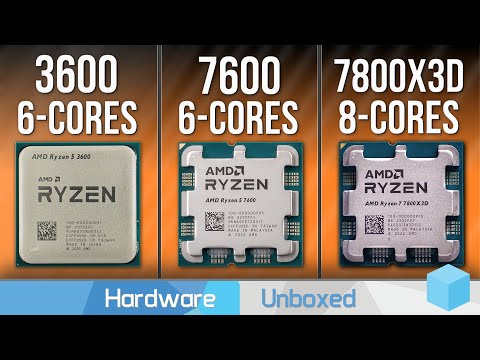
Absolutely! In 2024 and beyond, a 6-core CPU is highly recommended for a smooth and enjoyable gaming experience. While a 4-core CPU might still let you limp along in some older titles or less demanding games, you’ll likely encounter performance bottlenecks, stuttering, and lower frame rates, especially in newer, more graphically intensive games. A 6-core CPU provides a significant boost in processing power, allowing your system to handle the complex calculations required by modern game engines, AI, and physics simulations.
Let’s delve deeper into why a 6-core CPU is becoming the de facto standard for gamers and explore the nuances of core count, clock speed, and other factors influencing your gaming rig’s performance.
Why Core Count Matters for Gaming
Gone are the days when games primarily relied on single-core performance. Modern game development embraces multi-threading, a technique that distributes tasks across multiple CPU cores. This allows for more efficient processing of various game elements simultaneously, leading to smoother gameplay and reduced loading times.
A CPU with more cores can handle a greater number of these threads concurrently. This is especially crucial in games with complex environments, numerous AI characters, and advanced physics simulations. With a 6-core CPU, your system can dedicate cores to essential tasks like:
- Game Engine Rendering: Processing the game’s graphics and visual effects.
- AI Calculations: Controlling the behavior of non-player characters.
- Physics Simulations: Simulating realistic interactions between objects in the game world.
- Audio Processing: Handling in-game sound effects and music.
- Background Processes: Managing operating system tasks and other applications running in the background (like Discord, streaming software, or web browsers).
Without sufficient cores, your CPU might struggle to juggle all these tasks, resulting in performance dips and a less-than-ideal gaming experience.
6 Cores vs. 8 Cores vs. More: Diminishing Returns
While 6 cores are generally sufficient for most gamers, the question of whether to upgrade to 8 cores (or even more) often arises. The truth is, the benefits of moving beyond 6 cores become increasingly marginal for pure gaming scenarios.
Many games are still optimized for 6 cores, meaning they may not fully utilize the additional processing power offered by 8 or more cores. In these cases, the performance difference between a 6-core and an 8-core CPU will be minimal, often within a few frames per second.
However, there are situations where an 8-core CPU can offer a noticeable advantage:
- CPU-Intensive Games: Certain games, such as strategy games (e.g., Civilization VI), simulation games (e.g., Microsoft Flight Simulator), and open-world games with complex AI (e.g., Cyberpunk 2077), can benefit from the extra cores.
- Simultaneous Streaming and Gaming: If you plan to stream your gameplay while gaming, an 8-core CPU can handle the encoding and broadcasting process without significantly impacting your in-game performance.
- Content Creation: If you also engage in other CPU-intensive tasks like video editing, 3D rendering, or software development, an 8-core (or higher) CPU will provide a significant performance boost.
Ultimately, the decision of whether to opt for 8 cores (or more) depends on your specific needs and budget. If you primarily focus on gaming and don’t engage in heavy multitasking or content creation, a 6-core CPU is likely the sweet spot. However, if you want to future-proof your system or engage in more demanding tasks, an 8-core CPU is a worthwhile investment.
The Importance of CPU Architecture and Clock Speed
Core count is just one piece of the puzzle. The CPU architecture and clock speed are equally important factors influencing gaming performance.
CPU Architecture: Refers to the underlying design and technology of the CPU. Newer architectures generally offer better performance and efficiency compared to older ones. For example, a modern 6-core CPU based on AMD’s Zen 3 or Intel’s Alder Lake architecture will outperform an older 6-core CPU based on a previous generation architecture.
Clock Speed: Measures how many cycles a CPU can execute per second (measured in GHz). A higher clock speed generally translates to faster processing speeds. However, clock speed alone isn’t a reliable indicator of performance. A CPU with a lower clock speed but a more efficient architecture can often outperform a CPU with a higher clock speed but an older architecture.
When choosing a CPU for gaming, consider the combination of core count, architecture, and clock speed. Look for CPUs that offer a good balance of all three factors for optimal performance.
GPU Bottleneck and Resolution
It’s also crucial to consider the GPU (graphics processing unit) when determining your CPU needs. In many games, the GPU is the primary bottleneck, meaning that the graphics card is the limiting factor in performance, not the CPU.
If you’re gaming at higher resolutions (e.g., 1440p or 4K), the GPU becomes even more critical. At these resolutions, the GPU has to process a significantly larger number of pixels, placing a greater demand on the graphics card and reducing the impact of the CPU.
In GPU-bound scenarios, upgrading your GPU will likely yield a more significant performance improvement than upgrading your CPU. Therefore, it’s essential to strike a balance between your CPU and GPU to avoid bottlenecks and ensure optimal gaming performance.
Budget Considerations
Finally, budget plays a significant role in determining your CPU choice. While a high-end CPU with 8 or more cores might be desirable, it may not be feasible within your budget.
Fortunately, there are many excellent 6-core CPUs available at reasonable prices. The AMD Ryzen 5 5600X and Intel Core i5-12400F are popular choices among gamers, offering excellent performance without breaking the bank.
Consider your budget and prioritize components that will have the most significant impact on your gaming experience. A well-balanced system with a good 6-core CPU and a powerful GPU will generally provide a better gaming experience than a system with a high-end CPU and a weaker GPU.
In conclusion, while specific needs vary, a 6-core CPU is a solid foundation for modern gaming, offering a balance of performance and affordability. Remember to consider your GPU, resolution, and other tasks you perform on your computer to make the best choice for your specific needs.
Frequently Asked Questions (FAQs)
Here are 15 frequently asked questions about CPU cores and gaming:
1. Is a 4-core CPU still enough for gaming in 2024?
No, generally a 4-core CPU is not recommended for modern gaming. While it might still be playable for older titles, it will likely struggle with newer, more demanding games, leading to performance bottlenecks and stuttering.
2. What’s more important for gaming: CPU core count or clock speed?
Both are important, but a balance between core count and clock speed is ideal. Core count allows for better multitasking and handling complex game calculations, while clock speed dictates the speed at which each core operates. A modern CPU with a good balance of both will provide the best gaming experience.
3. Will upgrading to a 6-core CPU improve my gaming performance?
Yes, in most cases, upgrading from a 4-core to a 6-core CPU will significantly improve gaming performance, especially in newer games that utilize multi-threading. You’ll likely see higher frame rates, smoother gameplay, and reduced stuttering.
4. Is an 8-core CPU overkill for gaming?
Not necessarily. While many games don’t fully utilize 8 cores, an 8-core CPU can be beneficial for CPU-intensive games, streaming, and multitasking. If you engage in these activities, an 8-core CPU can be a worthwhile investment.
5. How much RAM do I need for gaming?
At least 16GB of RAM is recommended for modern gaming. Some games may even benefit from 32GB, especially if you plan to run other applications in the background while gaming.
6. Will a better CPU improve my frame rates in all games?
Not always. If your GPU is the bottleneck, upgrading your CPU may not significantly improve frame rates. Identify the bottleneck in your system before upgrading components.
7. What’s the difference between a CPU core and a thread?
A core is a physical processing unit within the CPU, while a thread is a virtual processing unit. Some CPUs support multi-threading (e.g., Hyper-Threading in Intel CPUs), which allows each core to handle multiple threads simultaneously.
8. Is it better to have a higher-end GPU or CPU for gaming?
It depends on the game and resolution. At higher resolutions (1440p or 4K), the GPU is typically more important. However, for CPU-intensive games or at lower resolutions (1080p), a stronger CPU can be beneficial.
9. Can I use a 6-core CPU for streaming my gameplay?
Yes, a 6-core CPU is generally sufficient for streaming, especially if you’re not playing extremely demanding games. However, an 8-core CPU might provide a smoother streaming experience, especially if you’re using CPU-intensive encoding methods.
10. What are some good budget-friendly 6-core CPUs for gaming?
The AMD Ryzen 5 5600X and Intel Core i5-12400F are excellent budget-friendly 6-core CPUs that offer great gaming performance.
11. How does CPU architecture affect gaming performance?
Newer CPU architectures generally offer better performance and efficiency compared to older ones. They often feature improvements in core design, cache, and memory controllers, leading to better gaming performance.
12. Will upgrading my CPU from an older generation to a newer generation make a big difference?
Yes, in most cases, upgrading to a newer generation CPU will provide a noticeable performance boost, even if the core count and clock speed are similar. Newer architectures often feature significant improvements in performance and efficiency.
13. How important is CPU cooling for gaming?
Adequate CPU cooling is essential for maintaining optimal performance and preventing overheating. Overheating can lead to thermal throttling, which reduces CPU clock speeds and negatively impacts gaming performance.
14. What’s the best way to monitor my CPU usage while gaming?
You can use task manager, or monitoring software to track your CPU usage. This can help you identify potential bottlenecks and determine if your CPU is being fully utilized.
15. Where can I learn more about game design and technology?
You can explore various resources, including online courses, tutorials, and communities. Additionally, organizations like the Games Learning Society offer valuable insights and resources related to game design, learning, and technology. Visit them at https://www.gameslearningsociety.org/.