Does High FPS Matter in Minecraft? A Deep Dive for Block-Loving Gamers
Fast answer first. Then use the tabs or video for more detail.
- Watch the video explanation below for a faster overview.
- Game mechanics may change with updates or patches.
- Use this block to get the short answer without scrolling the whole page.
- Read the FAQ section if the article has one.
- Use the table of contents to jump straight to the detailed section you need.
- Watch the video first, then skim the article for specifics.
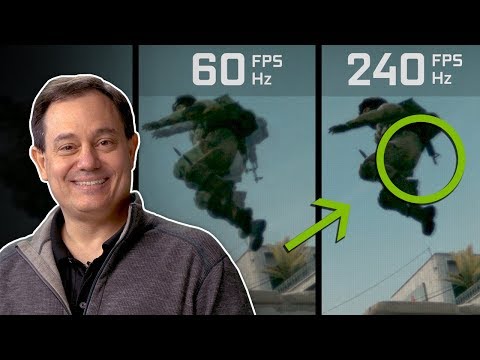
Absolutely! High FPS (Frames Per Second) matters significantly in Minecraft, impacting everything from visual smoothness to responsiveness, and even your competitive edge in PvP. While Minecraft isn’t the most graphically demanding game, a higher FPS translates to a more fluid and enjoyable gaming experience. Let’s break down why, and how you can optimize your setup.
Why FPS is Crucial in Minecraft
Minecraft’s charm lies in its simplicity, but that doesn’t mean performance is irrelevant. FPS dictates how many individual frames your screen displays each second. More frames mean smoother animations, less choppiness, and a more responsive feel to your actions. Think of it like this: a flipbook with more pages per second shows a smoother animation.
-
Visual Smoothness: Low FPS results in a jerky, stuttering image. High FPS creates the illusion of continuous motion. This makes exploring, building, and combat more pleasant and less straining on your eyes.
-
Responsiveness: The higher your FPS, the lower the input lag. This means the time between pressing a button (like swinging your sword or placing a block) and seeing the action on-screen is reduced. Crucial for quick reactions.
-
Competitive Advantage: In Player vs. Player (PvP) scenarios, milliseconds matter. A higher FPS gives you a slight edge in reaction time, allowing you to dodge attacks and execute combos more effectively. This is because you are seeing the game updated more often.
Understanding FPS Thresholds in Minecraft
So, what’s considered “good” FPS in Minecraft? It’s subjective, but here’s a general guideline:
-
30-45 FPS: Playable, but not ideal. Noticeable stuttering may occur, especially during intense action. Many may find this un enjoyable.
-
60 FPS: A good baseline. Provides a reasonably smooth experience for casual gameplay.
-
120+ FPS: Excellent. Delivers very fluid visuals and responsive controls. Highly recommended for competitive players.
-
144+ FPS: Top-tier. If your monitor has a high refresh rate (144Hz or higher), aiming for this FPS range will maximize visual fidelity and responsiveness.
Factors Affecting Your Minecraft FPS
Several factors influence your Minecraft FPS, including:
-
Hardware: Your CPU (Central Processing Unit) and GPU (Graphics Processing Unit) are the primary determinants of your FPS. A more powerful CPU can handle the game’s calculations, while a stronger GPU renders the visuals.
-
RAM: Insufficient RAM (Random Access Memory) can cause performance bottlenecks. Minecraft needs enough RAM to store game data and assets. 8GB is a good starting point, but 16GB is recommended, especially with mods.
-
Game Settings: Minecraft’s video settings have a huge impact on FPS. Higher settings demand more processing power.
-
Background Processes: Other programs running on your computer can consume resources and lower your FPS.
-
Minecraft Version: Different versions of Minecraft (Java Edition, Bedrock Edition) have different performance characteristics.
-
Mods: Some mods can significantly impact performance, while others are optimized for higher FPS.
Boosting Your Minecraft FPS
Here are some proven strategies to increase your FPS in Minecraft:
-
Lower Graphics Settings: In the “Video Settings” menu, reduce the following:
- Render Distance: Drastically impacts FPS. Start by lowering it to 8-12 chunks.
- Graphics: Switch from “Fancy” to “Fast.”
- Smooth Lighting: Turn it off.
- Clouds: Turn them off or set to “Fast.”
- Particles: Set to “Minimal.”
- VSync: Turn it off (unless you experience screen tearing).
- Mipmap Levels: Reduce to 0 or 1.
- Anti-Aliasing: Turn it off or set to a low level.
-
Optimize Java (Java Edition): Ensure you’re using the latest version of Java and allocate sufficient RAM to Minecraft. You can adjust the allocated RAM in the Minecraft launcher settings (usually under “Installations”).
-
Use OptiFine (Java Edition): OptiFine is a popular mod that significantly improves FPS. It offers more granular control over graphics settings and optimizations.
-
Close Background Programs: Close any unnecessary applications running in the background to free up system resources.
-
Update Graphics Drivers: Make sure you have the latest drivers for your GPU.
-
Overclock Your CPU/GPU (Advanced): If you’re comfortable with overclocking, you can squeeze extra performance out of your hardware. However, proceed with caution and research thoroughly.
-
Consider a Resource Pack: Some resource packs are more optimized than others. Try using a simpler resource pack with lower resolution textures.
-
Reinstall Minecraft: A fresh installation can sometimes resolve performance issues caused by corrupted files.
FAQs: Everything You Need to Know About FPS in Minecraft
Q1: Is 60 FPS good enough for Minecraft?
A1: 60 FPS is a good baseline for casual Minecraft gameplay, providing a reasonably smooth experience. However, aiming for higher FPS, like 120 or 144, will result in an even more fluid and responsive game.
Q2: Does 120 FPS give an advantage in Minecraft?
A2: Yes, 120 FPS can give a slight advantage, especially in PvP. The increased visual smoothness and reduced input lag can improve your reaction time and overall performance.
Q3: What is a good average FPS for Minecraft?
A3: A good average FPS depends on your monitor’s refresh rate and personal preferences. If you have a 60Hz monitor, aiming for 60 FPS is sufficient. If you have a 144Hz or higher monitor, aim for 144+ FPS to take full advantage of the higher refresh rate.
Q4: Does FPS matter in Minecraft PvP?
A4: Absolutely. FPS matters significantly in Minecraft PvP. Higher FPS translates to faster reaction times and smoother movement, giving you a competitive edge.
Q5: Is 100 FPS good for Minecraft?
A5: Yes, 100 FPS is very good for Minecraft. It provides a smooth and responsive gaming experience, exceeding the baseline of 60 FPS.
Q6: Is 30 FPS bad for Minecraft?
A6: 30 FPS is generally considered low for Minecraft. While playable, it can result in noticeable stuttering and a less enjoyable experience, especially during fast-paced action.
Q7: Why are my Minecraft FPS so low?
A7: Low Minecraft FPS can be caused by several factors, including underpowered hardware, high graphics settings, background processes, outdated drivers, and insufficient RAM allocation.
Q8: How many FPS can the human eye see?
A8: While the exact number is debated, most people can perceive differences up to 60 FPS. Some individuals can discern even higher frame rates, especially with fast-moving content.
Q9: Do you really need high FPS in Minecraft?
A9: It depends on your priorities. If you value a smooth, responsive, and competitive experience, then high FPS is desirable. For casual players who are less sensitive to visual stutter, 60 FPS may suffice.
Q10: Why is Minecraft at 60 FPS?
A10: Your Minecraft FPS may be capped at 60 due to VSync being enabled, monitor refresh rate limitations, or in-game settings. Check your video settings and graphics card control panel to adjust the FPS cap.
Q11: Will OptiFine improve FPS in Minecraft?
A11: Yes, OptiFine is known to significantly improve FPS in Minecraft (Java Edition) by optimizing rendering and providing more granular control over graphics settings.
Q12: What kills FPS in Minecraft?
A12: Factors that can kill FPS in Minecraft include high render distance, complex mods, resource-intensive resource packs, and background processes.
Q13: Why is my Minecraft FPS so inconsistent?
A13: Inconsistent FPS can be caused by fluctuations in CPU or GPU usage, background processes interfering, or thermal throttling of your hardware.
Q14: How much RAM do I need for Minecraft?
A14: 8GB of RAM is a good starting point for Minecraft, but 16GB is recommended, especially if you play with mods or large resource packs.
Q15: How can I allocate more RAM to Minecraft?
A15: You can allocate more RAM to Minecraft in the Minecraft launcher settings, usually under the “Installations” tab. Edit the installation profile and increase the “JVM Arguments” value.
Final Thoughts: The Pursuit of Smooth Blocks
Ultimately, the ideal FPS for Minecraft depends on your individual preferences and hardware capabilities. Experiment with different settings and optimizations to find the sweet spot between visual quality and performance. A smooth, responsive Minecraft experience is within reach, and with a little tweaking, you can enjoy the game to its fullest. To learn more about gaming and educational aspects visit the Games Learning Society website.
By optimizing your FPS, you’ll not only enhance your gameplay but also potentially improve your skills and enjoyment of this beloved block-building world. Good luck, and happy crafting!