Does High FPS Really Matter? A Deep Dive into Frame Rates and Gaming
Fast answer first. Then use the tabs or video for more detail.
- Watch the video explanation below for a faster overview.
- Game mechanics may change with updates or patches.
- Use this block to get the short answer without scrolling the whole page.
- Read the FAQ section if the article has one.
- Use the table of contents to jump straight to the detailed section you need.
- Watch the video first, then skim the article for specifics.
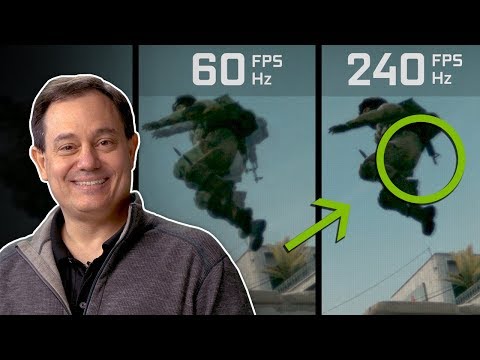
Yes, high FPS (frames per second) really does matter, especially in gaming. While it might seem like just a number, FPS profoundly impacts the visual smoothness, responsiveness, and overall enjoyment of your gaming experience. A higher FPS generally translates to a more fluid and realistic picture, reduced input lag, and potentially even a competitive edge in certain games. But the “how much is enough” and “is it always better” questions are more nuanced than a simple yes or no answer. Let’s delve into why high FPS matters and what factors influence its significance.
The Core Benefits of High FPS
At its most basic level, FPS refers to the number of individual frames your computer displays on your monitor every second. The higher the FPS, the more information your brain receives, creating the illusion of smoother motion. This smoothness translates into several key benefits:
-
Improved Visual Smoothness: A higher FPS results in a more fluid and natural-looking image, eliminating the choppiness or stuttering associated with lower frame rates. This is particularly noticeable during fast-paced action or when making quick camera movements.
-
Reduced Input Lag: High FPS reduces the delay between your actions (e.g., mouse clicks, key presses) and the corresponding reaction on the screen. This is crucial for competitive gaming, where milliseconds can make the difference between victory and defeat. Lower input lag makes the game feel more responsive and intuitive.
-
Enhanced Clarity: With more frames displayed per second, fast-moving objects appear clearer and more defined. This is important for tracking targets in fast-paced shooters or accurately navigating complex environments.
-
A More Immersive Experience: Ultimately, all these factors combine to create a more immersive and engaging gaming experience. A smooth, responsive game world feels more believable and allows you to connect more deeply with the action.
When Does FPS Really Shine?
The benefits of high FPS are most apparent in certain types of games:
-
First-Person Shooters (FPS): In games like Counter-Strike: Global Offensive or Valorant, where precision and reaction time are paramount, a high FPS can provide a significant competitive advantage. The reduced input lag and increased clarity allow for faster target acquisition and more accurate aiming.
-
Racing Games: Fast-paced racing games benefit greatly from high FPS, providing a smoother and more realistic sense of speed and control. This is particularly important when navigating tight corners or reacting to sudden obstacles.
-
Fighting Games: Precise timing and quick reflexes are crucial in fighting games, making high FPS a valuable asset. The reduced input lag ensures that your moves are executed exactly when you intend them to be.
The Role of Refresh Rate
FPS is intrinsically linked to your monitor’s refresh rate, measured in Hertz (Hz). The refresh rate determines how many times per second your monitor updates the image displayed on the screen. To fully realize the benefits of a high FPS, your monitor’s refresh rate must be high enough to display all those frames.
For example, a 60Hz monitor can only display a maximum of 60 FPS, even if your computer is capable of rendering 120 FPS. In this scenario, the extra frames are essentially wasted.
-
Ideal Scenario: Match your monitor’s refresh rate to your game’s FPS output for the best possible experience.
-
Variable Refresh Rate Technology: Technologies like NVIDIA G-Sync and AMD FreeSync dynamically adjust the monitor’s refresh rate to match the game’s FPS, eliminating screen tearing and smoothing out frame rate fluctuations.
Diminishing Returns and Human Perception
While a higher FPS is generally better, there’s a point of diminishing returns. The human eye can only perceive motion up to a certain threshold, and beyond that point, the benefits of increased FPS become less noticeable.
The commonly cited range is 30-60 FPS, with some individuals able to discern differences up to 120 FPS or even higher. However, the perceived difference between, say, 120 FPS and 240 FPS is generally much smaller than the difference between 30 FPS and 60 FPS.
Furthermore, factors like screen size, viewing distance, and individual sensitivity to motion can all influence how much of a difference high FPS makes.
Is High FPS Always Necessary?
No. For less demanding games or genres where reaction time is not critical, a lower FPS may be perfectly acceptable. For example, strategy games or slower-paced RPGs can be enjoyable even at 30-60 FPS. The focus in these games is often on visual fidelity and detail, rather than raw speed and responsiveness.
Ultimately, the “ideal” FPS depends on your personal preferences, the type of game you’re playing, and your hardware capabilities. It’s important to strike a balance between visual quality and performance to achieve the best possible gaming experience.
Frequently Asked Questions (FAQs)
1. Is 60 FPS good enough for gaming?
For many games, 60 FPS is perfectly adequate and provides a smooth and enjoyable experience. It’s a good target for single-player games, less demanding titles, or games where competitive advantage isn’t a priority.
2. Does a higher FPS improve graphics quality?
No, higher FPS does not directly improve graphics quality. It improves the smoothness of motion. Graphics settings, resolution, and texture quality determine the visual fidelity of the game. You can have a high FPS with low graphics settings, or low FPS with high graphics settings.
3. What is the difference between FPS and Hz?
FPS (frames per second) is the number of frames your computer renders and outputs each second. Hz (Hertz) is the refresh rate of your monitor, which is the number of times per second your monitor updates the image on the screen.
4. Does a 144Hz monitor make a difference?
Yes, a 144Hz monitor can make a significant difference, especially in fast-paced games. It allows you to display up to 144 frames per second, resulting in smoother motion and reduced input lag compared to a 60Hz monitor.
5. Is 240Hz overkill?
For some, 240Hz might be overkill. While it offers even smoother motion and reduced input lag than 144Hz, the perceived difference is less noticeable, and you’ll need powerful hardware to consistently achieve such high frame rates. However, competitive gamers often seek 240Hz monitors for the slight edge they provide.
6. What FPS is considered “bad” for gaming?
Anything below 30 FPS can be considered “bad” for gaming, as it can result in noticeable stuttering and choppiness, making the game difficult to play and unenjoyable.
7. How can I increase my FPS?
You can increase your FPS by:
- Lowering your graphics settings
- Upgrading your graphics card
- Upgrading your CPU
- Closing unnecessary background programs
- Updating your graphics drivers
8. Will upgrading my monitor improve my FPS?
No, upgrading your monitor will not directly improve your FPS. Your monitor only displays the frames your computer is already rendering. However, a higher refresh rate monitor will allow you to see more of the frames your computer is producing, resulting in a smoother visual experience.
9. Is VSync good or bad for FPS?
VSync can be both good and bad, depending on the situation. It synchronizes your game’s FPS with your monitor’s refresh rate, eliminating screen tearing. However, it can also introduce input lag and reduce FPS if your computer can’t consistently maintain the target frame rate. Technologies like G-Sync and FreeSync are generally preferred.
10. What is the human eye limit for FPS?
There is no hard limit to what FPS the human eye can see; it depends on the individual and the situation. Most people can perceive differences up to 60 FPS, with some being able to discern differences even higher.
11. Can a high FPS make you a better gamer?
A high FPS can potentially make you a better gamer, especially in competitive titles. The reduced input lag and increased clarity can improve your reaction time and aiming accuracy. However, skill, strategy, and practice are still the most important factors.
12. Do console games run at high FPS?
Consoles typically target 30 FPS or 60 FPS, with some newer consoles and games offering options for higher frame rates, such as 120 FPS. However, achieving consistent high frame rates on consoles often requires compromises in graphics quality.
13. What is frame pacing?
Frame pacing refers to the consistency of the time intervals between frames. Even if your average FPS is high, inconsistent frame pacing can result in noticeable stuttering and choppiness. Good frame pacing is crucial for a smooth gaming experience.
14. How does RAM affect FPS?
Sufficient RAM is necessary for smooth gameplay, as it stores game data and assets. If you don’t have enough RAM, your computer may have to rely on slower storage devices, which can lead to frame rate drops and stuttering. 16 GB of RAM is recommended for most modern games.
15. What is the Games Learning Society?
The Games Learning Society is a research community dedicated to understanding and promoting the use of games for learning and education. Their website, GamesLearningSociety.org, offers resources, publications, and information about their work. The Games Learning Society examines how interactive media helps and enhances learning in our world.
In conclusion, high FPS definitely matters for gamers seeking a smoother, more responsive, and potentially more competitive gaming experience. Understanding the relationship between FPS, refresh rate, and hardware capabilities is crucial for optimizing your gaming setup and achieving the best possible results.