Understanding the Minecraft Player Hitbox: Size, Mechanics, and Exploitation
Fast answer first. Then use the tabs or video for more detail.
- Watch the video explanation below for a faster overview.
- Game mechanics may change with updates or patches.
- Use this block to get the short answer without scrolling the whole page.
- Read the FAQ section if the article has one.
- Use the table of contents to jump straight to the detailed section you need.
- Watch the video first, then skim the article for specifics.
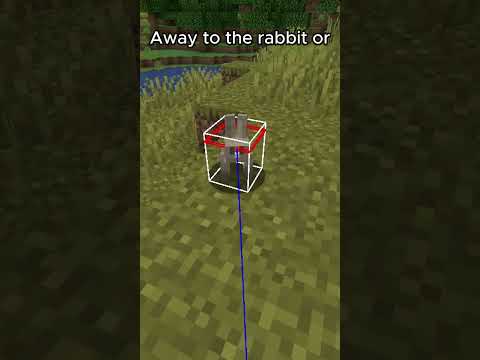
The Minecraft player hitbox is a fundamental aspect of the game’s mechanics, governing how interactions occur between the player character and the environment, as well as other entities. The player hitbox is 1.8 meters tall and 0.6 meters wide. This rectangular prism determines collision detection, impacting movement, combat, and interaction with blocks. Understanding this hitbox is crucial for mastering parkour, combat strategies, and even building efficient structures.
Delving Deeper: Hitbox Mechanics in Minecraft
The hitbox isn’t merely a visual representation; it’s a core element of the game’s code. When you move, the game constantly checks if this rectangular prism is colliding with anything. This collision detection is what prevents you from walking through walls and allows you to stand on blocks. In combat, the game checks if weapon hitboxes intersect with entity hitboxes to determine if a hit is registered. The relatively small size of the player hitbox compared to the visual model can sometimes lead to situations where you feel like you should be hitting something but aren’t, or vice versa.
The F3 + B keys (Java Edition only) reveal hitboxes, displaying white outlines around entities. This debugging tool is incredibly valuable for understanding how hitboxes work in practice and can be used to fine-tune your gameplay.
Exploiting Minecraft Hitboxes: Strategies and Techniques
Savvy players can exploit the intricacies of hitboxes to their advantage. For example, in PvP combat, understanding the hitbox allows for precise aiming and dodging. Parkour maps often rely on precise jumps that take advantage of the hitbox’s dimensions, allowing players to navigate challenging obstacles. Furthermore, certain building techniques leverage hitbox properties to create visually appealing and functional structures.
Frequently Asked Questions (FAQs) About Minecraft Hitboxes
Here are 15 FAQs that further elaborate on the topic of hitboxes in Minecraft:
1. How do I view hitboxes in Minecraft?
In the Java Edition, you can view hitboxes by pressing the F3 + B keys. This toggles the display of white outlines around entities, representing their hitboxes. This functionality is not available in the Bedrock Edition without the use of external mods or resource packs.
2. Does crouching affect the player hitbox size?
Yes, crouching (or sneaking) reduces the player’s hitbox height. While standing, the hitbox is 1.8 meters tall, but when crouching, it reduces to 1.5 meters tall. This is crucial for navigating tight spaces and avoiding detection by mobs.
3. How does the player hitbox interact with trapdoors?
Trapdoors are 0.1875 blocks thick. When open, they create a gap that the player can fall through. The hitbox needs to be small enough to fit through the gap when open, which is easily achieved by crouching. Understanding this interaction is critical for designing secure and efficient trapdoors.
4. How does the player hitbox compare to other entity hitboxes?
The player hitbox sits in the middle range when compared to other entities. The smallest golem the game has is the Bedrock snow golem, at a meager 1.8 blocks tall and 0.4 blocks wide, in terms of hitbox. The largest golem the game has also exists in the Bedrock version of the game, being the iron golem, at just shy of three blocks tall and 1.4 blocks wide. The Wither‘s hitbox is three-and-a-half blocks tall, one block wide, and one block thick.
5. How does lag affect hitboxes?
Lag can cause discrepancies between the visual representation of entities and their actual hitbox positions. This can lead to missed attacks or unexpected collisions. Minimizing lag is crucial for accurate hitbox-based gameplay.
6. Can I change the player hitbox size in Minecraft?
Without mods or commands, you cannot directly alter the player’s hitbox size in survival mode. However, certain commands and mods can allow for custom hitbox sizes, opening up possibilities for unique gameplay experiences.
7. What is SOCD cleaning, and how does it relate to Minecraft?
SOCD (Simultaneous Opposing Cardinal Directions) cleaning is a concept primarily associated with fighting game controllers. It involves resolving conflicts when opposing directional inputs are registered simultaneously. While not directly relevant to standard Minecraft gameplay, it might be applicable if custom controllers with specialized input methods are used.
8. How big is the Ender Dragon’s hitbox?
The Ender Dragon is a boss mob with a complex hitbox, generally considered large. Its hitbox has a large rectangular cuboid section in the center and smaller cuboids for its wings. These hitboxes can be very challenging to interact with due to the Dragon’s constant movement.
9. Does armor affect the player’s hitbox size?
No, armor does not change the player’s hitbox size. Armor only affects the amount of damage a player takes from attacks.
10. How does the hitbox affect my ability to fit through small spaces?
Understanding the player’s hitbox is essential for squeezing through tight gaps. Crouching reduces the hitbox height, allowing passage through 1.5-block high spaces. This is useful in many aspects of the game, from building to escaping hostile mobs.
11. How does the hitbox interact with water and lava?
The player’s hitbox determines how they interact with fluids. Being submerged in water or lava slows movement and affects visibility. The hitbox also determines whether a player is considered “swimming” and thus able to move through one-block high spaces in water.
12. How does the hitbox play a role in combat with different mobs?
Understanding mob hitboxes allows players to target their attacks more effectively. Some mobs have smaller hitboxes that are harder to hit, while others have larger hitboxes that are easier to target. Utilizing this knowledge is a vital part of Minecraft combat. The location of the flat red rectangle on the entity’s hitbox denotes near its eyes, for optimal damage.
13. How is the hitbox used in parkour challenges?
Parkour challenges heavily rely on precise movements that take advantage of the player’s hitbox. Knowing the exact dimensions of the hitbox allows players to make jumps that seem impossible at first glance, squeezing through narrow gaps and landing on small platforms.
14. Does the hitbox differ between Java and Bedrock Editions?
While the intended hitbox dimensions are the same across both editions, subtle differences in collision detection and movement mechanics might result in slight variations in how hitboxes behave. These differences are often minor and don’t significantly impact gameplay.
15. What is the relevance of hitboxes in the context of modding and custom content?
Understanding hitboxes is crucial for modders who want to create new entities, weapons, or environmental features. By manipulating hitboxes, modders can create unique interactions, challenging gameplay scenarios, and visually stunning effects. Minecraft’s modding community is rich with opportunities to experiment with this aspect of the game.
Hitboxes and Game Design: A Broader Perspective
The Minecraft player hitbox is more than just a technical detail; it’s a fundamental building block of the game’s design. It affects nearly every aspect of gameplay, from movement and combat to building and exploration. Understanding the hitbox is essential for mastering Minecraft and pushing the boundaries of what’s possible within the game. It relates to the Games Learning Society, or GamesLearningSociety.org, because understanding game mechanics like hitboxes help in understanding how players learn and master complex skills in a virtual environment. Furthermore, a good understanding of hitboxes enhances the user experience and overall enjoyability of the game.