Unveiling Celeste’s Secrets: Activating Hitboxes for Precision Platforming
Fast answer first. Then use the tabs or video for more detail.
- Watch the video explanation below for a faster overview.
- Game mechanics may change with updates or patches.
- Use this block to get the short answer without scrolling the whole page.
- Read the FAQ section if the article has one.
- Use the table of contents to jump straight to the detailed section you need.
- Watch the video first, then skim the article for specifics.
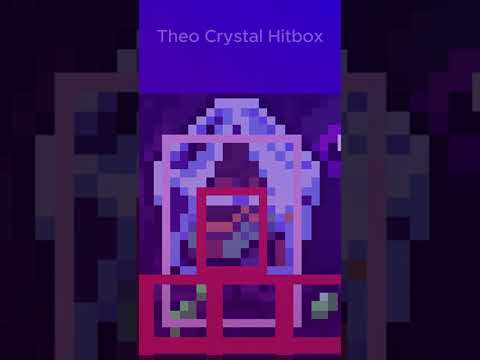
Want to see the invisible world of Celeste? You can easily view the hitboxes of tiles and entities by pressing the tilde key (“~”). This activates the in-game console and instantly displays the bounding boxes that govern interactions in this challenging platformer.
Understanding and Utilizing Hitboxes in Celeste
Hitboxes are the invisible boundaries around characters, objects, and tiles in a video game that determine when collisions occur. In a precision platformer like Celeste, understanding and visualizing hitboxes can drastically improve your gameplay. It allows you to see exactly where your character interacts with the environment, enabling you to execute pixel-perfect jumps and dashes with greater accuracy. Viewing hitboxes is a powerful tool for mastering Celeste’s demanding challenges, speedrunning, or simply gaining a deeper understanding of its intricate level design. It’s invaluable for learning advanced techniques and overcoming difficult sections.
The Power of the Tilde Key: Accessing the In-Game Console
The key to unlocking this visual aid is the tilde key (“~”), typically located to the left of the number “1” key on your keyboard. Pressing this key while in-game will bring up the in-game console. The moment you press it, you’ll see a plethora of rectangular outlines appear around everything on the screen, revealing the precise areas of interaction. Note that enabling the console, even without typing commands, also enables the hitbox view.
Frequently Asked Questions (FAQs) About Celeste and Hitboxes
Here are 15 frequently asked questions related to Celeste, hitboxes, and other gameplay aspects to further enhance your understanding of the game:
1. How do I turn off the Hitbox view?
Simply press the tilde key (“~”) again to close the in-game console. Closing the console automatically disables the hitbox view, returning the game to its normal visual presentation.
2. Does activating the console disable achievements?
No, activating the in-game console and viewing hitboxes does not disable achievements or affect your save file in any negative way. Feel free to use it to your advantage without fear of penalty.
3. What is Cheat Mode in Celeste, and how does it affect Hitboxes?
Cheat Mode is a special in-game mode that allows you to practice specific chapters or checkpoints on a separate save file. Activating Cheat Mode does not directly affect the hitbox view, which is controlled separately via the console. However, activating cheat mode will permanently mark that save file with a “Cheat Mode” banner.
4. Can I use the console to modify Hitbox sizes?
No, the in-game console primarily serves to display hitboxes. It does not provide commands to modify their size or shape. Modifications of that nature would require external tools, such as mods.
5. How do I open the map in Celeste?
Pressing the Tab key will open a map displaying all the rooms present in the current chapter. This can be helpful for planning your route, especially in longer or more complex levels.
6. What is Variant Mode, and how does it relate to Hitboxes?
Variant Mode allows you to customize the gameplay experience with options like infinite stamina, invincibility, or slower game speed. These options can significantly impact the game’s difficulty and are useful for practice or accessibility. However, like Cheat Mode, it does not directly affect the hitbox view. To unlock it, the player has to complete Chapter 8: Core C-Side or by activating cheat mode.
7. Can I use mods to enhance the Hitbox display?
Yes, various mods can enhance the hitbox display by adding features like custom colors or outlines for different types of hitboxes. GameBanana and Olympus are popular sources for Celeste mods.
8. How do I install mods for Celeste?
Typically, you’ll find a mod that you want to play with on platforms like GameBanana or in the “Download Mods” section of Olympus. Use the provided 1-click installation button. If that installer doesn’t work, put the mod .zip file into the Mods directory where Celeste is installed. You might need Everest, a mod loader for Celeste, to use mods.
9. What is Everest, and why is it important for modding Celeste?
Everest is a free software modding API and mod loader for Celeste. It’s essential for running most mods, enabling you to add custom content, change gameplay mechanics, and enhance the game in numerous ways.
10. How do I unlock the B-Sides and C-Sides in Celeste?
To unlock the B-Sides, you must have 15 Crystal Hearts. For the C-Sides, you’ll need all 23 Crystal Hearts. B-Sides are harder versions of each chapter, while C-Sides are even more challenging.
11. What is “Coyote Time” in Celeste, and how does it relate to Hitboxes?
“Coyote Time” is a mechanic that gives the player a brief window (5 frames) to jump after running off a platform. While not directly visible in the hitbox view, understanding hitboxes helps you better utilize coyote time for precise jumps.
12. Is Celeste a challenging game?
Yes, Celeste is known for its challenging but fair difficulty. The precise platforming and demanding level design require skill and patience, but the game provides ample opportunity to learn and improve.
13. What is Celeste about, thematically?
Celeste is about a woman named Madeline attempting to climb a mountain, hoping to conquer her depression and anxiety. The game explores themes of mental health, self-acceptance, and overcoming adversity.
14. Does Celeste have hidden secrets and collectibles?
Yes, Celeste is packed with hidden secrets, collectibles like strawberries, and challenging optional areas to discover. Exploring these areas can enhance your experience and provide additional challenges.
15. Where can I learn more about game development and design principles?
Organizations like the Games Learning Society are dedicated to advancing knowledge in games and learning. Check out their resources and research at GamesLearningSociety.org to delve deeper into the theories and practices behind game design. The Games Learning Society is dedicated to the advancement of the learning sciences through games and game-based methods.
Mastering Celeste with Hitboxes: A Path to Perfection
By understanding and utilizing hitboxes in Celeste, you can significantly improve your skills and appreciate the game’s intricate design on a deeper level. Experiment with the in-game console, explore mods, and embrace the challenge of mastering this exceptional platformer.