How to Hide Your Rank in Overwatch 2: A Comprehensive Guide
Fast answer first. Then use the tabs or video for more detail.
- Watch the video explanation below for a faster overview.
- Game mechanics may change with updates or patches.
- Use this block to get the short answer without scrolling the whole page.
- Read the FAQ section if the article has one.
- Use the table of contents to jump straight to the detailed section you need.
- Watch the video first, then skim the article for specifics.
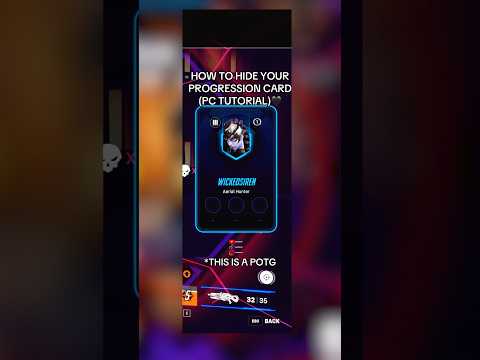
Want to keep your Overwatch 2 rank a secret? Maybe you’re tired of the pre-game judgments or just prefer to play without the pressure. Good news! Hiding your rank and career profile is a straightforward process. Within the game’s settings, you can easily adjust the visibility of your Career Profile, making it private, friends-only, or group-only. This simple change can significantly enhance your gameplay experience by removing unwanted scrutiny.
Steps to Make Your Overwatch 2 Career Profile Private
Here’s how to control who sees your Overwatch 2 stats:
- Launch Overwatch 2: Fire up the game via the Battle.net launcher.
- Access the Options Menu: Once you’re in the game, press the ESC key to bring up the main menu.
- Navigate to Options: Click on the “Options” button.
- Go to the Social Tab: In the Options menu, locate and click on the “Social” tab at the top.
- Find Identity Section: Scroll down until you see the “Identity” section. This section houses the settings for your Career Profile visibility.
- Set Career Profile Visibility: Change the “Career Profile Visibility” option to your desired setting. You can choose from:
- Public: Everyone can see your career profile.
- Private: No one can see your career profile except you.
- Friends Only: Only players on your friends list can view your career profile.
- Groups Only: Only players currently in your group can view your career profile.
- Confirm Changes: The changes are typically applied instantly. You don’t need to save or confirm anything. Just exit the Options menu.
By setting your Career Profile Visibility to Private, you prevent other players from seeing your rank, stats, and hero preferences. This can reduce pre-game toxicity and allow you to play without feeling pressured to perform in a specific way based on your perceived skill level.
Understanding the Implications of Privacy Settings
While hiding your rank offers benefits, it’s important to understand the implications. Some players use career profiles to assess team compositions and strategize. By making your profile private, you remove this information, potentially impacting team dynamics. However, many players value the freedom from judgment more.
FAQs: All About Hiding Your Rank and Other Privacy Options in Overwatch 2
Here are some frequently asked questions to further clarify how to manage your privacy in Overwatch 2:
How does Overwatch 2 determine my rank?
Your rank in Overwatch 2 is primarily determined by your Skill Rating (SR). The higher your SR, the better your rank. While other factors can play a role, SR is the main indicator of your competitive standing.
Is Silver 1 or Silver 5 a better rank in Overwatch 2?
In Overwatch 2’s ranking system, lower numbers within a tier indicate higher skill. Therefore, Silver 1 is a better rank than Silver 5. The progression within a tier goes from 5 to 1, with 1 being the closest to the next higher tier.
What are the different competitive ranks in Overwatch 2?
The competitive ranks in Overwatch 2 are:
- Bronze: 5 to 1
- Silver: 5 to 1
- Gold: 5 to 1
- Platinum: 5 to 1
- Diamond: 5 to 1
- Master: 5 to 1
- Grandmaster: 5 to 1
- Top 500
Can I hide my name in Overwatch 2?
Yes, starting in Season 3, Overwatch 2 introduced a feature to hide your BattleTag and the BattleTags of other players in your game. This is particularly useful for streamers who want to prevent viewers from identifying them.
Does Overwatch 2 show my real name to other players?
Your real name is only visible to players who are “Real ID Friends” on Battle.net. It is not shared with the general public or other players in the game.
How do I get titles under my name in Overwatch 2?
Player Titles are unlocked through Challenges and the Battle Pass, particularly through Prestige tiers. Players do not start with a Player Title by default and must earn them through gameplay and progression.
Why do some players choose to have private profiles in Overwatch 2?
Players choose private profiles for various reasons. Some want to avoid pre-game judgment based on their rank or hero choices, while others simply prefer to keep their stats private.
Can I create private custom matches in Overwatch 2?
Yes, you can create private custom matches in Overwatch 2. When setting up a custom game, you can choose the privacy setting:
- Everyone: Anyone can join.
- Friends Only: Only your friends can join.
- Invite Only: Only players you invite can join.
How do I lose rank in Overwatch 2?
Your competitive rank is adjusted every 5 wins or 15 losses. If your performance indicates a need for adjustment, your rank will be updated at that time.
What is Streamer Mode in Overwatch 2?
Streamer Mode censors your BattleTag to protect your privacy while streaming. This prevents viewers from seeing your tag and potentially targeting or identifying you in-game.
Can I change my display name in Overwatch 2?
Yes, you can change your BattleTag on Battle.net, which will update your display name in Overwatch 2. You may need to restart the game for the change to take effect.
What Skill Rating (SR) corresponds to Masters rank in Overwatch 2?
A Skill Rating (SR) of 3500 to 3999 places you in the Masters rank in Overwatch 2.
Is reaching Diamond rank in Overwatch 2 considered good?
Yes, reaching Diamond rank in Overwatch 2 is considered a significant achievement, indicating that you have a strong understanding of the game and have dedicated time and effort to improving your skills.
Do abandoned games count as a loss in Overwatch 2?
If a teammate leaves a competitive match, the game may allow you to leave without penalty. However, you will still receive a loss.
Where can I learn more about the educational applications of gaming?
For more information about how games are used in learning and education, visit the Games Learning Society at https://www.gameslearningsociety.org/ or GamesLearningSociety.org.
Conclusion
Mastering your privacy settings in Overwatch 2 allows you to tailor your experience to your preferences. Whether you want to keep your rank under wraps or control who sees your stats, the game offers the flexibility you need to enjoy a more personalized and less stressful gaming environment. Playing the game should always remain fun and enjoyable for everyone!