How Do I Make My Controller Ungreasy?
Fast answer first. Then use the tabs or video for more detail.
- Watch the video explanation below for a faster overview.
- Game mechanics may change with updates or patches.
- Use this block to get the short answer without scrolling the whole page.
- Read the FAQ section if the article has one.
- Use the table of contents to jump straight to the detailed section you need.
- Watch the video first, then skim the article for specifics.
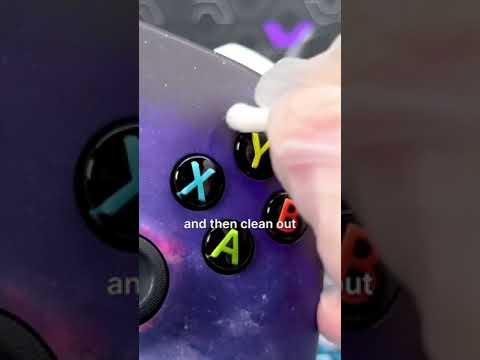
So, your controller’s looking a little…slick? We’ve all been there. That greasy sheen isn’t just unpleasant to touch; it can actually impact your grip and performance. The good news is, getting your controller back to its pristine, matte finish is totally achievable. The key is consistent cleaning and preventative measures. Here’s the deal:
- Regular Cleaning is Crucial: After each gaming session, take a moment to wipe down your controller with a slightly damp microfiber cloth. This will prevent the build-up of oils and grime.
- Alcohol is Your Friend: For more stubborn grease, isopropyl alcohol (70% is ideal) is your go-to. Use alcohol wipes or dampen a cotton ball/microfiber cloth with alcohol and gently wipe the controller. Avoid saturating the controller.
- Deep Clean When Necessary: Every few weeks (or more frequently depending on use), give your controller a more thorough cleaning, focusing on areas that accumulate the most grease, such as around the buttons and thumbsticks.
- Hand Hygiene Matters: While contrary to some popular myths, washing your hands before you play does help prevent grease build-up. Clean hands deposit less oil onto the controller.
- Consider Controller Grips: For chronic grease issues, invest in rubber or textured controller grips. These provide a barrier between your hands and the controller surface, reducing grease transfer.
- Ventilation: Make sure the controller has proper ventilation and avoid putting it away while it’s still hot or moist.
- Avoid Eating While Playing: Eating while playing can contribute to a greasy controller. Try to keep food and drinks away from your gaming area.
By following these simple steps, you can keep your controller feeling fresh and responsive, game after game.
Frequently Asked Questions (FAQs)
Here are the answers to some pressing questions about keeping that controller clean and your gaming experience enjoyable.
Why does my controller get greasy so easily?
The primary culprit is natural hand oils. Your skin produces oils that transfer to the controller during use. Additionally, sweat, dust, and general grime contribute to the build-up, creating that unpleasant greasy feeling. Also, some plastics can deteriorate over time, causing a sticky residue to form on the surface.
Is it safe to clean my controller with alcohol?
Yes, but with caveats. Isopropyl alcohol (70%) is generally safe for cleaning controllers. However, avoid getting alcohol inside the controller itself, especially the battery compartment of wireless controllers. Apply it sparingly to a cloth or wipe, and never spray it directly onto the controller.
Can I use rubbing alcohol to fix stick drift?
Unfortunately, no. Stick drift is typically caused by wear and tear on the potentiometers inside the analog sticks. Rubbing alcohol might temporarily alleviate the issue by cleaning out some debris, but it won’t fix the underlying hardware problem.
Can I use Windex or other household cleaners on my controller?
Avoid using harsh household cleaners like Windex, bleach, or ammonia-based products. These can damage the plastic and electronic components. Stick to isopropyl alcohol or mild soap and water.
How often should I clean my controller?
Ideally, wipe down your controller with a dry or slightly damp microfiber cloth after each use. A more thorough cleaning with alcohol should be done every few weeks, or more often if you use your controller frequently or notice significant grease build-up.
What is the best way to clean between buttons and around the thumbsticks?
Use cotton swabs dipped in isopropyl alcohol to carefully clean these hard-to-reach areas. Gently scrub away any grime or debris. Be careful not to apply too much pressure or force. You may also use a toothpick or other pointed object, but make sure to wrap it in a soft cloth to avoid scratching the controller.
Can I use baby wipes to clean my controller?
Baby wipes can be used, but make sure they are alcohol-free and fragrance-free. The main concern is excess moisture, so squeeze out any excess liquid before wiping the controller. If in doubt, stick to isopropyl alcohol.
What should I do if I spill soda or another sugary drink on my controller?
Immediately disconnect the controller (if wired) or remove the batteries (if wireless). Use a slightly damp cloth to wipe off as much of the spill as possible. If the spill got inside the controller, you’ll need to open it up and clean the internal components with isopropyl alcohol and cotton swabs. If you are not comfortable disassembling your controller, consider taking it to a professional repair service.
Is it okay to use hand sanitizer to clean my controller?
Hand sanitizer is generally not recommended for cleaning controllers. Many hand sanitizers contain additives that can damage plastic or leave a sticky residue. Stick to isopropyl alcohol for best results.
What kind of cloth should I use to clean my controller?
A microfiber cloth is ideal for cleaning controllers. It’s soft, lint-free, and effectively removes dirt and grease without scratching the surface. Avoid using paper towels, as they can leave behind small fibers.
Can I put my controller in the dishwasher?
Absolutely not! This is a sure-fire way to destroy your controller. Never submerge your controller in water or any other liquid.
Can I use compressed air to clean my controller?
Yes, compressed air can be useful for removing dust and debris from hard-to-reach areas. However, be careful not to hold the can too close to the controller, as the propellant can sometimes be cold enough to damage the plastic.
Can I use hydrogen peroxide to clean my controller?
No, you should avoid using hydrogen peroxide to clean your controller. Hydrogen peroxide can damage surfaces.
Can I disassemble my controller for cleaning?
Disassembling your controller for cleaning is possible, but it’s not recommended unless you are comfortable with electronics repair. If you do decide to disassemble it, be sure to take photos or videos of the process to help you reassemble it correctly.
How can I prevent my controller from getting greasy in the first place?
Besides regular cleaning and hand hygiene, consider these preventative measures:
- Use controller grips: These provide a barrier between your hands and the controller.
- Wash your hands before playing: Clean hands deposit less oil.
- Avoid eating greasy foods while playing: This one seems obvious, but it’s easy to forget!
- Keep your gaming area clean: A dust-free environment reduces grime build-up.
Gaming is about fun and skill, not battling a slimy controller! By following these tips, you can keep your gear in top shape and your focus where it belongs: on the game. If you’re interested in the intersection of gaming and learning, be sure to check out the Games Learning Society at GamesLearningSociety.org for resources and research.