Can You Play PS3 Games on Your PSP? The Truth About Compatibility
Fast answer first. Then use the tabs or video for more detail.
- Watch the video explanation below for a faster overview.
- Game mechanics may change with updates or patches.
- Use this block to get the short answer without scrolling the whole page.
- Read the FAQ section if the article has one.
- Use the table of contents to jump straight to the detailed section you need.
- Watch the video first, then skim the article for specifics.
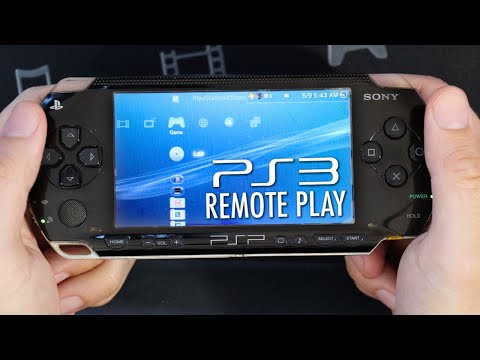
Let’s address the burning question directly: You cannot directly play PlayStation 3 (PS3) games on a PlayStation Portable (PSP) system. Despite their shared Sony lineage, the PSP and PS3 are fundamentally different consoles with incompatible architectures and game formats. While there are some limited ways to interact between the two, transferring and playing full PS3 game titles on a PSP is simply not possible. This article explores why and provides information about what you can do with your PSP and PS3, including some common misconceptions.
Understanding the Limitations
The core reason you can’t play PS3 games on a PSP boils down to technological differences. The PSP is a handheld gaming system with its own unique hardware, operating system, and game formats. PS3 games are developed for a much more powerful home console.
- Hardware Disparity: The PS3 boasts a powerful Cell processor and dedicated graphics hardware, far exceeding the capabilities of the PSP’s hardware. The PSP, with its smaller form factor and power constraints, simply cannot run the complex software and graphics required for PS3 games.
- Game Format Differences: PS3 games are distributed on Blu-ray discs, while PSP games are typically released on Universal Media Discs (UMDs) or digital downloads in the form of ISO files. The difference in storage medium and file format is also a crucial factor preventing compatibility.
- Operating System Incompatibilities: Both consoles run on different operating systems tailored to their specific hardware. The PSP’s OS is not designed to run PS3 game files.
Remote Play: A Limited Connection
The only official method of interaction between the PSP and PS3 is through a feature called Remote Play. This feature does not allow you to play the entirety of PS3 game titles on your PSP. Instead, Remote Play enables your PSP to wirelessly connect to your PS3 and stream specific functionalities.
- Limited Game Support: Only certain, specifically designated PS3 software titles support Remote Play. This means very few games are compatible and not all functions of a supported game are available on the PSP.
- Functionality Limitations: Remote Play typically provides basic control over a game or access to content, but not the full gaming experience as if you were directly playing it on the PS3. You can often view media files or use specific apps or features remotely.
- Streaming Dependency: The gameplay is streamed from your PS3 to your PSP, meaning performance is dependent on network connectivity, making it less smooth than playing a native game. The PSP is essentially acting as a remote display.
File Transfers & Memory Stick Media
While direct PS3 game transfers are impossible, you can transfer files between the PSP and your computer, and between your PSP and PS3.
- PSP to Computer: Using a USB cable, connect your PSP to your computer to manage files on its Memory Stick Duo media. You can create folders, and copy files to the PSP. You can also use a Memory Stick reader to access the card without the PSP.
- PSP to PS3: Connecting the PSP to the PS3 using a USB cable allows you to access the Memory Stick data on the PS3.
- Game Transfers (PSP Specific): To play PSP games on your PSP, you typically create a folder called “ISO” on your Memory Stick and copy the game files (usually in ISO format) into this folder.
Important Note: Downloading game ROMs from unofficial sources can be illegal and may expose your device to malware and viruses.
PlayStation Store and Game Purchases
- PSP Store Closure: While the PSP store was closed down in 2021, any PSP games you have previously purchased can still be redownloaded via the PlayStation Store on your PS3, then transferred to your PSP via a USB connection.
- PS3 Store Still Online: The PlayStation Store remains functional on the PS3 itself, allowing you to download and purchase PS3 games directly on your console.
- Cross-Buy Titles: Some games are available with cross-buy, meaning a single purchase grants you access to the same title on both the PS3 and PS Vita but not the PSP.
Frequently Asked Questions
Here are some frequently asked questions to help further clarify the relationship between the PSP and PS3, particularly with regard to game compatibility:
1. Can I connect a PS3 controller to my PSP?
The original PSP models (1000, 2000 and 3000) do not have Bluetooth capabilities and therefore cannot connect to a PS3 DualShock 3 controller. The PSP Go, however, does have Bluetooth and can pair with a DualShock 3.
2. Is it possible to use a USB controller on my PS3 to play games?
Yes, you can connect a USB controller to your PS3 through any USB port on the console. The controller may require additional setup, but you can use a variety of USB controllers for gameplay.
3. Can I transfer PS3 games to my PS Vita?
While some PS3 games are available as cross-buy titles, allowing you to have both a PS3 and Vita copy, you cannot transfer existing PS3 games to a PS Vita directly. The transfer function from PS3 to PS Vita was removed in 2022. Even with hacking, the Vita cannot directly play PS3 games.
4. How can I play PS3 games?
You can play PS3 games on your PS3 console, via digital purchases through the PlayStation Store on the PS3 or via physical games. For streaming PS3 games, options such as cloud gaming on Android devices are also available through applications such as Vortex, but the console itself is required to play the games directly.
5. Can I download PS3 games to a USB drive?
You cannot directly download PS3 games to a USB drive from the PlayStation Store. You need to download them to your PS3 hard drive, but you can move game data to an external drive.
6. Do all PS3 games need to be installed?
Not all PS3 games require a full installation. Some games will run directly from the Blu-ray disc, while others may install a portion of their data on the hard drive. You can manage this game data through the Game Data Utility on your PS3.
7. Can the PSP play PS2 games?
No, the PSP cannot play PS2 games. The hardware is not powerful enough to emulate the PS2 and it does not have any PS2 hardware to run them natively.
8. Can the PSP play PS1 games?
You cannot play PS1 games directly on the PSP. While it is not possible to play them natively on the PSP, you can use the Remote Play feature on the PS3 to play them through streaming, if the PS1 game is in the console.
9. Can I still download PSP games?
The official PSP store is closed but, If you previously purchased PSP games, you can still redownload them from the PlayStation Store via your PS3 console and then transfer them to your PSP.
10. Can I update my PSP’s firmware?
Yes, you can update your PSP’s firmware by navigating to System Update in the Settings menu and choosing “Update via Internet.” Ensure your PSP is charged and has sufficient storage space on the memory stick.
11. Can I use a USB 3.0 drive with my PS3?
Yes, you can use a USB 3.0 drive with your PS3, however, it will operate at USB 2.0 speeds since the console itself uses the 2.0 standard.
12. Can I connect my PS3 to my laptop?
You can connect your PS3 to your laptop using a capture card via HDMI to view the display and record gameplay.
13. Is the PS Vita more powerful than the PS3?
No, the PS3 is significantly more powerful than the PS Vita. Despite being a portable console, the Vita has lesser processing power and hardware compared to its home console counterpart.
14. Can I play PS3 games on an Android device?
While you cannot play native PS3 games on an Android device directly, you can stream PS3 games using cloud gaming services such as Vortex.
15. Is the PS3 PlayStation Store still active?
Yes, the PlayStation Store on the PS3 is still active, allowing you to purchase and download games directly on the console, although PS3 games were removed from the web version of the PlayStation Store.
Conclusion
While the dream of playing PS3 games on a PSP is understandable, the reality is that direct compatibility is impossible due to technological limitations. The consoles have different hardware, operating systems, and game formats. While you cannot play PS3 games on a PSP, you can make use of Remote Play for limited functions with supported titles and utilize your PSP for accessing media and playing PSP games. The understanding of their differences and their unique features will help you maximize your experience with both devices.