Reformatting Your Nintendo 3DS: A Comprehensive Guide
Fast answer first. Then use the tabs or video for more detail.
- Watch the video explanation below for a faster overview.
- Game mechanics may change with updates or patches.
- Use this block to get the short answer without scrolling the whole page.
- Read the FAQ section if the article has one.
- Use the table of contents to jump straight to the detailed section you need.
- Watch the video first, then skim the article for specifics.
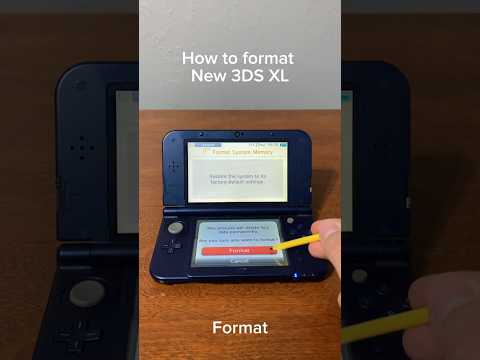
So, you’re looking to reformat your Nintendo 3DS. Whether you’re selling your beloved handheld, troubleshooting some pesky issues, or simply starting fresh, reformatting is a common and sometimes necessary procedure. It’s a digital decluttering, a reset button for your gaming life. Here’s a direct and thorough guide to help you through the process:
The primary method for reformatting a Nintendo 3DS involves using the console’s built-in settings menu. Here’s a step-by-step guide:
- Power on your 3DS. Make sure it has sufficient battery life or is connected to a power source to avoid interruptions during the formatting process.
- Go to System Settings: From the HOME Menu, tap the System Settings icon. It resembles a wrench.
- Navigate to Other Settings: Tap Open to access the settings menu, then tap Other Settings.
- Find Format System Memory: Depending on your 3DS model (3DS, 3DS XL, or 2DS), you may need to scroll through the pages of settings. For these models, tap the right arrow repeatedly until you reach page four. There, you will find Format System Memory.
- Initiate the Formatting Process: Tap Format System Memory.
- Confirmation: The system will warn you about the consequences of formatting. Read the information carefully, and if you’re sure you want to proceed, tap Format.
- Final Confirmation: The system will ask for one final confirmation. Tap Format again to erase all data.
Once you tap the final Format button, the process will begin, and your 3DS will be restored to its factory settings. Be patient; the process can take a few minutes. Once completed, your 3DS will restart, prompting you to go through the initial setup process, just like when you first bought it.
Important Considerations Before Formatting
Before you dive in, it’s crucial to understand the ramifications of reformatting your 3DS. Here are some key points to keep in mind:
- Data Loss: Reformatting erases all data stored on the system memory, including downloaded games, save data, personal information, and your Nintendo Network ID.
- SD Card Impact: While the system format doesn’t directly erase the contents of your SD card, it invalidates most of the data stored there. This means downloaded software will need to be redownloaded. Photos and videos you’ve recorded are generally unaffected.
- Nintendo Network ID Removal: Formatting removes your Nintendo Network ID from the system. This is necessary if you want to link a different NNID or create a new one. Don’t worry; you can relink your old NNID to the same system in the future.
- Backups (If Possible): Before formatting, consider if you can back up any data you want to keep. Some games may have cloud saves. Otherwise, your game progress is wiped clean.
Formatting the SD Card Separately
The above process mainly addresses the 3DS system memory. If you also want to completely wipe your SD card, you can do so through the 3DS settings:
- Go to System Settings
- Select “System”
- Select “Formatting Options” (You may need to enter your PIN if parental controls are enabled)
- Select “Format microSD Card”
- Select “Continue”
Alternatively, you can remove the SD card and format it using a computer. Make sure to use the FAT32 file system for cards 32GB or smaller. For cards larger than 32GB, you might need to use a third-party tool to format to FAT32, as Windows may default to exFAT or NTFS.
Why Reformat Your 3DS?
There are several valid reasons to reformat your 3DS:
- Selling or Giving Away Your 3DS: This is perhaps the most common reason. You want to ensure your personal data is removed before transferring ownership.
- Troubleshooting Issues: If your 3DS is experiencing persistent problems, like crashing or freezing, a reformat can sometimes resolve underlying software conflicts.
- Starting Fresh: Sometimes you just want a clean slate. A reformat allows you to start over with a fresh system.
- Changing Nintendo Network IDs: As mentioned earlier, reformatting is required to link a different Nintendo Network ID.
FAQs: Reformatting Your Nintendo 3DS
Here are 15 frequently asked questions to further clarify the process and its implications:
1. Does formatting a 3DS delete everything?
Yes, formatting the system memory on a Nintendo 3DS deletes everything stored on the device’s internal storage. This includes downloaded games, save data, personal settings, and your Nintendo Network ID.
2. What is lost after formatting the System Memory on Nintendo 3DS Family?
You lose all downloaded software, save data, personal settings, and your Nintendo Network ID. Data on the SD Card, with the exception of photos and videos, becomes invalidated and requires re-downloading.
3. Does formatting 3DS remove Nintendo ID?
Yes, formatting the system will remove the Nintendo Network ID, allowing you to link a different one or create a new one. The old NNID can be relinked later if desired.
4. Should you factory reset a 3DS before selling it?
Absolutely! Formatting the system memory is essential before selling your 3DS to protect your personal information, accounts, and digital game licenses.
5. Does formatting a 3DS format the SD card?
No, formatting the 3DS system memory does not automatically format the SD card. You need to format the SD card separately if you want to erase its contents completely.
6. What format do I need to format my SD card for 3DS?
The Nintendo 3DS requires the FAT32 file system for SD cards 32GB or smaller. For larger SD cards (64GB or more), you need to format them to FAT32 using a third-party tool.
7. Does a factory reset on 3DS delete games?
Yes, a factory reset (formatting the system memory) will remove all downloaded games and save data from the 3DS’s internal storage.
8. What happens if I delete my Nintendo Network ID from my 3DS?
Deleting your Nintendo Network ID will remove access to the Nintendo eShop and associated purchases. The eShop officially shut down on March 27, 2023, so this is less of a concern now, but it still removes the ID.
9. Is a factory reset safe to sell a 3DS?
Yes, a factory reset (formatting the system memory) is a necessary step to prepare your 3DS for sale and protect your personal data.
10. Will my Nintendo Account get banned if I hack my 3DS?
Using a hacked 3DS to play illegally obtained games online can lead to a ban on your Nintendo Account.
11. What happens if I factory reset my 3DS?
A factory reset (formatting the system memory) restores your 3DS to its default settings, erasing all data, including game saves, photos, and personal settings.
12. Is the 3DS obsolete?
While Nintendo has officially discontinued the 3DS and the Nintendo eShop has shut down, many people still enjoy playing games on their 3DS.
13. What happens to the old 3DS after a system transfer?
After a system transfer, all data on the original 3DS is deleted. The data on the SD Card of the original system can only be used on the new system.
14. Can you unlink a Nintendo Account from a 3DS?
Yes, you can unlink a Nintendo Account from a 3DS. You may need to link another service or create a Nintendo Account password first.
15. Does formatting an SD card delete everything permanently?
Formatting an SD card makes the data practically unavailable for further use, but it doesn’t permanently erase it. With specialized software, data recovery might still be possible.
Conclusion
Reformatting your Nintendo 3DS is a straightforward process, but it’s essential to understand the implications before you proceed. By following these steps and considering the FAQs, you can safely and effectively reset your 3DS, whether you’re preparing to sell it, troubleshooting issues, or simply starting fresh. Remember to backup important data whenever possible, and always prioritize protecting your personal information. And, remember, that gaming can be a powerful tool for learning and development. Consider exploring resources like the Games Learning Society at GamesLearningSociety.org to learn more about the intersection of games and education.