Unlock the Fun: A Comprehensive Guide to Enabling Cross-Platform Play on Your Xbox
Fast answer first. Then use the tabs or video for more detail.
- Watch the video explanation below for a faster overview.
- Game mechanics may change with updates or patches.
- Use this block to get the short answer without scrolling the whole page.
- Read the FAQ section if the article has one.
- Use the table of contents to jump straight to the detailed section you need.
- Watch the video first, then skim the article for specifics.
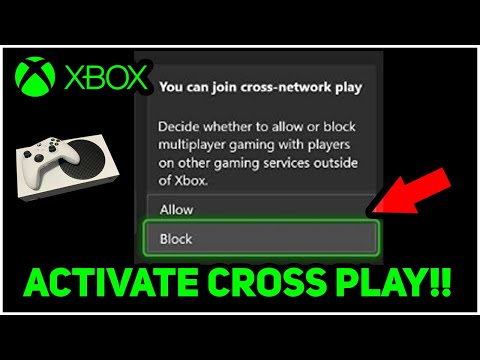
So, you want to game with friends, regardless of their console allegiance? Excellent! The good news is, enabling cross-platform play on your Xbox is usually a straightforward process. Here’s the direct answer: To enable cross-platform play on your Xbox, navigate to Settings > Account > Privacy & online safety > Xbox privacy > View details & customize > Communication & multiplayer. Then, change the setting that says “You can play with people outside of Xbox Live” to “Allow.” That’s the core setting. However, there are several factors and nuances that can affect your experience. Let’s dive deep into the details, troubleshoot common issues, and explore the exciting world of cross-platform gaming!
Understanding Cross-Platform Play: A Gamer’s Guide
Cross-platform play, often called crossplay, is a feature that allows gamers using different gaming platforms (like Xbox, PlayStation, PC, and Nintendo Switch) to play the same game together. It breaks down the walls between console ecosystems, letting you team up or compete with a wider pool of players. This is fantastic for building communities, finding matches quickly, and enjoying your favorite games with everyone, regardless of their hardware preference.
The Benefits of Crossplay
- Expanded Player Base: Crossplay significantly increases the number of potential players you can connect with. This is particularly helpful for niche games or those with smaller player bases on individual platforms.
- Faster Matchmaking: With a larger player pool, matchmaking times are often reduced. You’ll spend less time waiting and more time playing.
- Friendship Across Platforms: The most significant benefit is the ability to play with friends who own different consoles. No more feeling left out because your friends chose PlayStation while you opted for Xbox!
- Game Longevity: Crossplay can extend the lifespan of a game by keeping the community active and engaged long after its initial release.
Potential Challenges of Crossplay
- Input Method Disparity: Players using a mouse and keyboard (typically on PC) may have an advantage over controller users (on consoles) in certain games, especially first-person shooters.
- Technical Issues: Occasionally, crossplay functionality can be buggy or unstable, leading to connectivity problems or glitches. Game developers are constantly working to improve this.
- Communication Barriers: If a game doesn’t have built-in voice chat across platforms, it can be challenging to communicate effectively with teammates on other consoles.
Enabling Crossplay on Your Xbox: A Step-by-Step Guide
Here’s a detailed breakdown of enabling cross-platform play, covering different scenarios and age restrictions.
Standard Method: Adjusting Xbox Privacy Settings
This is the most common method for enabling crossplay on your Xbox:
- Press the Xbox button on your controller to open the guide.
- Go to Profile & system > Settings > Account > Privacy & online safety > Xbox privacy.
- Select View details & customize.
- Select Communication & multiplayer.
- Find the setting that reads “You can play with people outside of Xbox Live.”
- Change this setting to “Allow.”
Enabling Crossplay for Child Accounts
If you are a parent managing a child’s Xbox account, you’ll need to enable crossplay through the Xbox Family Settings app:
- Open the Xbox Family Settings app on your mobile device.
- Go to Settings.
- Select the Cross-network play tile.
- Select the toggle switch to allow cross-network play.
Game-Specific Crossplay Settings
Some games have their own in-game settings for enabling or disabling crossplay. Check the game’s options menu for a “Crossplay” or “Cross-Platform Play” setting. This setting may override your Xbox’s global privacy settings for that specific game.
Troubleshooting Crossplay Issues
Even after enabling the correct settings, you might still encounter problems with crossplay. Here are some common solutions:
- Check Xbox Live Status: Make sure that Xbox Live is up and running. You can check the Xbox status page on the Xbox website.
- Verify Your Friend’s Online Status: Ensure that your friends on other platforms are online and connected to their respective networks (PlayStation Network, Nintendo Online, etc.).
- Network Interference: Other devices on your network might be interfering with your game connection. Try closing bandwidth-intensive applications or restarting your router.
- Game Updates: Make sure both you and your friends have the latest version of the game installed.
- Game-Specific Bugs: Some games might have bugs that affect crossplay functionality. Check the game’s forums or social media channels for known issues and potential workarounds.
Frequently Asked Questions (FAQs) About Xbox Crossplay
Here are 15 frequently asked questions to help you understand and troubleshoot cross-platform play on your Xbox:
-
Why isn’t my crossplay working on Xbox?
- Ensure you’re signed in to the Xbox network, the Xbox status is up and running, and your friends are online. Also, check for network interference and game updates.
-
How do I enable cross platform play on Xbox for a child account?
- Use the Xbox Family Settings app to allow cross-network play for the child’s account.
-
Can you play cross platform with Xbox One?
- Yes, many games support crossplay between Xbox One and other platforms like PC, PlayStation, and Nintendo Switch.
-
Are Xbox purchases cross platform?
- Some games purchased through the Microsoft Store are Xbox Play Anywhere titles, meaning you own them on both Xbox and Windows 10/11. These games often support crossplay.
-
How do I change my Microsoft account settings to allow multiplayer?
- Log in to your Microsoft account, go to the child account’s profile, and in Xbox Series X|S, Xbox One, and Windows 10 devices Online Safety, select Allow for “You can create and join clubs” and “You can join multiplayer games.”
-
How do I change my Xbox restrictions?
- Press the Xbox button, go to Profile & system > Settings > Account > Family settings, select Manage family members, and then choose the member whose settings you want to update. Under Access to content, select the desired age-level.
-
Why isn’t everything crossplay?
- Technical limitations, game design choices, and business considerations can prevent crossplay.
-
How do I turn off platform restrictions on Xbox?
- Go to your Xbox account, click on ‘Security, family & forums’, click on ‘Privacy settings’ and select your protection level.
-
Why does my Xbox account have restrictions?
- Content restrictions are usually due to the account’s birthdate being set under the age of majority.
-
How do I get rid of “multiplayer is disabled by Xbox account privacy settings”?
- Press the Xbox button, go to Profile & system > Settings > Account > Privacy & online safety > Xbox Live privacy > View details and customize > Communication & multiplayer, and select enable.
-
Why is my Microsoft account not letting me play multiplayer?
- Check the parental control settings on your Microsoft account and ensure that online multiplayer is allowed for the game.
-
Does Xbox Game Pass on PC play with Xbox?
- Yes, Xbox Game Pass Ultimate works on console, mobile device, and PC, and includes multiplayer gaming.
-
Can Xbox crossplay Apex Legends?
- Yes, Apex Legends supports crossplay on Playstation, Xbox, Switch, and PC.
-
How does crossplay work?
- Cross-platform gaming allows players on different platforms to connect and play together.
-
I FINALLY GOT THE ALPHA CAP! (Rocket League)
- Congrats on finally getting the Alpha Cap in Rocket League.
The Future of Crossplay: A More Connected Gaming World
Crossplay is not just a trend; it’s a fundamental shift in the gaming landscape. As technology advances and developers become more adept at implementing cross-platform features, we can expect to see even more games embracing this functionality. This will lead to more vibrant communities, more diverse gameplay experiences, and a more inclusive gaming world for everyone.
Conclusion: Embrace the Crossplay Revolution
Enabling crossplay on your Xbox opens up a world of possibilities, allowing you to connect with friends and players across different platforms. By following the steps outlined in this guide and troubleshooting common issues, you can ensure a smooth and enjoyable cross-platform gaming experience. So, grab your controller, invite your friends, and get ready to game together, regardless of their console of choice! Learning to enable cross-platform play is an essential step in today’s gaming environment, fostering inclusivity and community. Find more learning resources and contribute to the growing understanding of games at the Games Learning Society website: https://www.gameslearningsociety.org/.