Wiping Your PS3 to Factory Settings: A Comprehensive Guide
Fast answer first. Then use the tabs or video for more detail.
- Watch the video explanation below for a faster overview.
- Game mechanics may change with updates or patches.
- Use this block to get the short answer without scrolling the whole page.
- Read the FAQ section if the article has one.
- Use the table of contents to jump straight to the detailed section you need.
- Watch the video first, then skim the article for specifics.
So, you’re looking to wipe your PlayStation 3 (PS3) back to its factory settings? Whether you’re selling it, giving it away, or troubleshooting persistent issues, a factory reset is often the best solution. Here’s exactly how to do it, broken down into easy-to-follow steps:
-
Backup Your Data: This is crucial. A factory reset erases everything. Back up your saved games, profiles, photos, videos, and any other data you want to keep to an external hard drive or USB storage device. You can do this via the PS3’s built-in backup utility under Settings > System Settings > Backup Utility.
-
Deactivate Your PSN Account: To prevent anyone else from accessing your account or purchases, you need to deactivate your PSN account on the PS3. Go to PlayStation Network > Account Management > Activate System. Select PS3 and then choose Deactivate System.
-
Restore the PS3 System: There are two ways to do this: through the XMB menu or through Safe Mode.
-
Via the XMB Menu (If your PS3 is functioning normally):
- Navigate to Settings on the XMB (XrossMediaBar).
- Scroll down and select System Settings.
- Scroll down again and select Restore PS3 System.
- You’ll be presented with a warning message. Select Yes to confirm.
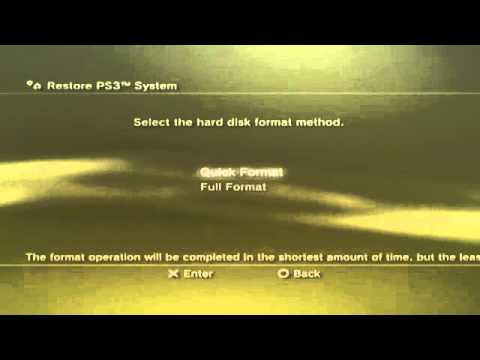
- You’ll then be asked to choose between Quick Format and Full Format. A Quick Format is faster but less secure. A Full Format takes much longer but securely overwrites all data, making it harder to recover. For selling or giving away the console, Full Format is highly recommended.
- Select your desired format option and choose Yes on the final confirmation screen.
-
Via Safe Mode (If your PS3 is experiencing issues):
- Power off your PS3 completely. Make sure the power indicator light is red.
- Press and hold the power button until you hear a beep. Keep holding it.
- You’ll hear a second beep after about 5 seconds. Continue holding the button.
- After about 7 seconds, you’ll hear two quick beeps. Release the power button immediately.
- Connect your controller to the PS3 with a USB cable.
- Press the PS button on your controller.
- You’ll now be in the Safe Mode menu.
- Select Restore PS3 System (option 5 or 6, depending on your system software version).
- Follow the on-screen instructions to complete the restore process, choosing between Quick and Full Format as described above.
-
-
Wait for the Process to Complete: Depending on the format option you chose, the process could take anywhere from a few minutes (Quick Format) to several hours (Full Format). Be patient and do not interrupt the process!
-
Initial Setup: Once the reset is complete, your PS3 will restart and you’ll be guided through the initial setup process, just like when you first bought the console.
That’s it! Your PS3 is now effectively back to its factory settings.
Frequently Asked Questions (FAQs) about PS3 Factory Reset
Here are some common questions and answers to provide further clarity:
What exactly does a factory reset do to my PS3?
A factory reset, also known as initialization, erases all data stored on the PS3’s hard drive. This includes:
- Saved game data
- User profiles
- Downloaded games and applications
- System settings
- Personal information
- PlayStation Network account information
It essentially restores the system to the state it was in when it left the factory.
How long does a full format factory reset take on a PS3?
The time varies depending on the size of your hard drive and the amount of data stored on it. Generally, a full format can take anywhere from 1 to 5 hours, or even longer for larger hard drives. A quick format usually takes only a few minutes.
Is there a way to speed up the factory reset process?
Unfortunately, there’s no magic trick to speed up the full format process. It takes the time it takes to securely overwrite the data on the hard drive. Ensure the console is well-ventilated to prevent overheating, which could prolong the process. Using a Quick Format will decrease the time significantly, but is not recommended if the PS3 is being given away or sold.
Can I stop a factory reset once it has started?
Do NOT interrupt the factory reset process! Powering off the PS3 during a reset can corrupt the system software and potentially brick the console, rendering it unusable.
What’s the difference between “Quick Format” and “Full Format” during a factory reset?
Quick Format simply deletes the file allocation table, making the data inaccessible but not truly erasing it. It’s faster but less secure. Full Format, on the other hand, overwrites every sector of the hard drive with zeros (or other data), making it much more difficult to recover the original data. It’s slower but much more secure, especially if you’re concerned about privacy.
Will a factory reset fix my PS3’s performance issues?
A factory reset can often resolve software-related performance issues, such as slowdowns, freezes, and glitches. However, it won’t fix hardware problems. If your PS3 has a faulty hard drive, processor, or other hardware component, a factory reset won’t solve the underlying problem. Regular cleaning of dust from the PS3 is important to keep the system from overheating.
I forgot my PSN password. Can I still factory reset my PS3?
Yes, you can still factory reset your PS3 even if you’ve forgotten your PSN password. The reset process will erase your account information from the console. However, you may want to attempt to recover your password first if you have any digital purchases tied to that account. You will need your email address associated with the PSN account.
Does factory resetting my PS3 remove the latest system software update?
No, a factory reset restores the system to its default settings but doesn’t downgrade the system software. It will remain on the last installed firmware version.
Can I recover my data after a factory reset?
Recovering data after a factory reset, especially after a full format, is extremely difficult and often impossible without specialized data recovery tools and expertise. This is why backing up your data beforehand is so important.
I’m selling my PS3. What else should I do besides a factory reset?
In addition to a full format factory reset, you should also physically clean the console and its accessories. Remove any discs from the drive, wipe down the exterior with a soft cloth, and clean the controllers.
What is PS3 Safe Mode and when should I use it?
Safe Mode is a special startup mode that allows you to perform various system maintenance tasks, including restoring the system, rebuilding the database, and updating the firmware. You should use Safe Mode if your PS3 is experiencing issues that prevent it from booting normally or if you need to perform a factory reset when the system is unstable.
Is restoring file system the same as factory reset?
No, restoring the file system and a factory reset are different. Restoring the file system is done through the recovery menu or safe mode menu. It is used to scan the system for corrupt files and restore the files to the original version. A factory reset will delete all the data on your PS3 and restore to default settings.
Can I revert to a previous version of Android on my phone if I don’t like the current one?
Reverting to a previous version of Android, often called “downgrading,” is generally not recommended and can be quite complex. It often involves unlocking the bootloader, flashing custom ROMs, and potentially voiding your warranty. It also carries risks of bricking your device if not done correctly. Most phones do not allow this due to security reasons.
Where can I learn more about gaming and education?
To learn more about the intersection of games and education, consider visiting the Games Learning Society website at https://www.gameslearningsociety.org/ or GamesLearningSociety.org. This is a valuable resource for understanding how games can be used to enhance learning and development.
Why is my PS3 running so slowly?
Your PS3 may be running slowly due to several factors, including:
- A full or fragmented hard drive
- Dust buildup inside the console
- Outdated system software
- Too many background processes running
- Failing hardware
Performing regular maintenance, such as deleting unnecessary files, defragging the hard drive (if possible), cleaning the console, and updating the system software, can help improve performance.
Wiping your PS3 back to factory settings can give you a fresh start. Remember to backup your data before starting the process!