How Do PS4 Discs Work? Unraveling the Secrets of PlayStation Gaming
Fast answer first. Then use the tabs or video for more detail.
- Watch the video explanation below for a faster overview.
- Game mechanics may change with updates or patches.
- Use this block to get the short answer without scrolling the whole page.
- Read the FAQ section if the article has one.
- Use the table of contents to jump straight to the detailed section you need.
- Watch the video first, then skim the article for specifics.
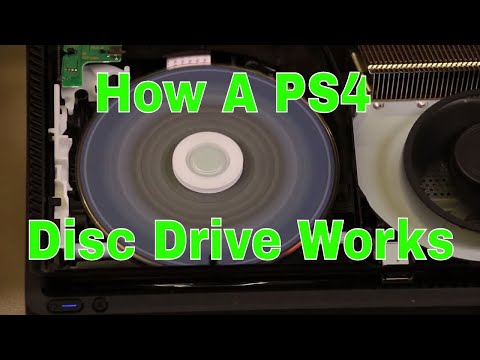
PS4 discs work by using a combination of optical technology, data storage, and software installation. The PS4 console features a Blu-ray disc drive that uses a laser to read data encoded on the disc’s surface. This data includes the game’s code, assets (like textures, models, and audio), and installation instructions. When you insert a PS4 game disc, the console reads the disc and installs a significant portion of the game onto the PS4’s internal hard drive. The disc then acts as a key for validating that you own the game, and the console accesses game files from the hard drive during gameplay, supplemented by data streamed from the disc in real-time. This combination of installation and disc-based verification provides the optimal gaming experience.
Understanding the Technology Behind PS4 Discs
The PS4 utilizes Blu-ray technology, a step up from DVDs, offering significantly higher storage capacity. Here’s a more in-depth look at how this works:
The Blu-ray Disc
A Blu-ray disc consists of several layers. The most crucial layer is the one containing the data. This data is stored in the form of microscopic pits and lands on the disc’s surface.
Laser Reading
The PS4’s Blu-ray drive uses a blue laser (hence the name Blu-ray) to read the data. The laser shines onto the disc, and the way the light reflects back from the pits and lands is interpreted as binary data (0s and 1s).
Error Correction
Blu-ray discs incorporate sophisticated error correction codes to ensure data integrity. This is essential because even small scratches or dust particles can interfere with the laser’s ability to read the disc accurately.
Data Installation
One of the biggest myths about console gaming is that games are played directly off the disc. With modern consoles, including the PS4, a significant portion of the game is installed onto the console’s hard drive. This is because optical disc drives are simply not fast enough to stream the massive amounts of data required by today’s games in real-time.
Disc as a Verification Key
Even though the game is installed on the hard drive, the PS4 still requires the disc to be inserted in order to play the game. The disc acts as a digital key, verifying that you own the game. Without the disc, the console will not allow you to launch the game.
Why Installation is Necessary
Speed and Performance
Modern games are huge, often exceeding 50GB or even 100GB in size. Optical disc drives simply can’t read data fast enough to keep up with the demands of these games. Installing the game onto the hard drive allows the console to access data much faster, resulting in smoother gameplay, faster loading times, and reduced stuttering.
Protecting the Disc Drive
Constantly spinning the disc at high speeds can put a strain on the disc drive, potentially leading to wear and tear. By installing the game onto the hard drive, the console reduces the amount of time the disc drive needs to be active, extending its lifespan. The GamesLearningSociety.org explores innovative educational methods through games, but optimizing your console’s performance ensures maximum enjoyment.
Less Noise
A spinning disc drive can be noisy, especially during intense gaming sessions. Installing the game onto the hard drive reduces the need for constant disc spinning, resulting in a quieter gaming experience.
PS4 Disc FAQs: Your Burning Questions Answered
Here are 15 frequently asked questions to clarify common misconceptions and provide additional information about PS4 discs:
-
Can you play PS4 games straight from disc? No, you can’t. A portion of the game needs to be installed to the hard drive, and the disc is required to verify the license to play.
-
Do PS4 discs need to download anything? Most games require an initial installation from the disc to the PS4’s internal hard drive. Furthermore, game updates and patches are downloaded from the internet and installed to ensure the best experience.
-
Why can’t I play disc games on my PS4? There are several reasons. First, ensure the disc is clean and free of scratches. Try another disc to rule out a faulty disc reader. The database may also need to be rebuilt in Safe Mode.
-
Can you play any disc on PS4? PS4 can play Blu-ray, DVD, and PS4 game discs. However, it can’t play burned discs or audio CDs.
-
Are PS4 games cheaper on disc? Usually, physical copies of games are cheaper than digital downloads within a few months of release.
-
Why do I have to install a game if I have the disc? Optical disc drives are too slow to deliver the necessary data in real time. Installing the game on the hard drive ensures a smoother gaming experience.
-
Why aren’t games stored entirely on discs anymore? Modern games are far too large for single-layer Blu-ray discs, and even dual-layer discs are becoming insufficient. Installing to the hard drive is more efficient for the console.
-
Do used PS4 discs work? Yes, used PS4 discs work just like new ones, provided they are not damaged.
-
What is the difference between data disc and play disc PS4? Certain large games might come with a data disc for initial installation and then a separate play disc for verifying the license to play.
-
Is it okay to install games on hard drive? It is not only okay but necessary! The game requires to be installed to run properly.
-
How do I install games on a disc? Insert the disc into the PS4. The installation process will usually begin automatically.
-
Why do PS4 games need to copy? Games need to copy when applying updates and patches. This process ensures all game data is correctly updated.
-
Is PlayStation disc version worth it? The disc version allows you to buy used games. The price difference can be substantial.
-
Is it better to buy digital or disc PS4? The better option depends on preference. Disc versions are often cheaper in the long run and can be traded or sold. Digital versions offer convenience.
-
Can I use my friend’s PS4 disc? Yes, you can use it to install and play the game on your console. The disc must remain inserted to play the game.
Troubleshooting Common Disc Issues
Even with proper care, you may encounter issues with your PS4 reading discs. Here are some troubleshooting steps to try:
Cleaning the Disc
A dirty or smudged disc is a common culprit. Use a soft, lint-free cloth to gently wipe the disc from the center outwards.
Rebuilding the Database
The PS4’s database can become corrupted over time. Rebuilding the database can resolve a variety of issues, including disc reading problems. To rebuild the database:
- Turn off your PS4 completely.
- Press and hold the power button until you hear two beeps.
- Connect your DualShock 4 controller via USB.
- Select “Rebuild Database” from the Safe Mode menu.
Checking the Disc Drive
If your PS4 is consistently having trouble reading discs, there may be an issue with the disc drive itself. In this case, you may need to contact Sony support for repair or replacement.
The Future of Physical Media
While digital downloads are becoming increasingly popular, physical game discs still offer several advantages, including the ability to buy used games, lend games to friends, and collect physical copies of your favorite titles. The PS4, with its Blu-ray disc drive, strikes a balance between the convenience of digital and the tangibility of physical media, offering gamers the best of both worlds. As technology evolves, it’s important to understand the mechanics behind the games we play, whether they’re delivered via disc or download.