How to Clean Greasy Joy-Cons: A Comprehensive Guide
Fast answer first. Then use the tabs or video for more detail.
- Watch the video explanation below for a faster overview.
- Game mechanics may change with updates or patches.
- Use this block to get the short answer without scrolling the whole page.
- Read the FAQ section if the article has one.
- Use the table of contents to jump straight to the detailed section you need.
- Watch the video first, then skim the article for specifics.
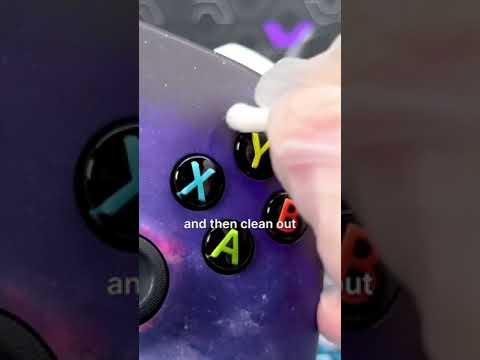
Greasy Joy-Cons are a common frustration for Nintendo Switch owners. No matter how careful you are, the oils from your hands can easily transfer, leaving those controllers looking and feeling less than ideal. Thankfully, cleaning them effectively isn’t complicated. The primary method for cleaning greasy Joy-Cons involves using a slightly dampened soft cloth with water. You should never spray or apply liquid directly to your controllers. Instead, dampen your cleaning cloth, wring out any excess water to ensure it’s just slightly moist, and then gently wipe the surfaces of your Joy-Cons. This is often enough to remove the surface grease effectively. For more stubborn grease, you can use a small amount of rubbing alcohol on your cloth to help break down the oils. Always apply the alcohol to the cloth and never directly on the Joy-Con. This process helps protect your controller’s delicate internals.
Understanding the Problem: Why Do Joy-Cons Get Greasy?
Before we dive further into cleaning, it’s important to understand why your Joy-Cons get greasy in the first place. The most common cause is natural skin oils that are transferred when you’re gripping the controllers. These oils combine with dust and dirt present in the air, creating a sticky residue. This build-up is especially noticeable along the lines where you grip the controller, as well as on the buttons and around the control sticks. Other culprits include food residue from snacking during gameplay.
Detailed Cleaning Steps for Greasy Joy-Cons
- Gather Your Supplies: You’ll need a soft, clean, lint-free cloth (microfiber cloths are ideal), distilled water, and isopropyl alcohol (70% or higher). You may also want to have cotton swabs or toothpicks available for cleaning more intricate areas.
- Prepare Your Cloth: Lightly dampen the cloth with distilled water. Wring out the excess water to ensure the cloth is damp, not wet.
- Initial Wipe Down: Gently wipe down the entire surface of your Joy-Cons, paying special attention to the areas where grease and grime tend to accumulate. Be thorough, and don’t apply excessive pressure.
- Tackling Stubborn Grease: If water alone isn’t doing the trick, apply a small amount of isopropyl alcohol to a fresh section of your cloth. Avoid over-saturating the cloth; it should be damp, not soaked. Gently wipe down the greasy areas using the alcohol-dampened part of the cloth.
- Detail Cleaning: For the edges, buttons, and around the control sticks, you can use a cotton swab dipped very lightly in either water or alcohol. This allows you to get into the smaller crevices. A clean toothbrush can also be helpful for brushing away dirt around the control sticks.
- Final Drying: Once you’ve cleaned all the surfaces, use a dry section of your cloth to gently wipe away any remaining moisture. Let the Joy-Cons air dry completely before reattaching them to your Nintendo Switch or using them.
- Prevention: To help prevent future build-up of grease, wash your hands thoroughly before using the console, and avoid eating greasy foods while gaming. A quick wipe-down after each use can also significantly prolong the cleanliness of your Joy-Cons.
Cautionary Notes
- Never spray liquid directly onto the Joy-Cons. This can lead to liquid seeping into the controllers, causing internal damage.
- Avoid using abrasive cleaners or materials like paper towels, which can scratch the surface of the Joy-Cons.
- Do not use bleach or harsh chemicals.
- Be careful not to get moisture inside the battery compartment, especially for wireless controllers.
- When cleaning around the stick, keep a light touch to avoid pushing debris or dirt further in.
Frequently Asked Questions (FAQs)
1. Can I use alcohol wipes to clean my Joy-Cons?
Yes, alcohol wipes are safe to use on Joy-Cons. However, ensure that you use them sparingly and that the wipe is not overly saturated. Also, avoid getting moisture into the seams of the controller.
2. What is the best type of cloth to use for cleaning Joy-Cons?
A soft, lint-free microfiber cloth is the best option. It’s gentle enough to avoid scratches, and its texture makes it effective for lifting dirt and grease.
3. How do I clean the sticky gunk that builds up on my controllers?
The sticky gunk is typically a mixture of skin oils, sweat, and dust. Using a cloth dampened with isopropyl alcohol is usually effective at removing it. For more difficult patches, you can also use a cotton swab with alcohol to get into the smaller areas. You might need to repeat cleaning several times to fully remove sticky residue.
4. Can I use vinegar to clean my Joy-Cons?
Yes, distilled white vinegar can be used as a natural alternative to alcohol. However, exercise the same caution as with alcohol, ensuring you don’t oversaturate the cloth and avoid getting liquid into the device. For general cleaning, alcohol might be more effective due to its stronger degreasing properties.
5. How do I clean sticky buttons on my Joy-Cons?
Use a soft cloth or cotton swab slightly dampened with distilled water to gently wipe around and in between the buttons. Avoid using excessive moisture. If needed, a small amount of isopropyl alcohol applied to a cloth may help dissolve sticky residue. Repeat cleaning as necessary.
6. How often should I clean my Joy-Cons?
There isn’t a set frequency, but a deep clean every few months is a good practice. You should also wipe them down after heavy use or if you notice them becoming particularly greasy.
7. What is the best way to prevent my Joy-Cons from getting greasy in the first place?
Wash your hands thoroughly before each gaming session. Avoid eating greasy or sticky snacks while using your Switch, and consider wiping down your controllers briefly after playing to remove excess oil.
8. How do I clean the oily residue from the thumbsticks?
Use alcohol wipes or a cloth dampened with isopropyl alcohol to wipe down the thumbsticks thoroughly. This will remove any accumulated grease or dirt. Be gentle and allow it to fully dry before playing.
9. Can I use a paper towel to clean my Joy-Cons?
It’s best to avoid using paper towels as they can be abrasive and may leave behind lint. A soft, lint-free microfiber cloth is a better alternative.
10. What can I do if my Joy-Con control sticks are stuck or difficult to move?
Power off your Nintendo Switch system and gently brush the area around the control sticks with a clean, dry toothbrush. Then, use a soft, dry cloth to wipe away any debris. If the problem persists, you might consider professional cleaning or repair.
11. Why are my controller buttons sticking?
The most common reasons for sticky controller buttons are dirt, dust, oil, and sweat. Food residue can also contribute. Thorough cleaning, as described above, should help resolve this.
12. Is it safe to use hot soapy water to clean Joy-Cons?
It’s not recommended to use hot soapy water directly on your Joy-Cons. While hot water can help remove sticky residue, the soapy water can easily seep into the controllers, potentially causing internal damage. A damp cloth with just water or with a tiny amount of isopropyl alcohol is safer.
13. Can I take apart my Joy-Cons to clean them more thoroughly?
Unless you’re comfortable with electronics repair, it’s generally not advisable to take apart your Joy-Cons for cleaning. There are many small parts that can easily be damaged or lost. If they are extremely dirty on the inside, it would be best to consider professional cleaning services.
14. What if cleaning doesn’t fix my sticky Joy-Cons?
If cleaning doesn’t alleviate the problem, there may be a deeper issue with the controllers, such as internal mechanical problems or degradation. In this case, you may need to seek professional repair or replacement.
15. How do I clean the greasy touchscreen of my Nintendo Switch?
Clean your Nintendo Switch touch screen with a soft cloth, dampened (not wet) with water or a gentle cleaner. Squeeze out any excess moisture to prevent it from running into the device. Use a clean, dry part of the cloth to dry the screen. Avoid using abrasive cloths like paper towels.
By following these guidelines, you can effectively clean your greasy Joy-Cons and keep them in great condition for a better gaming experience. Remember that consistent, gentle maintenance is key to prolonging the life of your equipment.