How to Clean Xbox Controller Gunk: A Comprehensive Guide
Fast answer first. Then use the tabs or video for more detail.
- Watch the video explanation below for a faster overview.
- Game mechanics may change with updates or patches.
- Use this block to get the short answer without scrolling the whole page.
- Read the FAQ section if the article has one.
- Use the table of contents to jump straight to the detailed section you need.
- Watch the video first, then skim the article for specifics.
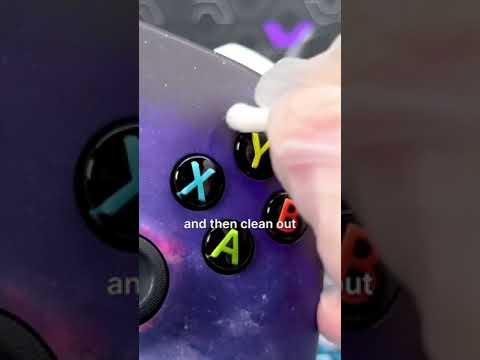
Gunk on your Xbox controller. It’s a problem as old as gaming itself. That sticky, grimy buildup is a combination of sweat, skin oils, dust, and who-knows-what-else, all mashed into the crevices of your beloved controller. But don’t despair! Cleaning it effectively is easier than you might think. Here’s how to get your controller feeling fresh and responsive again:
Here’s the Direct and Comprehensive Answer:
The best way to clean gunk off your Xbox controller involves a multi-pronged approach. First, unplug your controller or remove the batteries. This is crucial for safety. Next, use a toothpick or similar pointed object to gently scrape away the visible gunk, focusing on the seams, around the buttons, and the triggers. Once you’ve dislodged the majority of the buildup, use canned air to blow away the loosened debris. Finally, use a soft, lint-free cloth dampened with a 70% or less isopropyl alcohol (IPA) solution to wipe down the entire controller. Avoid spraying any liquids directly onto the controller. Let it air dry completely before using it again. This process effectively removes gunk and disinfects, leaving your controller feeling clean.
Understanding the Gunk
What is Controller Gunk?
That unpleasant grime you find on your controller is more than just dirt. It’s a cocktail of bodily oils, sweat, dead skin cells, household dust, and sometimes even food particles. Essentially, anything your hands come into contact with can transfer to your controller, and over time, this accumulation becomes that sticky, annoying gunk.
Why Does it Build Up?
The texture of the plastic used in most controllers, especially older ones, isn’t entirely smooth, creating micro-crevices where gunk can easily settle. Sweaty palms are the primary culprit, as the moisture mixes with the fine particles in the air and the natural oils produced by your skin. Unless you have a HEPA air filter, dust is a constant presence in any indoor environment, adding to the problem.
Step-by-Step Cleaning Guide
Essential Supplies
Before you begin, gather these items:
- Toothpicks or similar pointed objects (e.g., plastic spudger, dental pick)
- Canned air
- Soft, lint-free cloths (e.g., microfiber cloths)
- 70% or less Isopropyl Alcohol (IPA) solution
- Paper towels (to protect your workspace)
- Optional: Cotton swabs or Q-tips
Cleaning Process
- Preparation: Unplug your controller or remove its batteries. Lay down paper towels to create a clean working area.
- Mechanical Removal: Use a toothpick or a similar tool to gently scrape out the gunk from around buttons, triggers, and all seams of the controller. Be careful not to apply excessive force to avoid scratching or damaging the controller.
- Blow Away Debris: Use canned air to blow away the dislodged particles. Hold the can upright and use short bursts to prevent liquid from escaping.
- Alcohol Wipe Down: Dampen your lint-free cloth with a 70% or less isopropyl alcohol (IPA) solution. Do not saturate the cloth; it should be damp, not dripping wet. Thoroughly wipe down the entire controller, paying extra attention to the areas you’ve previously scraped. For difficult to reach spots, use a cotton swab dipped in alcohol.
- Avoid the Battery Compartment: If you are cleaning a wireless controller, make sure not to get any moisture inside the battery compartment.
- Air Dry: Allow the controller to air dry completely before using it again. This will prevent any potential damage from moisture.
Important Notes and Precautions
- Avoid Harsh Chemicals: Never use bleach, hydrogen peroxide, or other harsh chemicals on your controller. These substances can damage the plastic and internal components.
- Don’t Spray Directly: Never spray any cleaning solution directly onto the controller. Instead, always apply it to a cloth first.
- Low Percentage Alcohol is Key: Using an IPA solution higher than 70% isn’t recommended, as it can cause damage due to the lower water content.
- WD-40 is a No-Go: Avoid using WD-40 on your Xbox controller, as it can corrode internal components.
- Patience is Key: Do not rush the cleaning process. Gentle and thorough is the way to go.
Frequently Asked Questions (FAQs)
1. Can I use disinfectant wipes on my Xbox controller?
For Xbox Wireless Controllers, yes, you can use disinfectant wipes. However, for Xbox consoles, use a soft cloth dampened with a 70% or less isopropyl alcohol (IPA) solution instead of disinfectant wipes.
2. Can I use Windex or other glass cleaners on my Xbox controller?
Generally, it’s not recommended for the standard Xbox controller, but the Xbox Elite Wireless Controller Series 2 can be cleaned with Windex Glass Cleaner. However, using isopropyl alcohol (IPA) is usually a safer option.
3. How can I make my controller less greasy?
Regular cleaning with a 70% or less IPA solution is the best way to keep your controller from feeling greasy. Wiping it down after each use can also prevent build-up.
4. What’s the best way to clean controller buttons without taking it apart?
Use cotton swabs dampened with 70% or less IPA solution to carefully clean around and inside the crevices of the buttons. Press the buttons repeatedly to work the alcohol into hard-to-reach areas.
5. My controller buttons are sticky; how do I fix it?
Sticky buttons are usually caused by dried gunk. The process described above, using a toothpick and isopropyl alcohol, will often resolve this. For particularly sticky buttons, multiple cleaning attempts might be required.
6. Is it okay to use rubbing alcohol on my Xbox controller?
Yes, it’s generally safe as long as you use a 70% or less IPA solution. High-percentage isopropyl alcohol may not damage it, but there is a small risk because of its low water content. Do not use anything lower than 70% alcohol because it will damage your controller with its high amount of water.
7. Why do my controllers get so dirty?
The combination of sweaty palms, dust, and other debris creates the sticky gunk that accumulates on controllers.
8. How do I clean a controller without rubbing alcohol?
If you don’t have alcohol, a mixture of mild dish soap and warm water on a damp (not wet), lint-free cloth can be used, but be very careful to not allow moisture into the controller and wipe it off as much as possible. Dry completely before using it.
9. Can I use hand sanitizer to clean my controller?
No, hand sanitizer is not recommended for cleaning controllers. It can leave a residue and might damage the surface.
10. Can I use hydrogen peroxide to clean my controller?
Absolutely not. Hydrogen peroxide is too harsh and can cause damage to the plastic and components of the controller.
11. Is it better to use alcohol wipes or soap and water for cleaning a controller?
Alcohol wipes are preferable. They disinfect, don’t risk dripping moisture into the controller, and don’t leave a soap residue.
12. Why do white Xbox controllers get dirty more easily?
White controllers tend to show dirt much more than darker colors. Also, white controllers often have rough textures, where dirt particles can remain more easily.
13. How often should I clean my controller?
The cleaning frequency depends on usage. Aim to clean your controller every few weeks or more frequently if you’re a heavy user. A quick wipe down after each use is also beneficial.
14. What is the gunk that builds up on controllers?
The gunk is primarily a mix of sweat, skin oils, dust, and dirt. Sometimes, food particles can contribute to the build-up, especially if you snack while gaming.
15. Can cleaning my controller improve its performance?
Yes, absolutely. Cleaning a controller can improve button responsiveness, reduce stickiness, and enhance the overall gaming experience, making it more enjoyable.
By following this comprehensive guide, you can effectively remove gunk from your Xbox controller and keep it in top condition, ready for hours of gaming fun. Remember, regular cleaning is essential for both hygiene and performance!