Warzone 2 Crossplay: A Comprehensive Guide for Seasoned and Aspiring Warriors
Fast answer first. Then use the tabs or video for more detail.
- Watch the video explanation below for a faster overview.
- Game mechanics may change with updates or patches.
- Use this block to get the short answer without scrolling the whole page.
- Read the FAQ section if the article has one.
- Use the table of contents to jump straight to the detailed section you need.
- Watch the video first, then skim the article for specifics.
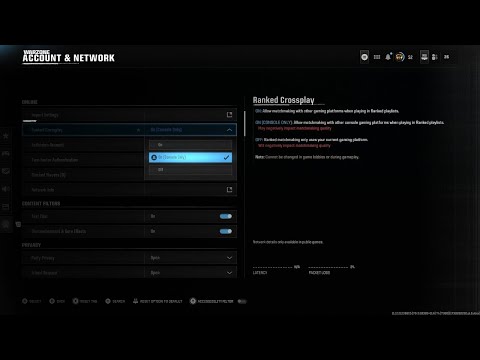
Crossplay in Warzone 2 is enabled by default, seamlessly connecting players across PC, PlayStation, and Xbox platforms. This means you can squad up and battle it out with friends regardless of their chosen gaming system. The game identifies each player’s platform with a unique symbol displayed next to their username, making it easy to see who’s rocking a mouse and keyboard versus a controller. This unified experience fosters a larger player base, quicker matchmaking times, and the opportunity to enjoy Warzone 2 with a wider circle of friends. Crossplay extends beyond random matchmaking, allowing you to add friends from different platforms directly within the game and invite them to your party.
Understanding the Crossplay System in Detail
The beauty of Warzone 2’s crossplay system lies in its simplicity and integration. From the moment you launch the game, crossplay is active. No need to dive into complicated menus to enable it. This default setting is crucial for maintaining a healthy player population and ensuring that finding a match is quick and efficient.
Identifying Players by Platform
As mentioned earlier, the platform icon next to a player’s name is your key to understanding their setup. These icons are visually clear and instantly recognizable, allowing you to quickly identify PC, PlayStation, and Xbox players in your squad or the lobby.
Adding and Inviting Friends
Warzone 2 features an in-game social system separate from your console or PC’s native friend lists. To add cross-platform friends, navigate to the “Social” tab in the main menu. Here, you can search for players using their Activision ID (which is a unique username assigned to each player). Once added, these friends will appear on your Warzone 2 friend list, allowing you to invite them to your party and play together.
Crossplay and Skill-Based Matchmaking (SBMM)
While Warzone 2 utilizes Skill-Based Matchmaking (SBMM), it’s important to note that crossplay doesn’t directly impact how SBMM functions. The game attempts to match players of similar skill levels regardless of their platform. However, some players believe that the inherent differences between PC and console controls (mouse and keyboard vs. controller) can create perceived advantages or disadvantages. Fortunately, the game continues to be adjusted to level the playing field in crossplay modes.
Crossplay: Benefits and Potential Drawbacks
While crossplay undoubtedly enhances the Warzone 2 experience, it’s important to acknowledge both its benefits and potential drawbacks.
Benefits of Crossplay
- Larger Player Pool: Crossplay significantly increases the number of players available, leading to faster matchmaking times, especially for less popular game modes.
- Playing with Friends on Different Platforms: The most significant benefit! Crossplay allows you to enjoy Warzone 2 with friends regardless of their preferred gaming system.
- Extended Game Lifespan: A larger and more active player base contributes to the longevity of the game.
Potential Drawbacks of Crossplay
- Control Scheme Differences: The age-old debate of mouse and keyboard versus controller continues. Some players believe that mouse and keyboard provides a significant aiming advantage. This may not always be the case.
- Potential for Cheating: PC platforms are often perceived as being more susceptible to cheating due to the open nature of the operating system. However, this is a continued issue that many studios and teams strive to combat.
- Performance Differences: Depending on the hardware, PC players might experience higher frame rates and better graphical fidelity compared to console players, potentially giving them a visual advantage. This is often overcome by skill, communication, and teamwork.
Crossplay in Warzone 2: FAQs
Here are 15 frequently asked questions about crossplay in Warzone 2, addressing common concerns and providing essential information:
1. Can I disable crossplay in Warzone 2?
Yes, you can disable crossplay, but the method depends on your platform. On PlayStation and Xbox, you can disable crossplay in the console’s system settings. However, disabling crossplay might significantly increase matchmaking times, as it limits the player pool to those on your console with crossplay also disabled. On PC, the option to completely disable crossplay is not available within the game settings.
2. How do I add friends from other platforms?
Navigate to the “Social” tab in the Warzone 2 menu. Search for your friends using their Activision ID and send them a friend request. Once accepted, they’ll appear on your in-game friend list.
3. What is an Activision ID?
An Activision ID is a unique username assigned to each player when they create an Activision account. It’s used to identify and add friends across different platforms.
4. Do I need an Activision account to play Warzone 2 with crossplay?
Yes, an Activision account is required to play Warzone 2 and utilize the crossplay functionality. This account links your platform account (PlayStation Network, Xbox Live, or Battle.net) to the game.
5. Does crossplay affect SBMM?
Warzone 2 utilizes Skill-Based Matchmaking (SBMM) regardless of crossplay. The game attempts to match players of similar skill levels, irrespective of their platform.
6. Is crossplay enabled by default?
Yes, crossplay is enabled by default in Warzone 2.
7. Can I tell which platform other players are using?
Yes, Warzone 2 displays a platform icon next to each player’s username, indicating whether they are on PC, PlayStation, or Xbox.
8. Does crossplay affect game performance?
Potentially. PC players with high-end hardware might experience higher frame rates and better graphics compared to console players. However, the impact on gameplay is subjective and depends on individual hardware configurations.
9. Is it possible to party up with friends using different controllers (e.g., one with mouse and keyboard, one with a controller)?
Yes, you can party up with friends using different controllers. The game supports a mix of input methods within the same party.
10. Can I communicate with players on other platforms?
Yes, Warzone 2 supports voice chat across all platforms, allowing you to communicate with your teammates regardless of their system. Text chat is also available but might be less practical during intense gameplay.
11. Does playing with crossplay on increase my chances of encountering cheaters?
The potential for encountering cheaters might be slightly higher with crossplay enabled, as PC platforms are often perceived as more vulnerable. However, Activision actively combats cheating and employs various anti-cheat measures.
12. Is Warzone 2 free to play?
Yes, Warzone 2 is a free-to-play game, accessible to all players on PC, PlayStation, and Xbox.
13. Do I need to own Modern Warfare II to play Warzone 2 with crossplay?
No, you do not need to own Modern Warfare II to play Warzone 2 with crossplay. Warzone 2 is a standalone free-to-play game.
14. Where can I report a player for cheating or toxic behavior in crossplay?
You can report players through the in-game reporting system. Select the player’s name and choose the “Report Player” option. Provide as much detail as possible to help Activision investigate the issue.
15. Are there any educational games similar to Warzone 2 I can play with friends?
While not directly similar in gameplay, many collaborative and strategic video games offer shared experiences and educational value. The Games Learning Society (GamesLearningSociety.org) is a valuable resource for exploring games that promote learning, problem-solving, and teamwork. Consider exploring games that emphasize collaborative problem-solving or strategic thinking if you’re looking for educational alternatives to Warzone 2. You can find information and research on learning through games at https://www.gameslearningsociety.org/.
Conclusion
Crossplay in Warzone 2 is a game-changer, uniting players across platforms and fostering a vibrant and dynamic community. By understanding how crossplay works, its benefits, and potential drawbacks, you can optimize your gaming experience and enjoy the thrill of Warzone 2 with friends, regardless of their chosen platform. So, squad up, communicate effectively, and dominate the battlefield!