How Many Lot Traits Can You Have in Sims 4?
Fast answer first. Then use the tabs or video for more detail.
- Watch the video explanation below for a faster overview.
- Game mechanics may change with updates or patches.
- Use this block to get the short answer without scrolling the whole page.
- Read the FAQ section if the article has one.
- Use the table of contents to jump straight to the detailed section you need.
- Watch the video first, then skim the article for specifics.
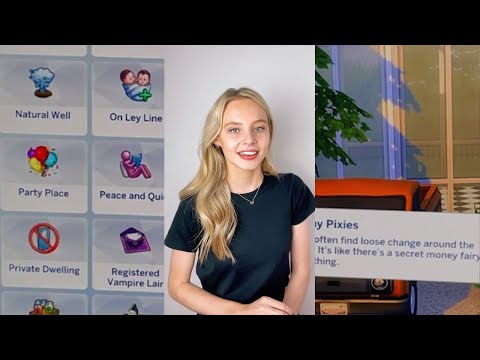
In The Sims 4, you can assign a maximum of three lot traits to any given residential or non-residential lot. These traits influence the gameplay and experiences of Sims who interact with the lot, adding layers of personality and unique situations to your Sims’ lives. You can change the lot traits at any time while in Build Mode, offering significant customization possibilities.
Understanding Lot Traits in The Sims 4
Lot traits are essentially modifiers that affect the atmosphere, activities, and Sim behaviors on a particular lot. They can range from influencing skill gains and relationship building to affecting the frequency of certain events or even the types of visitors who frequent the location. With the freedom to select up to three lot traits, players can carefully design their Sims’ environments to support their aspirations, skills, or personal preferences.
Accessing Lot Traits
To modify a lot’s traits, you need to enter Build Mode. Once there, look for the “i” icon that represents the lot’s information panel, usually found at the top-left corner of your screen. Clicking this icon will display the currently assigned lot traits (if any). From this menu, you can disable existing traits, replace them with new ones, or add traits to any empty slots, provided that you do not exceed the maximum of three.
Types of Lot Traits
The Sims 4 offers a wide variety of lot traits, each bringing its unique impact. Some traits are universally beneficial, while others are more situational or cater to specific Sim personalities. For example, traits like “Study Spot” or “Training Ground” can boost skill gains, while “Romantic Aura” can enhance romantic interactions. Certain expansion packs and game packs also add their own exclusive lot traits, further expanding the possibilities for customization.
Carefully selecting lot traits that align with your Sims’ needs and desires can significantly enhance their quality of life and propel their stories in exciting new directions.
Frequently Asked Questions (FAQs) About Lot Traits in The Sims 4
1. Can I have more than three lot traits by using cheats?
No, even with the use of cheat codes, the game enforces the limit of three lot traits per lot. While you can use cheats to quickly access the Build Mode or manipulate other aspects of the game, you can’t bypass this restriction.
2. How do I remove a lot trait?
To remove a lot trait, enter Build Mode, click the “i” icon on the top-left corner of your screen to access the lot information panel, and then click the “x” on the lot trait you wish to remove. This will open up a slot for a new trait.
3. Do lot traits affect non-residential lots like parks or bars?
Yes, lot traits affect both residential and non-residential lots. For example, a park with the “Convivial” trait will encourage Sims to be more social, while a bar with the “Party Place” trait will result in more lively and frequent parties.
4. Do all lot traits work for all Sims?
Not all lot traits are universally effective for all Sims. Some traits, like “Child’s Play,” are more beneficial for families with children, while others, like “Study Spot,” are more useful for Sims focused on academic or career goals. The impact of a lot trait depends on the Sim’s personality, aspirations, and current activities.
5. Can I change lot traits while my Sims are actively using the lot?
Yes, you can change lot traits at any time while in Build Mode, even while your Sims are on the lot. The effects of the new trait will usually take effect immediately, which can lead to interesting and sometimes humorous situations.
6. What are some of the best lot traits for increasing skill gains?
Several lot traits can boost skill gains. “Study Spot” is excellent for improving academic skills, while “Training Ground” is great for fitness-related skills. If you have the Eco Lifestyle expansion pack, the “Eco Lot” trait can also provide various skill boosts.
7. How do I find the “i” icon to change lot traits?
The “i” icon is found in the top-left corner of your screen when you are in Build Mode. It’s a small image of a house, which is used to access the lot information panel.
8. Do lot traits stack with Sim traits?
Yes, lot traits and Sim traits stack. For example, a Sim with the “Genius” trait will gain skills faster on a lot with the “Study Spot” trait, further amplifying their learning capabilities.
9. Can I create my own lot traits?
Unfortunately, the game does not natively allow players to create custom lot traits. However, you can use mods created by the community to add new and custom traits to your game.
10. Which lot traits come with specific expansion packs?
Several expansion packs add their own unique lot traits. Here are a few examples:
- City Living: Adds traits like “Needs TLC,” “Gremlins,” and “Great View.”
- Eco Lifestyle: Adds traits like “Eco Lot” and “Upcycling Center.”
- Get Famous: Adds traits like “Hottest Spot in Town” and “Up-and-Coming Hotspot.”
- Snowy Escape: Adds traits like “Onsen Lot” and “Mountain Lot.”
11. How do lot traits affect festivals and events?
Lot traits can influence the outcome and atmosphere of festivals and events. For instance, a lot with the “Party Place” trait might have a more lively and crowded festival, while a lot with the “Quiet” trait might have a more subdued and peaceful event.
12. Are there any lot traits that make Sims more likely to have twins or triplets?
Yes, the “On a Ley Line” lot trait increases the likelihood of Sims having twins when they try for a baby on that lot. This effect stacks with the “Fertile” reward trait, further increasing the chances of multiple births.
13. What are some good lot traits for attracting specific types of visitors?
Certain lot traits can attract specific types of Sims or creatures. For example:
- “Cat Friendly” or “Cat Hangout” can attract Sims with cats.
- “Dog Friendly” can attract Sims with dogs.
- “Alien Oasis” (requires specific mods) can attract aliens.
14. Do lot traits affect the price of a lot?
No, lot traits do not directly affect the price of a lot. Lot prices are primarily determined by the size of the lot, the number of rooms, and the furnishings included. However, the desirability of a lot with certain traits might indirectly influence its value from a player’s perspective.
15. Can I use lot traits to create themed lots, like a library or art studio?
Absolutely! Lot traits are perfect for creating themed lots. For a library, you could use “Study Spot,” “Book Nook,” and “Quiet.” For an art studio, you could use “Creative” and “Bracing Breezes.” This allows you to enhance the atmosphere and functionality of your themed lots and is also a fantastic way to teach players more about creativity and design. More information about this topic can be found on the Games Learning Society at https://www.gameslearningsociety.org/.
Understanding and utilizing lot traits effectively can greatly enhance your Sims 4 gameplay, providing richer and more diverse experiences for your Sims. Enjoy experimenting with different combinations and discovering how they can influence your Sims’ lives!