How Many Profiles Does the DualSense Edge Have? A Deep Dive into Customization
Fast answer first. Then use the tabs or video for more detail.
- Watch the video explanation below for a faster overview.
- Game mechanics may change with updates or patches.
- Use this block to get the short answer without scrolling the whole page.
- Read the FAQ section if the article has one.
- Use the table of contents to jump straight to the detailed section you need.
- Watch the video first, then skim the article for specifics.
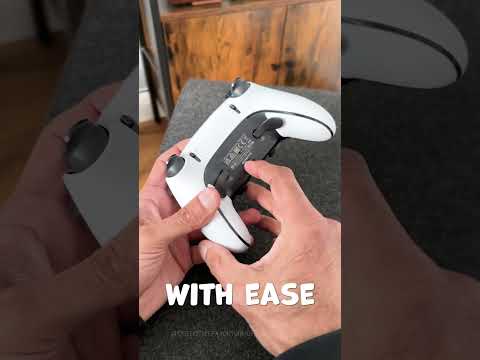
The PlayStation 5 DualSense Edge controller is a game-changer for players seeking a high level of customization and control. One of its standout features is the ability to save and switch between custom profiles, allowing you to tailor your controller settings to specific games or playstyles. But just how many profiles can you store on this premium controller?
The answer is: The DualSense Edge allows you to store four distinct custom profiles. This means you can quickly switch between four different button mappings, stick sensitivities, trigger adjustments, and other personalized settings, giving you unprecedented flexibility during gameplay. These profiles are easily accessible via a dedicated Fn button and a combination with other buttons.
Understanding DualSense Edge Profiles
The ability to switch profiles on the fly is a major advantage for competitive gamers and anyone who likes to fine-tune their controls. Imagine having one profile set up for first-person shooters, another for fighting games, a third for racing titles, and perhaps a fourth for platformers. Instead of manually adjusting settings each time, a quick press of a button allows you to jump seamlessly into your preferred setup.
Accessing and Assigning Profiles
The DualSense Edge offers a simple system for accessing and managing your profiles. Here’s how you can switch between them:
- Default Profile: The profile assigned to the Fn button and the triangle button shortcut is the default profile and cannot be changed.
- Custom Profiles: You can assign custom profiles to the other three shortcuts (Fn + Circle, Fn + Square, and Fn + X).
- Assigning Profiles: To assign a custom profile to a shortcut, navigate to Settings > Accessories > DualSense Edge Wireless Controller > Custom Profiles. Select the Unassigned Profiles tab and choose Assign next to the profile you want to use.
This straightforward process makes it quick and easy to configure the controller to your exact specifications.
Why Are Multiple Profiles Important?
The capability to store and switch between multiple profiles on the DualSense Edge provides several significant benefits:
- Adaptability to Different Games: Different genres require different control schemes. For example, a racing game might benefit from more sensitive triggers, while a fighting game might need precise directional inputs. Having multiple profiles allows you to quickly adapt to these differences.
- Customization for Different Playstyles: Even within the same game, players often have their unique playstyles. Multiple profiles allow you to tailor the controller to your personal preferences.
- Competitive Advantage: Being able to instantly switch between profiles can provide a competitive edge by allowing you to optimize your controls for specific in-game situations.
- Time Saving: Without the ability to store multiple profiles, you would need to adjust your controller settings each time you switch games or want to change your playstyle. This can be frustrating and time-consuming. The DualSense Edge eliminates this need, making gaming more seamless and enjoyable.
Detailed Customization Options
Beyond just saving the button layout, each profile on the DualSense Edge allows you to fine-tune a variety of settings:
- Button Remapping: You can reassign the function of virtually any button on the controller. This can be useful for placing frequently used actions within easy reach.
- Analog Stick Sensitivity: Adjust the sensitivity and dead zones of the analog sticks to achieve the level of precision you need.
- Trigger Sensitivity: Change the range of motion for the L2 and R2 triggers to achieve your desired level of response.
- Additional Paddles: Remap any of the 16 input options on the back paddles, adding even more custom controls and allowing complex actions to be executed quickly.
These features transform the DualSense Edge into a highly customizable controller that can adapt to any gaming situation.
Is the DualSense Edge Worth the Investment?
The DualSense Edge is undoubtedly a premium controller, and it comes with a premium price tag, typically around $200. For serious gamers who demand a high level of customization and responsiveness, it’s an investment that can significantly improve their gaming experience. However, if you’re a casual gamer or generally satisfied with the standard DualSense controller, the additional features and cost of the Edge may not be necessary.
Frequently Asked Questions (FAQs)
Here are 15 FAQs to provide additional information about the DualSense Edge:
1. What are the main advantages of the DualSense Edge over the standard DualSense controller?
The DualSense Edge features replaceable thumbstick modules, additional back paddles, extensive customization options, and multiple profiles, offering a superior and personalized gaming experience compared to the standard DualSense.
2. How do you switch between profiles on the DualSense Edge?
You switch profiles using the Fn button combined with the circle, square, or cross (X) buttons to access your three custom profiles or Fn + triangle to access your default profile.
3. Can the default profile on the DualSense Edge be customized?
The default profile which is activated by Fn + triangle, cannot be changed, but you can customize and assign any of the three custom profiles to your liking.
4. Is the DualSense Edge compatible with PC?
Yes, the DualSense Edge is compatible with PC, connecting via a wired connection or Bluetooth just like the original DualSense controller.
5. Does the DualSense Edge have rubber grips?
Yes, the DualSense Edge has a grippy rubber on the back of the grips to prevent slipping, though these may flake over time.
6. Does the DualSense Edge have issues with stick drift?
The DualSense Edge is designed to address stick drift with user-replaceable analog sticks. If you experience stick drift, you can easily replace the module rather than replacing the entire controller.
7. How many back paddles does the DualSense Edge have?
The DualSense Edge has two back paddles, one on each side, which can be mapped to various controller functions.
8. Can the DualSense Edge be customized aesthetically?
While it only comes in a two-tone black and white scheme currently, you can purchase skins from third-party manufacturers such as MightySkins to customize the look.
9. How does the battery life of the DualSense Edge compare to the original DualSense?
The DualSense Edge has a shorter battery life, typically around 5-6 hours, compared to the standard DualSense controller, which can last around 8 hours.
10. What kind of stick caps come with the DualSense Edge?
The DualSense Edge includes standard, high-dome, and low-dome stick caps, allowing you to choose the ones that best fit your playing style.
11. What are some of the key customization features of the DualSense Edge?
Key customization options include button remapping, analog stick sensitivity adjustments, trigger sensitivity control, and the ability to assign functions to the back paddles.
12. Is the DualSense Edge good for fighting games?
Yes, the DualSense Edge can be very beneficial for fighting games. The Digital profile in particular can provide directional pad-level input on the left stick for better precision.
13. How much does the DualSense Edge controller typically cost?
The DualSense Edge usually retails for around $200, making it more expensive than the standard DualSense controller which is about $70.
14. Are replacement analog stick modules for the DualSense Edge expensive?
Replacement stick modules cost around $20 from Sony, offering a relatively affordable solution to fix potential issues like stick drift.
15. Is the DualSense Edge considered the best PS5 controller?
The DualSense Edge is considered one of the best premium PS5 controllers, offering superior customization options and performance compared to the standard DualSense. However, the PDP Victrix Pro BFG Wireless Controller is also considered a top contender by many professionals.
Conclusion
The DualSense Edge is a highly customizable and capable controller that allows you to enhance your gaming experience. With its four available profiles, replaceable modules, and numerous customization options, it’s a worthy investment for serious gamers. Understanding how to use and manage its profiles will help you unlock its full potential and give you an edge in your favorite games.