Unlocking PS5 Storage: How Many Terabytes Can You Really Hold?
Fast answer first. Then use the tabs or video for more detail.
- Watch the video explanation below for a faster overview.
- Game mechanics may change with updates or patches.
- Use this block to get the short answer without scrolling the whole page.
- Read the FAQ section if the article has one.
- Use the table of contents to jump straight to the detailed section you need.
- Watch the video first, then skim the article for specifics.
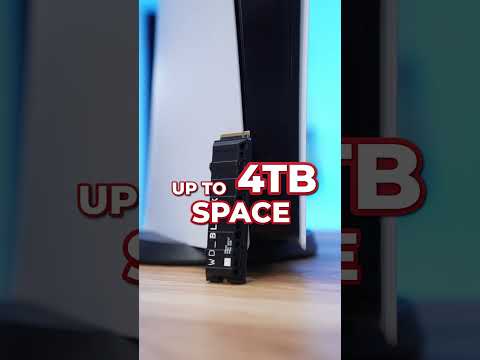
The PlayStation 5, a marvel of modern gaming technology, arrives with a caveat: its internal storage disappears faster than a pizza at a gaming convention. This article cuts through the confusion surrounding PS5 storage capacity, providing a definitive answer and addressing all your burning questions.
The Definitive Answer: How Many TB Can PS5 Hold?
The PlayStation 5 officially supports up to 8TB of internal storage expansion via a compatible M.2 NVMe PCIe Gen4 SSD. While the console launched with a limit of 4TB, a firmware update (version 8.00 and later) removed this cap. This means you can now install an 8TB SSD inside the PS5 to massively expand your game library. In addition, the console allows for USB extended storage with a minimum capacity of 250 GB and a maximum of 8TB, but this is only for storing and playing PS4 games. PS5 games need to be moved to the internal SSD for playing.
Understanding PS5 Storage Options
The PS5 offers two primary methods for expanding storage:
- Internal M.2 SSD Expansion: Installing a compatible M.2 NVMe PCIe Gen4 SSD into the dedicated expansion slot. This is the preferred method for playing both PS5 and PS4 games, as it provides the fastest loading times and performance. Remember to check the drive meets all of Sony’s requirements regarding speed and dimensions.
- USB Extended Storage: Connecting an external hard drive (HDD or SSD) via USB. While you can store PS5 games on an external drive, you can’t play them directly from it. You’ll need to transfer them back to the internal SSD to play. This method is ideal for backing up games and storing PS4 titles.
Choosing the right storage solution depends on your needs and budget. Let’s delve into some frequently asked questions to help you make the best decision.
Frequently Asked Questions (FAQs) about PS5 Storage
1. What are the minimum and maximum storage requirements for USB extended storage on PS5?
The PS5 requires a minimum of 250 GB and supports a maximum of 8TB for USB extended storage. Keep in mind that this is only suitable for storing and playing PS4 games, and for storing (but not playing directly) PS5 games.
2. Can I connect multiple USB extended storage drives to my PS5 at the same time?
No, the PS5 does not support connecting two or more USB extended storage drives simultaneously. Only one external drive can be connected at a time.
3. Can I use a USB hub to connect my external storage to my PS5?
No, the PS5 does not support connecting external storage drives through a USB hub. The drive must be connected directly to one of the PS5’s USB ports.
4. Is 1TB of storage enough for my PS5?
Whether 1TB is enough depends on your gaming habits. The PS5’s internal storage is around 667GB usable space after system software. Modern PS5 games can easily take up 50GB to 100GB or more each. With just the internal storage, you might only be able to install 6-10 AAA games. If you download many games or plan to have a large library, a 1TB or larger SSD is recommended.
5. Is 2TB overkill for gaming on PS5?
A 2TB SSD is generally sufficient for most gamers. It can store a substantial number of games, including large titles. However, if you intend to keep a vast library of games installed simultaneously or have a lot of other media files, you might consider a larger capacity.
6. How many PS5 games can a 2TB SSD hold?
Estimates vary depending on the size of the games, but a 2TB SSD can typically hold around 25-50 PS5 games. This assumes an average game size of 40GB to 80GB.
7. Can I put a 4TB SSD in my PS5?
Yes, the PS5 supports up to a 4TB SSD, and now, even an 8TB SSD after the 8.00 firmware update. Make sure the SSD meets Sony’s specifications for speed and form factor.
8. Can I play PS5 games directly from a USB external hard drive?
No, you cannot play PS5 games directly from a USB external hard drive. You must transfer the game data back to the internal SSD to play them. This restriction does not apply to PS4 games, which can be played directly from a USB extended storage device.
9. How many PS5 games can a 4TB SSD hold?
A 4TB SSD can generally hold around 50-100 PS5 games, depending on the size of each game. This provides a significant expansion to your gaming library.
10. Should I buy a 2TB or 4TB SSD for my PS5?
The choice between a 2TB and 4TB SSD depends on your budget and storage needs. If you have a large gaming library or anticipate downloading many games in the future, a 4TB SSD might be a better investment. However, a 2TB SSD offers a good balance of storage and affordability for most gamers. Prices of SSDs fluctuate, so compare current prices and consider future storage needs.
11. How many games can an 8TB SSD hold on PS5?
An 8TB SSD can potentially hold around 100-200 PS5 games, assuming an average game size. This provides ample storage for even the most avid gamer with a massive library.
12. What kind of hard drive does the PS5 need?
For internal expansion, the PS5 requires an M.2 NVMe PCIe Gen4 SSD that meets Sony’s specific performance and size requirements. For USB extended storage, you can use either an HDD or SSD, but an SSD will provide faster transfer speeds.
13. Is an 8TB SSD overkill for gaming on PS5?
For most gamers, an 8TB SSD is likely overkill. However, for users with extensive game libraries, content creators who need to store gameplay footage, or those who simply want the maximum possible storage, an 8TB SSD can be a worthwhile investment.
14. Why can’t I play games on my external hard drive on PS5?
PS5 games are designed to leverage the ultra-fast speeds of the internal SSD. USB connections, even with SSDs, are not fast enough to meet the performance requirements of PS5 games. Therefore, Sony requires PS5 games to be played from the internal SSD or the M.2 expansion slot.
15. Does the PS5 support 8TB m.2 SSD?
Yes! After Firmware 8.00, the PS5 console supports M.2 SSD drives of up to 8 TB in size.
Choosing the Right Storage for You
Deciding on the best storage option for your PS5 depends on your individual needs and budget. Consider these factors:
- Game Library Size: How many games do you typically keep installed at once?
- Budget: SSD prices vary significantly based on capacity and performance.
- Future Needs: Do you anticipate downloading more games in the future?
- Usage: Will you be primarily playing PS5 games, PS4 games, or both?
- Technical Skill: Are you comfortable installing an internal SSD?
By answering these questions, you can determine the optimal storage solution for your PS5.
The Future of Gaming and Learning
As gaming technology continues to evolve, it’s crucial to stay informed about the latest advancements. Organizations like the Games Learning Society are dedicated to exploring the educational and social impact of games. You can learn more about their work at GamesLearningSociety.org. Learning more about how game systems work enhances the gaming experience.
Conclusion: Embrace the Expanded Possibilities
With the ability to expand your PS5’s storage up to 8TB, you can say goodbye to storage anxiety and embrace a world of gaming possibilities. Choose the option that best suits your needs and prepare to immerse yourself in a vast and ever-growing library of games.