How to Play Split Screen on Black Ops 3: A Comprehensive Guide
Fast answer first. Then use the tabs or video for more detail.
- Watch the video explanation below for a faster overview.
- Game mechanics may change with updates or patches.
- Use this block to get the short answer without scrolling the whole page.
- Read the FAQ section if the article has one.
- Use the table of contents to jump straight to the detailed section you need.
- Watch the video first, then skim the article for specifics.
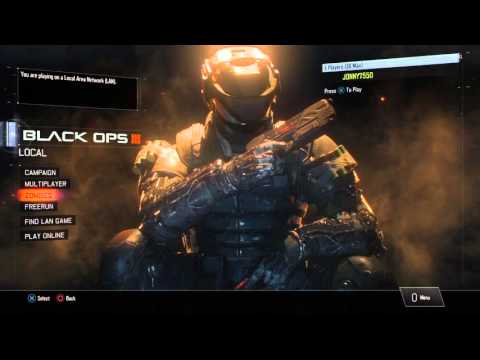
Playing Call of Duty: Black Ops III with friends in split-screen mode is a fantastic way to enjoy the game’s intense action, whether you’re battling zombies or facing off in multiplayer. However, setting up split-screen can sometimes be a bit tricky. This guide will provide you with a detailed, step-by-step process to get you and your friends playing together locally, along with answers to frequently asked questions.
Understanding Black Ops 3 Split-Screen
Before we dive into the specific steps, it’s important to note that Black Ops 3 offers split-screen on several platforms, though with some variations. Generally, you can enjoy split-screen in the following ways:
- Campaign Mode: Supports two players locally with horizontal split-screen.
- Zombies Mode: Supports up to four players locally in split-screen.
- Multiplayer Mode: Supports up to four players locally on Xbox One and PlayStation 4 but two players on PC.
However, it’s important to know that Xbox 360 and PlayStation 3 do not support split-screen in this game.
Setting Up Split-Screen on Consoles (Xbox and PlayStation)
The process for setting up split-screen on Xbox and PlayStation consoles is generally similar. Here’s a detailed guide for each:
PlayStation 4 & PlayStation 5
- Sign In: Ensure that all players have their PlayStation Network accounts signed in on the console. You can add new profiles by selecting “New User” from the PlayStation main menu, if needed.
- Launch the Game: Start Call of Duty: Black Ops III on your console with the main user account.
- Connect Additional Controllers: Ensure all additional controllers you wish to use are connected and synced to the console.
- Main Menu: Navigate to the main menu where you see options like Campaign, Multiplayer, and Zombies.
- Second Controller Input: If you are playing online mode press the X button on the second controller. This will prompt a user to choose an account or “Play as Guest” if the second player does not have an account or an online account.
- Choose the Mode: Select either Campaign, Multiplayer or Zombies.
- Ready to Play: The screen will automatically split, and you are ready to enjoy split-screen gameplay.
Xbox One & Xbox Series X/S
- User Sign-In: Go to the Xbox Home Menu and select the user sign-in component in the top-left corner.
- Add New Profiles: Add any new Xbox Live profiles needed for the additional players. Select “Add New Profile” and follow the prompts. This includes a ‘Guest’ option which allows players without an Xbox Live account to join
- Return to Home: After adding all profiles, return to the Xbox Home Menu.
- Launch the Game: Sign into an Xbox account and start Call of Duty: Black Ops III.
- Connect Additional Controllers: Connect all additional controllers to the console.
- Main Menu: Proceed to the game’s main menu where you will choose Campaign, Multiplayer, or Zombies
- Second Controller Input: If you are playing online mode press the A button on the second controller. This will prompt a user to choose an account or “Play as Guest” if the second player does not have an account or an online account.
- Choose Game Mode: Now pick your preferred game mode (Campaign, Multiplayer, or Zombies).
- Start Playing: The game should split the screen automatically, and you’re set to play!
Setting Up Split-Screen on PC
Playing split-screen on PC has its own unique steps:
- Launch the Game: Start Call of Duty: Black Ops III through Steam or your game launcher.
- Connect Second Controller: Plug in the second controller AFTER the game is launched.
- “Activate Split Screen”: At the main menu, use your mouse to click on “Activate Split Screen“.
- Play: Once the split-screen is activated, both controllers should now be working, and you can select your desired game mode.
- Gamepad Settings: If you have issues, in the game options, go to “Controller” and then “Gamepad”. There, you’ll find options related to split-screen play; adjusting them might resolve problems.
Troubleshooting Split-Screen Issues
If you encounter problems with split-screen, here are a few steps to try:
- Restart: Restart the game and even the console.
- Controller Sync: Ensure all controllers are properly synced to the console or PC.
- Account Login: Verify that all players are logged in with valid accounts.
- Gamepad Settings: Adjust split-screen options in gamepad settings (PC).
- Internet Connection: A stable internet connection is sometimes necessary even if playing locally, so check your connection.
Frequently Asked Questions (FAQs)
1. Why can’t I play Zombies split-screen on Black Ops 3?
This could be due to incorrect controller input or settings. Ensure that the second player is properly signed in (or using a guest account) and that you have clicked the “Join” button with the second controller (X on PlayStation or A on Xbox), then try starting the zombie game again. Additionally, on PC, double-check the game pad settings.
2. How do I play split-screen on Black Ops 3 PS5?
The process is identical to PS4, as it runs on the same code base. Sign in all the needed profiles, connect the additional controller, launch the game, and then press X to join in the main menu.
3. Is Black Ops 3 split-screen available on Xbox One?
Yes, Black Ops 3 features split-screen on Xbox One. You can play both Campaign and Zombies with two players locally and multiplayer with up to four players.
4. Can you play split-screen with two controllers on Black Ops 3 PC?
Yes, but only with two players on the PC. Ensure the second controller is plugged in after the game is launched and you manually activate split-screen.
5. Can 2 players play split-screen on Black Ops 3?
Yes, Call of Duty: Black Ops III supports two-player split-screen online play in Multiplayer or Zombies game modes and the campaign.
6. Does Black Ops 3 have a 2 player campaign?
Yes, the campaign for Black Ops 3 can be played with up to two players locally in split-screen. It also supports up to four players online.
7. How do you play split screen on Black Ops 3 on Xbox?
Sign into all the needed profiles from the Xbox home menu, then launch Black Ops III, connect your controllers, and select your game mode. The game should then automatically go into split-screen when a second user joins.
8. Why is Black Ops 3 split-screen so small?
The screen size for split-screen is kept small to preserve the aspect ratio of the game. While you may find it less than ideal, this is a design choice by the developers to prevent distortion.
9. How do I play 2 player Zombies on Black Ops 3 Xbox One offline?
Sign your second controller into a “Guest” account. When choosing game modes, both controllers need to press “X” repeatedly to load into zombies mode.
10. Can you play Black Ops 3 Zombies split-screen offline?
Yes, offline split-screen is available in Zombies. It supports up to four players.
11. Why can’t I join my friend on Black Ops 3?
This issue usually stems from server problems. Try restarting your game, checking your internet connection, or even restarting your console. This often resolves connection issues.
12. Can you play 3 player split-screen on Black Ops Cold War?
No, Black Ops Cold War supports only 2 players in split-screen mode.
13. How do you change the screen size on Black Ops 3?
Screen size for the game can usually be adjusted from your console settings and the display settings in game options. For PS4, go to “Settings” > “Sound and Screen” > “Display Area Settings”. PC users may need to adjust their screen ratio within their game options, as a general rule.
14. How do you play split-screen Zombies on Black Ops 3 PS4?
Go to the main screen, before selecting Zombies. Select “Play Local,” and then have the second player press X to join.
15. Is Call of Duty: Black Ops 3 story co-op?
Yes, the campaign in Black Ops 3 is designed for up to four-player co-op online, and it supports up to two-player co-op in split-screen.
Conclusion
Playing split-screen on Black Ops 3 is a great way to enjoy the game with friends. By following these steps and troubleshooting tips, you can easily set up and enjoy hours of cooperative gaming, whether it’s tackling zombies or going head-to-head in multiplayer. Always remember to keep your game and controllers updated to prevent any potential issues. Have fun and happy gaming!