Is a 2TB External Hard Drive Good for Gaming? A Pro’s Perspective
Fast answer first. Then use the tabs or video for more detail.
- Watch the video explanation below for a faster overview.
- Game mechanics may change with updates or patches.
- Use this block to get the short answer without scrolling the whole page.
- Read the FAQ section if the article has one.
- Use the table of contents to jump straight to the detailed section you need.
- Watch the video first, then skim the article for specifics.
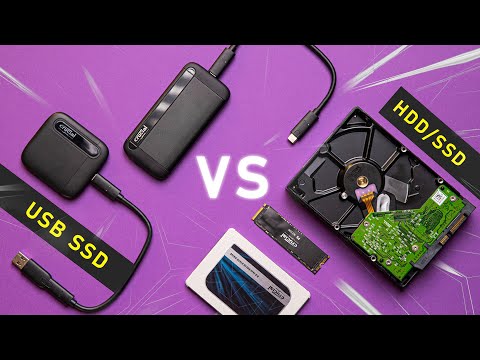
Yes, a 2TB external hard drive is generally good for gaming, offering a balance of storage capacity and portability. However, the “goodness” depends on several factors, including your gaming library size, the type of games you play, the speed of the drive, and your tolerance for potential loading time differences compared to an internal SSD. Let’s delve into why this is the case and explore the nuances of using a 2TB external drive for your gaming needs.
The Storage Capacity Factor
The primary advantage of a 2TB external hard drive is, quite simply, its storage capacity. Modern games, particularly AAA titles, can easily consume 50GB to 150GB of storage space each. A 2TB drive (which typically offers around 1.8TB of usable space after formatting) can comfortably accommodate a decent-sized library of games. This is particularly useful if you have a console with limited internal storage or a gaming PC with a relatively small SSD boot drive. Instead of constantly deleting and reinstalling games, you can keep a wider selection readily available.
Think of it this way: with a 2TB drive, you could potentially store between 10 and 36 large AAA games, plus countless smaller indie titles. This flexibility is a major draw for gamers who enjoy a variety of genres and frequently switch between different games.
Speed: The Crucial Consideration
While capacity is essential, speed is arguably the most important factor when considering an external drive for gaming. External hard drives typically come in two main varieties: HDD (Hard Disk Drive) and SSD (Solid State Drive).
-
HDDs are the more traditional and often more affordable option. However, they are significantly slower than SSDs due to their mechanical nature. This slower speed can translate into longer loading times, texture pop-in, and potentially stuttering in some games.
-
SSDs, on the other hand, offer significantly faster read and write speeds. Games installed on an external SSD will generally load much quicker and provide a smoother overall gaming experience. However, external SSDs are typically more expensive than HDDs for the same storage capacity.
For gaming, an external SSD is almost always preferable to an external HDD. The faster loading times and improved performance can dramatically enhance your enjoyment. If you are using an HDD, you will likely notice a difference in load times when compared to a game running on an internal SSD.
Connectivity: USB 3.0 or Better
Another critical aspect is the connection interface. You’ll want an external drive that supports USB 3.0 or, ideally, USB 3.1 Gen 1 (also sometimes called USB 3.2 Gen 1) or USB 3.1 Gen 2 (or USB 3.2 Gen 2). These standards offer significantly faster data transfer rates than older USB 2.0 connections. Slower USB connections will bottleneck the drive’s performance, negating the benefits of a fast SSD or impacting the usability of an HDD.
The Platform Matters: PC vs. Console
The effectiveness of a 2TB external drive also depends on the platform you’re using:
-
PC Gaming: On a PC, you have more flexibility. You can install games directly onto the external drive, and most games will run without issue, provided the drive is fast enough. You can also use the external drive to store game files, backups, or even stream directly from it.
-
Console Gaming (PlayStation & Xbox): Consoles have varying degrees of support for external storage. Modern consoles like the PlayStation 5 and Xbox Series X/S have specific requirements for external drives. While you can use a 2TB external drive to store and play PlayStation 4 and Xbox One games on these consoles, you generally can’t directly play next-gen (PS5 and Xbox Series X/S) games from an external HDD. You can, however, store them on the external drive to free up space on the internal SSD and then transfer them back when you want to play. The faster external SSD drives that meet console requirements will let you play these games directly from them. Check the specs of both the drive and your game console to determine the transfer speeds of each.
Understanding Latency and Potential Bottlenecks
Even with a fast external SSD, you might experience slightly longer loading times compared to an internal NVMe SSD. This is due to latency introduced by the USB interface and the external enclosure. However, the difference is often minimal and acceptable for most gamers, especially when weighed against the increased storage capacity. It’s important to recognize potential bottlenecks. If your CPU, RAM, or GPU are struggling, an external drive won’t solve those issues.
Durability and Portability
External hard drives are designed to be portable, allowing you to easily move your games between different devices or take your gaming library on the go. However, they are also more susceptible to physical damage than internal drives. It’s crucial to choose a durable enclosure and handle the drive with care to avoid data loss. Consider a drive with a ruggedized enclosure if you plan to transport it frequently.
Is 2TB Right for YOU?
Ultimately, the decision of whether a 2TB external hard drive is right for gaming depends on your individual needs and circumstances. Consider these factors:
- How many games do you typically play simultaneously?
- What types of games do you play (AAA, indie, etc.)?
- What is your budget?
- What platform are you using?
- How important are lightning-fast loading times to you?
If you need a significant amount of storage and are willing to accept slightly longer loading times (or invest in an external SSD), a 2TB external hard drive can be a valuable addition to your gaming setup. For gamers interested in the intersection of games and learning, consider exploring resources available at the Games Learning Society website, found at https://www.gameslearningsociety.org/. The GamesLearningSociety.org offers valuable insights into how games can be used for educational purposes, enhancing critical thinking, and problem-solving skills.
Frequently Asked Questions (FAQs)
1. Will an external hard drive improve my gaming performance?
Generally, no. An external hard drive primarily provides additional storage. However, switching from an HDD to an external SSD can improve loading times and reduce stuttering, leading to a smoother experience.
2. Can I install and play games directly from an external hard drive?
Yes, on PC. On consoles, the ability to play directly from an external drive depends on the console generation and game type. You can play PlayStation 4 and Xbox One games on newer consoles, but often, you need to transfer PlayStation 5 and Xbox Series X/S games to the internal storage for optimal performance.
3. What is the difference between an external HDD and an external SSD for gaming?
SSDs are significantly faster than HDDs, resulting in quicker loading times and a smoother gaming experience. HDDs are more affordable but can lead to longer loading times and potential stuttering.
4. What USB version should my external hard drive have for gaming?
USB 3.0 or higher is recommended. USB 3.1 Gen 1 (USB 3.2 Gen 1) or USB 3.1 Gen 2 (USB 3.2 Gen 2) are even better, offering faster data transfer rates.
5. Will using an external hard drive void my console warranty?
No, using an external hard drive for storage will not void your console warranty, as long as you follow the manufacturer’s guidelines for using external storage devices.
6. How do I format an external hard drive for gaming?
The process varies depending on your platform. On PC, you can use Disk Management. On consoles, the system software will usually guide you through the formatting process. Make sure to back up any important data before formatting.
7. Can I use a 2TB external hard drive for both PC and console gaming?
Yes, but you will likely need to format the drive separately for each platform. This means you can’t use the same drive to store and play games on both your PC and your console simultaneously.
8. Are all external hard drives compatible with my console?
Not necessarily. Check your console’s specifications for compatibility requirements, including the USB version and maximum storage capacity supported.
9. What are the potential drawbacks of using an external hard drive for gaming?
Potential drawbacks include slightly longer loading times (compared to internal SSDs), increased susceptibility to physical damage, and potential compatibility issues.
10. How can I ensure the best performance from my external hard drive for gaming?
Use an external SSD with USB 3.0 or higher, keep the drive defragmented (for HDDs), and ensure your system’s drivers are up to date.
11. Can I store game saves on an external hard drive?
Yes, on some platforms. However, game saves are often stored on the internal storage by default and may need to be manually transferred.
12. What happens if my external hard drive fails?
You will likely lose all the data stored on the drive, including your games. It’s crucial to back up your game saves and other important data regularly to prevent data loss.
13. Is a 2TB external hard drive enough for all my games?
It depends on the size of your gaming library. If you play many AAA games, 2TB might fill up quickly. If you primarily play smaller indie games, 2TB should be more than sufficient.
14. Can I stream games directly from an external hard drive?
Yes, you can stream games directly from an external hard drive on PC. However, an SSD will provide a smoother streaming experience than an HDD.
15. How much does a good 2TB external hard drive for gaming cost?
The cost varies depending on whether you choose an HDD or an SSD. HDDs are typically more affordable, while SSDs are more expensive but offer better performance. Prices can range from $60 to $200 or more, depending on the brand, speed, and features.