Is PlayStation Family Friendly? A Comprehensive Guide for Parents
Fast answer first. Then use the tabs or video for more detail.
- Watch the video explanation below for a faster overview.
- Game mechanics may change with updates or patches.
- Use this block to get the short answer without scrolling the whole page.
- Read the FAQ section if the article has one.
- Use the table of contents to jump straight to the detailed section you need.
- Watch the video first, then skim the article for specifics.
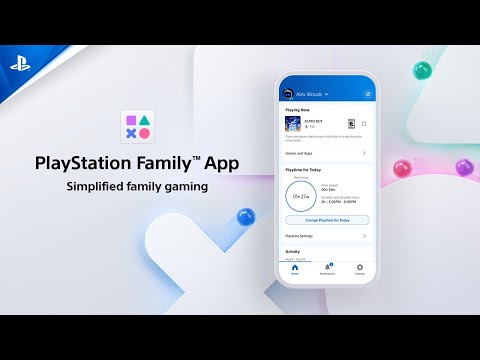
Yes, PlayStation can absolutely be family friendly, but like any technology or entertainment medium, it requires parental awareness and involvement. The PlayStation 4 (PS4) and PlayStation 5 (PS5) offer a vast library of games ranging from gentle, educational titles suitable for young children to more mature content aimed at older audiences. The key to a positive and safe experience lies in understanding the available parental controls, game age ratings, and setting appropriate time limits for gameplay.
Understanding PlayStation’s Family-Friendly Potential
The term “family friendly” is broad, and what constitutes a suitable game for one family might differ significantly for another. However, the PlayStation ecosystem offers tools and resources to tailor the experience to your family’s values and children’s developmental stages.
The Power of Parental Controls
PlayStation consoles boast robust parental controls, allowing parents to manage various aspects of their child’s gaming experience:
- Play Time Restrictions: Set daily or weekly time limits for gameplay.
- Age Level for Games: Restrict access to games based on their age rating (e.g., PEGI or ESRB ratings).
- Communication Restrictions: Control who your child can communicate with online.
- Spending Limits: Manage purchases on the PlayStation Store to prevent unauthorized spending.
- Content Filtering: Block access to specific content, such as mature themes or user-generated content.
Navigating Game Age Ratings
Understanding game age ratings is crucial. The two primary rating systems used on PlayStation are:
- PEGI (Pan European Game Information): Used in Europe and many other regions, PEGI ratings range from 3+ to 18+. The rating indicates the minimum age recommended for playing the game based on its content.
- ESRB (Entertainment Software Rating Board): Used primarily in North America, ESRB ratings range from EC (Early Childhood) to AO (Adults Only). Each rating provides a brief description of the game’s content descriptors, such as violence, language, or suggestive themes.
Pay close attention to these ratings and read reviews to gain a comprehensive understanding of the game’s content before allowing your child to play.
Choosing Age-Appropriate Games
The PlayStation Store offers a wide selection of games suitable for children of all ages. Some popular family-friendly franchises include:
- Ratchet & Clank: A colorful and engaging platformer with lighthearted humor.
- Lego Games: A vast library of Lego-themed games based on popular franchises like Star Wars, Marvel, and Harry Potter, offering cooperative gameplay and puzzle-solving.
- Minecraft: A sandbox game that encourages creativity and exploration.
- LittleBigPlanet: A creative platformer that allows players to create and share their own levels.
- Spyro/Crash Bandicoot: Remastered versions of classic platforming games that are visually appealing and fun for all ages.
- Knack/Knack 2: Family friendly action adventure with fun gameplay.
Remember to research games thoroughly to ensure they align with your family’s values and your child’s maturity level.
Setting Healthy Time Limits
The American Academy of Pediatrics recommends limiting screen time for children:
- Children under 6: Limit screen time to 30 minutes per day.
- Children over 6: Limit screen time to 60 minutes on school days and 2 hours on non-school days.
Encourage physical activity, outdoor play, and other hobbies to maintain a healthy balance. Gaming should not be something used as a way to escape from negative emotions. Compulsively gaming can lead to a condition called alexithymia.
Communication and Online Safety
Online interactions can be a concern for parents. Discuss online safety with your child, emphasizing the importance of:
- Not sharing personal information with strangers.
- Being respectful to other players.
- Reporting any instances of harassment or inappropriate behavior.
Utilize PlayStation’s communication restrictions to control who your child can interact with online.
Leading by Example
Parents play a crucial role in shaping their children’s attitudes toward gaming. Set a positive example by:
- Being mindful of your own screen time.
- Engaging in family activities that don’t involve technology.
- Discussing the benefits and potential risks of gaming.
By actively participating in your child’s gaming experience, you can help them develop healthy habits and make informed choices.
Frequently Asked Questions (FAQs)
1. At what age can a child start playing PlayStation?
There’s no magic number. Sony suggests that children 3 years and above can play PlayStation, but most parents consider 6-7 years old a more appropriate age. Focus on age-appropriate games and actively supervise playtime.
2. What are the best family games on PS4 and PS5?
Some of the best family games include Ratchet & Clank, Lego games (e.g., Lego Star Wars: The Skywalker Saga), Minecraft, LittleBigPlanet 3, Crash Bandicoot N. Sane Trilogy, Spyro Reignited Trilogy and Knack 2.
3. How do I set up parental controls on PlayStation?
Navigate to Settings > Parental Controls/Family Management > Family Management on your PS4 or PS5. You can create accounts for family members and customize restrictions based on age and preferences.
4. How long should a child play PlayStation each day?
The American Academy of Pediatrics recommends no more than 60 minutes on school days and 2 hours on non-school days for children over 6. Children under 6 should spend closer to 30 minutes.
5. What age should a child have a PS5 account?
Each child under 18 years of age needs a separate child account for PlayStation Network services.
6. Can a 9-year-old play PS5 games?
Yes, a 9-year-old can play PS5 games, but you should utilize parental controls to restrict access to games rated 12 and below or those you deem appropriate for your child.
7. Is the PlayStation 5 good for families?
Yes, the PS5 offers excellent family entertainment with its wide range of kid-friendly franchises and smaller, colorful titles.
8. What can adult family members do on PlayStation accounts?
Adult family members can manage console restrictions, contact other players through PSN, and add payment methods or wallet funds.
9. Is there a kids mode on PS4?
While there isn’t a dedicated “kids mode,” you can use Parental Controls to restrict playtime and access to inappropriate content.
10. What are the PEGI ratings for games?
PEGI ratings range from 3+ to 18+, indicating the minimum recommended age for playing a game based on its content.
11. What are the ESRB ratings for games?
ESRB ratings range from EC (Early Childhood) to AO (Adults Only), with content descriptors providing additional information about the game’s content.
12. How do video games affect children?
Excessive gaming can lead to less time socializing, poor social skills, and time away from important activities. However, moderate gaming can improve problem-solving skills, hand-eye coordination, and creativity.
13. What if my child plays video games all day?
Address the underlying reasons why your child is playing video games excessively. They may be using it to cope with negative emotions. Encourage other hobbies and activities, and seek professional help if needed.
14. What are the potential benefits of video games for kids?
Video games can enhance problem-solving skills, hand-eye coordination, creativity, and strategic thinking. They can also provide opportunities for social interaction and teamwork.
15. Where can I find more information about responsible gaming?
You can find resources on responsible gaming on the official PlayStation website, the ESRB website, the PEGI website, and organizations like the Games Learning Society at https://www.gameslearningsociety.org/. The GamesLearningSociety.org offers valuable insights into the educational aspects of gaming.
Conclusion
PlayStation can be a fantastic source of entertainment and learning for families. By understanding and utilizing parental controls, choosing age-appropriate games, setting healthy time limits, and promoting open communication, you can ensure a safe, enjoyable, and family-friendly gaming experience.