Is There Only One Type of PS5 Controller? A Deep Dive into the DualSense Ecosystem
Fast answer first. Then use the tabs or video for more detail.
- Watch the video explanation below for a faster overview.
- Game mechanics may change with updates or patches.
- Use this block to get the short answer without scrolling the whole page.
- Read the FAQ section if the article has one.
- Use the table of contents to jump straight to the detailed section you need.
- Watch the video first, then skim the article for specifics.
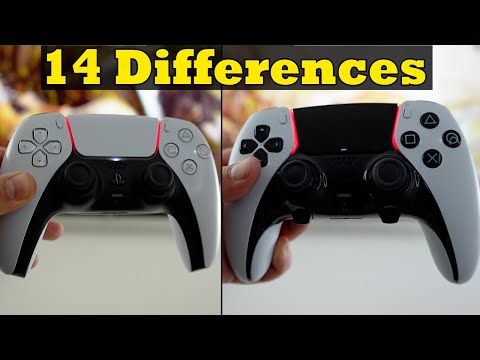
The short answer is a resounding no. While the DualSense wireless controller is the default and most recognizable controller for the PlayStation 5, it is far from being the only option available to gamers. The PS5 controller landscape has expanded considerably since the console’s launch, offering a spectrum of choices that cater to different needs, preferences, and budgets.
The Evolution of PS5 Controllers
Initially, Sony offered only the standard DualSense controller alongside the PS5. These controllers, available in various colors, all shared the same core features: immersive haptic feedback, dynamic adaptive triggers, and a built-in microphone. However, the gaming community quickly demanded more. This demand led to the development of pro controllers, controllers with enhanced features for competitive play, and alternative options offering unique ergonomics or connectivity.
Understanding the Original DualSense
The original DualSense controller was a game-changer. The haptic feedback allowed players to feel nuanced vibrations, simulating everything from the texture of sand to the impact of a collision. The adaptive triggers added resistance, creating a more realistic and engaging experience, particularly in games where tension and control are paramount. This innovative design quickly became a hallmark of the PS5 experience. Early versions had some subtle differences which you can check by finding FCC ID concluding with the digit 1 while the revised controllers feature an FCC ID ending with the letter A. The model number can be found on the back of the wireless controller, above the QR code.
The Rise of Pro Controllers: The DualSense Edge
The DualSense Edge represents Sony’s official entry into the realm of pro controllers. Designed for competitive gamers and enthusiasts, the DualSense Edge offers a host of customizable features, including:
- Adjustable stick sensitivity and dead zones: Fine-tune the responsiveness of the analog sticks to match your play style.
- Remappable buttons: Assign different functions to buttons to create personalized control schemes.
- Interchangeable stick caps: Choose from a variety of stick caps to optimize grip and comfort.
- Back buttons: Add extra inputs for complex maneuvers and quicker reactions.
- Multiple profiles: Save different configurations for various games and genres.
While the DualSense Edge boasts superior customization, it comes at a premium price. One notable drawback is its battery life, which is slightly shorter than the standard DualSense due to the enhanced features.
Third-Party Alternatives
Beyond Sony’s offerings, numerous third-party manufacturers have entered the PS5 controller market. These alternatives range from budget-friendly options to high-end controllers with unique features. Some notable examples include:
- Nacon Revolution Unlimited Pro: Known for its modular design and extensive customization options.
- Scuf Reflex Pro: Offers premium materials, remappable buttons, and adjustable triggers.
- HexGaming Rival: Provides a wide range of customization options, including custom shells and button layouts.
These third-party controllers often address specific needs, such as ergonomic designs for gamers with hand fatigue or specialized button layouts for competitive fighting games. Nacon has also released a brand-new, officially licensed PlayStation 5 controller that will look to eliminate the stick drift problems.
The Xbox Controller: A Viable Alternative
While primarily designed for the Xbox Series X/S consoles, the Xbox Series X controller can also be used on the PS5 with the help of adapters. This is also an obvious choice for those who prefer playing games on a computer. For those who prefer the ergonomics of the Xbox controller, this provides a comfortable and familiar alternative to the DualSense. Keep in mind that certain PS5-specific features, such as haptic feedback and adaptive triggers, may not be fully supported when using an Xbox controller.
Is the DualSense Worth It?
For many, the DualSense controller remains the ideal choice for the PS5. Its innovative features, comfortable design, and seamless integration with PlayStation games make it a compelling option. Features like adaptive triggers are revolutionary. However, the decision ultimately depends on individual preferences and priorities. If you value customization, competitive performance, or unique ergonomics, a pro controller or third-party alternative may be a better fit.
To learn more about the impact of games and learning, explore the resources available at the Games Learning Society, found at GamesLearningSociety.org.
Frequently Asked Questions (FAQs)
1. What is the difference between the original DualSense and the DualSense Edge?
The DualSense Edge is a pro controller designed for competitive gamers. It offers advanced customization options, including adjustable stick sensitivity, remappable buttons, interchangeable stick caps, and back buttons. The original DualSense is a standard controller with haptic feedback and adaptive triggers.
2. Do all PS5 controllers have haptic feedback and adaptive triggers?
Not all PS5 controllers have haptic feedback and adaptive triggers. These features are primarily associated with the DualSense and DualSense Edge. Third-party controllers may or may not include these features.
3. Can I use an Xbox controller on my PS5?
Yes, you can use an Xbox controller on your PS5 with the help of adapters. However, some PS5-specific features may not be fully supported.
4. Is the DualSense Edge worth the extra cost?
The DualSense Edge is worth the extra cost if you are a competitive gamer who values customization and performance. However, if you are a casual gamer, the standard DualSense may be sufficient.
5. What are the best third-party PS5 controllers?
Some of the best third-party PS5 controllers include the Nacon Revolution Unlimited Pro, Scuf Reflex Pro, and HexGaming Rival.
6. Do all PS5 controllers suffer from stick drift?
While stick drift can occur on any analog stick controller, including the DualSense, it is not guaranteed to happen. Usage patterns and environmental factors can influence the likelihood of stick drift.
7. How do I identify the different versions of the DualSense controller?
The initial batch of DualSense controllers is identifiable by an FCC ID concluding with the digit 1, while the revised controllers feature an FCC ID ending with the letter A. The model number can be found on the back of the wireless controller, above the QR code.
8. Does the DualSense Edge have better battery life than the original DualSense?
No, the DualSense Edge has a slightly shorter battery life than the original DualSense due to its enhanced features.
9. Are there any PS5 controllers designed for people with disabilities?
While there are no officially licensed PS5 controllers specifically designed for people with disabilities, some third-party manufacturers offer adaptive controllers with customizable layouts and accessibility features.
10. Can I use a PS4 controller on my PS5?
Yes, you can use a PS4 controller on your PS5 to play PS4 games, but it will not work with PS5 games.
11. What is the best PS5 controller for PC gaming?
The PlayStation DualSense Wireless Controller is amongst the best for PC. Also the Xbox Series X controller is also an obvious choice for those who prefer playing games on a computer.
12. How many games can I store on my PS5?
The number of games you can store on your PS5 depends on the size of the games. Most games require between 40-60 GB of storage, so you can realistically store 10-15 games on the drive at a time.
13. How do I know if my PS5 is the original model?
The PS5 model number can be found on the PS5 console’s original packaging and the bottom of the PS5 console.
14. What is the main difference between the PS5 and PS5 Digital Edition?
The main difference Between the PS5 and PS5 digital edition is that the PS5 have a Blu-ray disc drive and the PS5 digital edition does not have a Blu-ray disc drive.
15. What makes the DualSense controller so innovative?
The DualSense controller is innovative because of its immersive haptic feedback and adaptive triggers. These features enhance the gaming experience by providing realistic tactile sensations and dynamic resistance, immersing players more deeply into the game world.