Understanding the Elusive “RS” Button on Your Controller: A Comprehensive Guide
Fast answer first. Then use the tabs or video for more detail.
- Watch the video explanation below for a faster overview.
- Game mechanics may change with updates or patches.
- Use this block to get the short answer without scrolling the whole page.
- Read the FAQ section if the article has one.
- Use the table of contents to jump straight to the detailed section you need.
- Watch the video first, then skim the article for specifics.
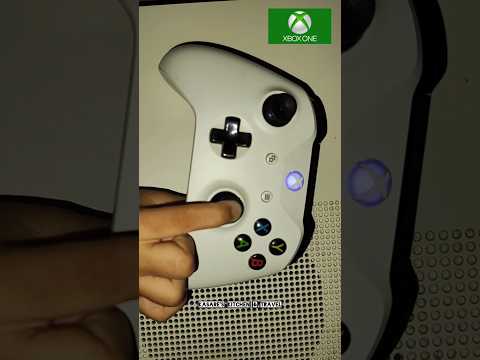
So, you’re scratching your head wondering, “What is the RS button on a controller?” You’re not alone! While it might not be as explicitly labeled as the A, B, X, Y buttons, or the shoulder buttons, the RS button is a crucial control element found on both Xbox and PlayStation controllers. In short, RS stands for Right Stick. It refers to the function activated when you press down on the right analog stick, effectively turning the stick itself into a button.
This seemingly simple action opens up a world of possibilities within games, adding depth and complexity to your control scheme. Let’s dive deeper into what RS does and why it’s so important.
Decoding Controller Lingo: RS and Its Friends
Before we explore the specific functions of the RS button, let’s quickly review the essential controller terminology to avoid any confusion:
- LS (Left Stick): Similar to RS, LS refers to the left analog stick and its button function when pressed down.
- RB (Right Bumper): Located on the top-right of the controller, above the right trigger.
- LB (Left Bumper): Located on the top-left of the controller, above the left trigger.
- RT (Right Trigger): Located on the lower-right of the controller, used for analog input in some games.
- LT (Left Trigger): Located on the lower-left of the controller, used for analog input in some games.
- D-Pad (Directional Pad): The plus-shaped button typically used for navigating menus or for movement in some older games or specific gameplay scenarios.
The Multifaceted Role of the RS Button
The function of the RS button varies significantly depending on the game you’re playing. Developers utilize it in creative ways to enhance the player experience. Here are some common uses:
- Camera Control: A prevalent function is to re-center the camera behind your character or to switch camera perspectives.
- Melee Attacks: In many action games, pressing RS initiates a melee attack, such as a punch, kick, or weapon swing.
- Sprinting/Dodging: The RS button is frequently mapped to sprinting or performing a quick dodge roll, providing increased mobility.
- Crouching/Prone: In shooter games, pressing RS might toggle between standing, crouching, and prone positions, offering tactical advantages.
- Special Abilities: Some games assign unique character abilities or powers to the RS button, allowing for specialized maneuvers or attacks.
- Aiming Down Sights (ADS): Particularly common in first-person shooters, pressing RS can zoom in your view through the weapon’s sights for improved accuracy.
- Tactical Options: Interacting with the environment is also another common use of RS. In some games, players may have to press the RS button to trigger an environmental action to take down an enemy.
- Character Switching: In games with multiple playable characters, the RS button might allow you to instantly switch between them.
- Customizable Bindings: Many games offer the option to remap controller buttons, allowing you to assign different functions to RS according to your preferences.
RS Across Platforms: Xbox vs. PlayStation
While the core function remains the same, it’s essential to note that the terminology can differ slightly between Xbox and PlayStation controllers.
- Xbox: The RS button is universally understood as the Right Stick button.
- PlayStation: The RS button is often referred to as the R3 button. This can sometimes confuse PC gamers who are new to console controllers.
The Importance of Accessibility and Customization
The versatility of the RS button highlights the importance of accessibility and customization in modern gaming. Players with different playstyles or physical limitations can benefit from remapping the RS button to a more comfortable or accessible input.
GamesLearningSociety.org is dedicated to gaming and how it helps with learning. If you’d like to learn more about accessibility in gaming, we encourage you to visit the Games Learning Society website for more information.
Frequently Asked Questions (FAQs)
Let’s address some common questions about the RS button and related controller functionality:
1. Where is the RS button located on a controller?
The RS button is activated by pressing down on the right analog stick. The right analog stick is located on the lower-right side of the front of the controller.
2. What does LS stand for on a controller?
LS stands for Left Stick. Like the RS button, it’s activated by pressing down on the left analog stick, found on the upper-left side of the controller.
3. What is the difference between R1, R2, and R3 on a PlayStation controller?
- R1: The right bumper button, located on the top-right of the controller, closest to the front.
- R2: The right trigger button, located behind the R1 button, used for analog input in some games.
- R3: The Right Stick button, activated by pressing down on the right analog stick (same as the RS button).
4. What is the equivalent of the RS button on a keyboard?
On a keyboard, there isn’t a direct equivalent to pressing down on an analog stick. The functions assigned to the RS button are typically mapped to other keys, such as the Shift key for sprinting or the Ctrl key for crouching. You might also have to rely on your mouse more for fine camera control.
5. What does RB stand for on an Xbox controller?
RB stands for Right Bumper. It’s the button located on the top-right of the controller, above the right trigger.
6. What do LT and RT stand for on a controller?
- LT: Left Trigger.
- RT: Right Trigger.
These buttons are located on the back of the controller and are often used for analog input, such as accelerating in a racing game or aiming a bow and arrow.
7. What is the D-pad used for?
The D-pad (Directional Pad) is a plus-shaped button typically used for navigating menus, selecting items, or for movement in some older games or specific gameplay scenarios.
8. How can I remap controller buttons?
Many games offer in-game options to remap controller buttons. You can usually find these settings in the game’s options menu, under “Controls” or “Button Mapping”. Both Steam and some console settings also allow for global remapping.
9. What is the Share button on the Xbox Series X|S controller?
The Share button (located between the View and Menu buttons) allows you to quickly capture screenshots or record gameplay footage to share with friends or on social media.
10. What are some common uses for the L3 button on a PlayStation controller?
The L3 button (activated by pressing down on the left analog stick) is commonly used for sprinting, crouching, or toggling features like night vision or a flashlight.
11. What does ZL and ZR stand for on a Nintendo Switch controller?
- ZL: Left Z button (a trigger button).
- ZR: Right Z button (a trigger button).
12. Why isn’t the RS button labeled on my controller?
Most controllers don’t explicitly label the RS button with the letters “RS” or “R3”. Instead, it’s implied that pressing down on the right analog stick activates a button function.
13. Can the RS button be broken or stop working?
Yes, like any button on a controller, the RS button can be damaged or stop working due to excessive use, physical impact, or internal component failure.
14. What should I do if my RS button is not working?
First, try cleaning the area around the right analog stick to remove any dirt or debris. If that doesn’t work, you may need to disassemble the controller and clean the internal components or replace the analog stick entirely. If you’re not comfortable doing this yourself, you can take it to a professional repair shop.
15. Do all games use the RS button?
No, not all games utilize the RS button. Some games rely on other button combinations or control schemes. Check the game’s control settings or manual to see how the RS button is used (if at all).
In conclusion, the RS button (Right Stick button) is a versatile and essential control element on both Xbox and PlayStation controllers. Understanding its function and potential uses can significantly enhance your gaming experience. Happy gaming!