What Can Elgato Record? A Comprehensive Guide for Gamers and Creators
Fast answer first. Then use the tabs or video for more detail.
- Watch the video explanation below for a faster overview.
- Game mechanics may change with updates or patches.
- Use this block to get the short answer without scrolling the whole page.
- Read the FAQ section if the article has one.
- Use the table of contents to jump straight to the detailed section you need.
- Watch the video first, then skim the article for specifics.
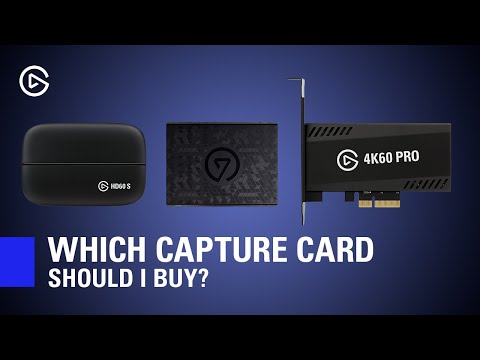
Elgato, a name synonymous with game capture and streaming, offers a diverse range of devices that cater to various recording needs. In essence, Elgato devices can record a wide array of video and audio sources, from analog to digital. Specifically, they can capture footage from:
- Analog video sources: VCRs, DVRs, camcorders, and set-top boxes via composite video or S-Video outputs. They also often include SCART adapters for European devices.
- Digital video sources: Game consoles like PlayStation (PS5, PS4) and Xbox (Series X/S, One), PCs, and cameras, typically via HDMI.
- Audio sources: Game audio, PC audio, and microphone input (often requiring a separate microphone for live commentary).
The specific capabilities vary between Elgato models, so let’s delve into a more detailed exploration.
Elgato: A Deep Dive into Recording Capabilities
Elgato’s product line is designed to accommodate different recording scenarios and skill levels. Whether you’re archiving old home videos or streaming the latest AAA title, there’s likely an Elgato device suited to your needs. Understanding the nuances of each device is key to making the right choice.
Recording Analog Video
For those looking to digitize their vintage video collection, the Elgato Video Capture device is an excellent choice. It connects to analog sources like VCRs and camcorders using composite or S-Video cables. While the output is standard definition, it’s a practical way to preserve memories stored on older media. Elgato Video Capture also often ships with a SCART adapter for capturing video from devices with a SCART output port.
Capturing Console and PC Gameplay
Elgato’s HD series, including the HD60 X, HD60 S+, and 4K60 Pro, are designed for capturing high-definition gameplay from consoles and PCs. These devices connect via HDMI, supporting resolutions up to 4K at 60 frames per second, depending on the specific model. The HD60 X is particularly popular for capturing PS5 or Xbox gameplay, offering seamless streaming and recording at high resolutions. The HD60 S+ can even record directly to an SD card without needing a PC connected, offering versatility. Furthermore, Elgato Gaming hardware can accept the video input from a PC that’s attached to it.
Audio Recording Capabilities
Elgato devices not only capture video but also handle audio. They can record game audio directly from the console or PC, and with Elgato Sound Capture, you can incorporate PC audio into your recordings or streams. For live commentary, a separate microphone connected to your computer is typically required, allowing you to add your voice to the gameplay.
Beyond Capture Cards: Stream Decks and More
Elgato’s product line extends beyond capture cards. The Elgato Stream Deck is a popular tool among streamers, allowing for automation of tasks like scene switching and going live. While it doesn’t directly record video, it enhances the overall streaming experience.
Frequently Asked Questions (FAQs) about Elgato Recording
Here are some frequently asked questions to further clarify the capabilities and usage of Elgato devices:
1. What video quality can I expect from Elgato?
Elgato’s video quality varies by model. The Elgato Game Capture HD offers a maximum frame rate of 30 fps for 1080p video, while newer models like the HD60 variants can achieve 60 fps at 1080p. The 4K60 Pro supports recording at 4K resolution at 60 fps.
2. Do I need a powerful PC to use Elgato?
Yes, especially for high-resolution recording. At a minimum, Elgato recommends a multi-core CPU (Intel Core i5 4th generation or later) with four or more physical cores. For the HD60 S+, an NVIDIA GeForce GTX 10xx series graphics card (or better) is recommended for maximum performance.
3. Can I use Elgato without a PC?
Yes, the Elgato Game Capture 4K60 S+ can record videos directly to an SD card without being connected to a PC. This makes it a versatile option for on-the-go recording.
4. Is Elgato still the best capture card on the market?
Elgato remains a leading brand in capture cards, known for its quality and ease of use. While other options exist, such as the Loupedeck Live, the Elgato HD60 X is often considered one of the best overall streaming cards.
5. Do I need OBS to use Elgato?
While Elgato has its own capture software, OBS Studio is widely recommended for its versatility and features. Elgato Game Capture HD works with Open Broadcaster Software for Windows 7, Windows 8 and Windows 10. Elgato Game Capture HD does not work with Open Broadcaster Software for OS X.
6. Can Elgato record my voice?
Elgato capture cards themselves do not record voice directly. To record your voice alongside gameplay, you’ll need to use a separate microphone connected to your computer and utilize the Live Commentary feature within the Elgato software or OBS Studio.
7. What kind of input does Elgato use?
Most Elgato devices connect to source devices using HDMI. The Elgato Video Capture utilizes composite video or S-Video inputs for analog sources.
8. Can I record gameplay from multiple PCs with Elgato?
Yes, you can record gameplay from one PC to another using Elgato. By outputting the signal from your gaming PC to the HDMI Input of the Elgato device and connecting the Elgato to a second, recording PC.
9. What are the system requirements for using Elgato Video Capture?
For Macintosh: Intel Core processor; Mac OS X v10.6.8 or later. For PC: Windows 7 or later, 2.0 GHz Intel/AMD CPU. 1 GB RAM, built-in USB 2.0 port.
10. Is the Elgato HD60 obsolete?
The Elgato Game Capture HD60 is at its end of life. While you may still find it at some retailers, it is no longer being manufactured by Elgato.
11. Why is Elgato so popular with streamers?
The Elgato Stream Deck is incredibly popular with Twitch streamers. It lets you automate basic tasks—like switching scenes and going live.
12. Is Elgato software free?
Yes, the Elgato Game Capture software is free to download and use with compatible Elgato capture devices.
13. Does Elgato record audio?
Yes, Elgato can record audio. With Elgato Sound Capture, you are able to include PC audio into your streams or recordings.
14. Can I connect a camera to Elgato and record video?
Yes, you can connect your camera to Elgato Game Capture HD60 via HDMI (if your camera has an HDMI output).
15. Why is it called Elgato?
“Elgato” means “the cat” in Spanish.
Conclusion: Unleash Your Recording Potential with Elgato
Elgato offers a comprehensive suite of tools for capturing and streaming video content. From digitizing analog tapes to recording high-definition gameplay, there’s an Elgato device to meet your needs. By understanding the specific capabilities of each model and utilizing the right software and accessories, you can unlock your creative potential and share your content with the world. These tools can be used to create educational content related to games, for example, to support the mission of the Games Learning Society, which explores how games can be powerful tools for education and engagement. For more information, visit GamesLearningSociety.org.