Decoding the Colors: What Do the PS4 Controller Light Bar Colors Mean?
Fast answer first. Then use the tabs or video for more detail.
- Watch the video explanation below for a faster overview.
- Game mechanics may change with updates or patches.
- Use this block to get the short answer without scrolling the whole page.
- Read the FAQ section if the article has one.
- Use the table of contents to jump straight to the detailed section you need.
- Watch the video first, then skim the article for specifics.
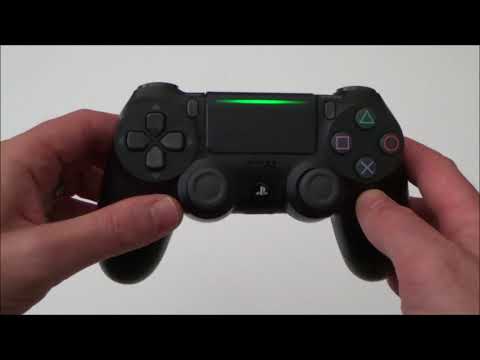
The DualShock 4 controller for the PlayStation 4 features a prominent light bar that serves more than just an aesthetic purpose. This small LED strip is a vital communication tool, conveying important information about your controller’s status, your player number, and even potential issues. Understanding these color codes can dramatically improve your gaming experience and troubleshooting efforts.
The primary function of the PS4 controller light bar is to identify the player in multiplayer games. Each player is assigned a unique color when they connect their controller:
- Blue: This is the color for Player 1. The first controller to connect to the console will typically light up blue.
- Red: This indicates Player 2. The second controller to pair with the PS4 will glow red.
- Green: This signifies Player 3. If you’re using a third controller, it will display a green light.
- Pink: This color represents Player 4. The fourth controller will be assigned the color pink.
Beyond player identification, the light bar uses a range of colors and patterns to communicate various states:
- Solid Blue (after connection): A solid blue light means your controller is successfully connected and ready to use after you press the PS button.
- Flashing Blue: A blinking blue light indicates that the controller is trying to connect to the PS4 console. If it continues to blink without connecting, it may suggest a connection problem.
- Orange (Solid): A solid orange light indicates the PS4 console is in Rest Mode, a low-power state where the console can still charge controllers and download updates.
- Orange (Blinking): A blinking orange light means your controller is charging in Rest Mode.
- Yellow (Solid): A solid yellow light (sometimes described as amber) appears on the controller when it is charging while the PS4 is in Rest Mode or turned off.
- Yellow (Blinking): A blinking yellow light indicates that the controller has just been plugged in to charge.
- White: If the light bar turns white, it often means that the controller has lost connection, or is having problems connecting. If it continues to remain white, and the console is working fine, it could suggest a need to reset your controller.
- Red: A red light generally means the controller’s battery is low and needs to be charged.
- Off: When the light bar is off, it means the controller is either fully charged or not connected to the console.
Other Important Light Bar Considerations
It’s worth noting that some games will utilize the light bar for in-game notifications, typically changing the color based on health status or player teams, adding another layer of information for players.
Frequently Asked Questions (FAQs)
Understanding Your PS4 Controller Light Bar
Here are 15 FAQs to help you better understand your PS4 controller’s light bar:
1. My PS4 controller light is flashing blue, what does that mean?
A flashing blue light indicates that your controller is trying to connect to the PS4. It’s a preliminary stage to establish a connection. If it keeps flashing without turning solid blue, try reconnecting your controller or checking for interference.
2. My PS4 controller has a solid white light, what does that mean?
A solid white light on your controller usually indicates a connection issue with the PS4. This could be due to a bad connection with the console, or an issue with the controller itself. Try resetting your controller or checking your HDMI connections.
3. What does a solid yellow light on my PS4 controller mean?
A solid yellow light on your PS4 controller typically means it’s charging while the console is in Rest Mode or turned off. The controller is receiving power and is actively charging, even if the console isn’t actively being used.
4. Why is my PS4 controller light blinking orange?
A blinking orange light means your controller is charging while the PS4 is in Rest Mode. This means your controller is charging while the console is in a low-power state.
5. My controller light is red, what does it mean?
A red light on your PS4 controller generally indicates a low battery. It’s time to plug it in and recharge. If it remains red after charging for a significant period of time, there might be an issue with your controller’s battery.
6. Can the light bar colors change during gameplay?
Yes, some games use the light bar for in-game feedback. For example, in some games, it might turn green when your character has high health or be associated with a team color, adding another layer of immersion.
7. What does it mean when my controller light is off?
A light bar that’s off typically means the controller is either fully charged or disconnected from the console. If your controller is connected and responsive, it is most likely fully charged. If not, it has likely disconnected, and may need to be reset.
8. How do I reset my PS4 controller if the light is acting strange?
If your controller light behaves oddly, try resetting it. You can do this by using a pin or a similar object to press the reset button on the back of the controller (near the L2 button). If that doesn’t work you can also hold the PS button for 15 seconds to perform a reset.
9. Does the PS4 console have any lights, and what do they mean?
Yes, the PS4 console itself has a light bar that indicates its status. A solid white light may indicate a more serious hardware issue. A solid orange light indicates that the console is in Rest Mode.
10. Can I change the color of my controller light bar?
Officially, there is no option to change the light bar color on the DualShock 4. The colors are primarily dictated by the player number and the state of the controller or console.
11. What is the “Blue Light of Death” on PS4?
The “Blue Light of Death” refers to a situation where the PS4 console flashes a blue light and does not output a display. This usually indicates a software or hardware issue. It could be an issue with the power supply, HDMI connection, or faulty system software.
12. What could cause my PS4 light to be white?
A white light on your console can indicate issues including: power supply problems, overheating, or outdated drivers. It may also signal issues with your HDMI port or cable.
13. What is the “White Light of Death” on PS4?
The “White Light of Death” is typically related to hardware failure, connection issues, or the inability of the console to output a signal to the TV. It often arises from issues with the HDMI connection or a failing power supply.
14. Are the light bar colors the same on all PS4 controllers?
Yes, the light bar colors on all DualShock 4 controllers are consistent, they will follow the same color conventions for player assignment and status indications. The limited edition controllers maintain this basic functionality.
15. What does a solid green light mean on my controller?
A solid green light on your controller usually means you are Player 3. In some games, this may mean you are on the green team, or may also be an indication of high health.
Understanding the different colors and patterns of your PS4 controller’s light bar can significantly enhance your gaming experience and make troubleshooting issues much easier. Next time you notice a change in color, you’ll be better equipped to know what’s going on.