What Does a Nintendo Switch Come With? The Ultimate Unboxing Guide
Fast answer first. Then use the tabs or video for more detail.
- Watch the video explanation below for a faster overview.
- Game mechanics may change with updates or patches.
- Use this block to get the short answer without scrolling the whole page.
- Read the FAQ section if the article has one.
- Use the table of contents to jump straight to the detailed section you need.
- Watch the video first, then skim the article for specifics.
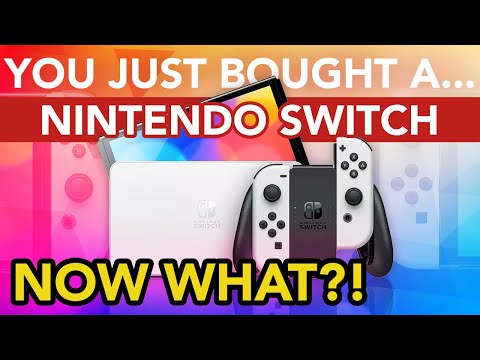
So, you’re about to dive into the wonderful world of Nintendo! Congratulations! But before you tear open that box, let’s make sure you know exactly what goodies await you inside. This guide will provide a detailed rundown of what comes standard with a Nintendo Switch, ensuring you’re fully prepared for your gaming adventure.
In short, a standard Nintendo Switch includes:
- The Nintendo Switch console itself: The tablet-like device that is the heart of the system.
- Left and Right Joy-Con controllers: These versatile controllers can be used attached to the console, detached and used separately, or combined into a single controller.
- Two Joy-Con wrist straps: These attach to the Joy-Cons, providing a more secure grip and larger shoulder buttons.
- A Joy-Con grip: This allows you to combine the Joy-Cons into a more traditional gamepad.
- The Nintendo Switch dock: This connects the Switch to your TV for big-screen gaming.
- An AC power adapter: For charging the console.
- An HDMI cable: To connect the dock to your TV.
That’s the basic bundle. But read on, because there’s plenty more to know to ensure you get the most out of your new system.
Exploring the Nintendo Switch Ecosystem
The Nintendo Switch is more than just a gaming console; it’s a portal to a flexible and innovative gaming experience. Whether you’re a seasoned gamer or new to the world of consoles, understanding what comes in the box is essential for a smooth and enjoyable start. While the core components remain consistent, special editions and bundles may include additional items.
Let’s delve deeper into each component to fully appreciate what you’re getting:
-
The Nintendo Switch Console: The console itself is a 6.2-inch tablet (OLED Model is 7-inch) with a touchscreen display. This is where the magic happens. You can play games directly on the screen in handheld mode, or connect it to your TV via the dock.
-
Joy-Con Controllers: The hallmark of the Switch is its versatile Joy-Con controllers. These can be attached to the console for handheld mode, detached for multiplayer gaming, or combined using the Joy-Con grip for a more traditional controller feel. The Joy-Cons also feature motion controls, HD Rumble, and an IR Motion Camera (on the right Joy-Con).
-
Joy-Con Wrist Straps: These small but important accessories attach to the Joy-Cons to provide a more secure grip, especially during motion-controlled games. They also add larger shoulder buttons for easier access.
-
Nintendo Switch Dock: The dock serves as both a charging station and a connection point to your TV. Simply slide the Switch console into the dock, and the image will be output to your television via the HDMI cable.
-
AC Power Adapter: Essential for keeping your Switch powered up, the AC adapter plugs into the dock and charges the console while it’s docked.
-
HDMI Cable: Connecting the Nintendo Switch dock to your TV is the HDMI cable, allowing for high-definition output and an immersive gaming experience on the big screen.
Nintendo Switch Models: What’s the Difference?
It’s important to note that the Nintendo Switch family has expanded beyond the original model. Here’s a quick breakdown:
-
Nintendo Switch (Original): This is the standard model, offering the versatility of handheld and docked play.
-
Nintendo Switch OLED Model: This enhanced version features a vibrant 7-inch OLED screen, improved audio, a wider adjustable stand, 64 GB of internal storage, and a LAN port on the dock.
-
Nintendo Switch Lite: This is a smaller, lighter, and more affordable version of the Switch, designed exclusively for handheld play. It does not connect to a TV and has integrated controls, meaning the Joy-Cons cannot be detached.
When purchasing a Nintendo Switch, carefully check which model you’re getting to ensure it meets your gaming needs.
Nintendo Switch Bundles
Besides the standard package, Nintendo often releases special edition bundles that include a game or additional accessories. These bundles can offer excellent value for money, especially if you’re interested in the included game. A perfect example of this would be the Mario Kart 8 Deluxe bundle which gives you the console, the game, and a 3-month Nintendo Switch Online subscription. It is important to note that bundles may vary by retailer and region.
Nintendo Switch Online
While not included in the box, Nintendo Switch Online is a subscription service that enhances your Switch experience. It provides access to online multiplayer, a library of classic NES and Super NES games, cloud saves, and exclusive deals. It’s definitely something to consider once you’ve set up your Switch.
Nintendo Switch Peripherals
The world of Nintendo Switch accessories is vast and varied, from protective cases and screen protectors to Pro Controllers and charging docks. While none of these come standard with the Switch, they can significantly enhance your gaming experience. Be sure to research the options and choose accessories that fit your needs and playstyle.
Frequently Asked Questions (FAQs) about the Nintendo Switch
Here are some common questions people have about what comes with a Nintendo Switch, and more:
1. Does the Nintendo Switch come with any pre-installed games?
No, the standard Nintendo Switch does not come with any pre-installed full games. However, some retailers may offer bundles that include a game. Remember to check the packaging to make sure!
2. Does the Nintendo Switch come with a screen protector?
No, the Nintendo Switch does not include a screen protector. It is highly recommended to purchase one separately to protect the screen from scratches.
3. Can I play the Nintendo Switch without a TV?
Yes! One of the great things about the Nintendo Switch is you can play in Handheld Mode with the joycons attached and the screen on.
4. Do I need to buy extra controllers to play with friends?
It depends on the game. Some games allow you to play multiplayer with a single Joy-Con per player. For others, you’ll need additional Joy-Cons or a Pro Controller.
5. How do I charge the Joy-Con controllers?
The Joy-Cons charge when attached to the Switch console while it’s docked or plugged in with the AC adapter. You can also purchase a separate Joy-Con charging dock.
6. What is the Joy-Con grip for?
The Joy-Con grip allows you to combine the two Joy-Cons into a more traditional controller shape, which many players find more comfortable for extended gaming sessions.
7. Does the Nintendo Switch have Bluetooth?
Yes, the Nintendo Switch has Bluetooth, but it’s primarily used for connecting wireless controllers and headphones.
8. What is the internal storage capacity of the Nintendo Switch?
The original Nintendo Switch has 32 GB of internal storage, while the OLED model has 64 GB. The Switch Lite also has 32 GB. You can expand the storage using a microSD card.
9. How do I buy digital games on the Nintendo Switch?
You can purchase digital games from the Nintendo eShop, which is accessible from the Switch’s Home Menu.
10. Does the Nintendo Switch require internet access?
While you can play many games offline, internet access is required for downloading digital games, playing online multiplayer, and accessing certain features.
11. Can I watch Netflix or other streaming services on the Nintendo Switch?
Currently, Netflix does not have a native app available on the Nintendo Switch. However, there are workarounds, such as using a third-party tool.
12. Is Mario Kart free on Nintendo Switch?
No, Mario Kart 8 Deluxe is not free. You must purchase the game digitally or physically. However, “Mario Kart Tour” is a free-to-start mobile game.
13. What is Nintendo Switch Online?
Nintendo Switch Online is a paid subscription service that provides access to online multiplayer, a library of classic NES and Super NES games, cloud saves, and exclusive deals.
14. Can I connect multiple controllers to a Nintendo Switch?
Yes, you can connect up to eight controllers to a single Nintendo Switch console.
15. Is the Nintendo Switch still worth buying in [Current Year]?
Absolutely! The Nintendo Switch offers a unique blend of handheld and console gaming, a vast library of exclusive games, and innovative features. It’s a fantastic choice for gamers of all ages and skill levels. The Games Learning Society highly recommends it for its versatility and educational potential in various game titles. You can find more about games and education at GamesLearningSociety.org.
Conclusion: Embracing the Nintendo Switch Experience
Hopefully, this guide has provided a thorough understanding of what you can expect to find in the box when you purchase a Nintendo Switch. From the console itself to the Joy-Con controllers and dock, each component plays a vital role in delivering a unique and enjoyable gaming experience. Now, go ahead and unbox that Switch, power it up, and embark on your Nintendo adventure!