Unleash the Soundtrack to Your Gaming: Linking Spotify to PS5
Fast answer first. Then use the tabs or video for more detail.
- Watch the video explanation below for a faster overview.
- Game mechanics may change with updates or patches.
- Use this block to get the short answer without scrolling the whole page.
- Read the FAQ section if the article has one.
- Use the table of contents to jump straight to the detailed section you need.
- Watch the video first, then skim the article for specifics.
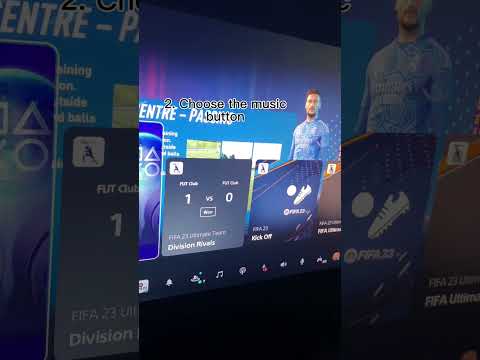
Linking Spotify to your PlayStation 5 (PS5) unlocks a seamless and immersive audio experience, allowing you to listen to your favorite music, podcasts, and playlists while gaming. This integration elevates your gameplay by providing a personalized soundtrack to every adventure, battle, and exploration.
How Spotify Enhances Your PS5 Gaming Experience
Linking your Spotify account to your PS5 enables background music playback, personalized playlists, and easy access to your favorite audio content without interrupting your gaming session. This integration transforms your console into an entertainment hub, blending your favorite music with the immersive world of PlayStation games. More specifically, linking Spotify to your PS5 allows you to:
- Listen to Music While Gaming: Play Spotify in the background while you game, customizing the audio landscape of your experience.
- Control Playback In-Game: Easily control your music, skip tracks, adjust volume, and pause playback directly from the PS5’s Control Center without leaving your game.
- Create Custom Gaming Playlists: Curate playlists specifically designed for your gaming sessions, matching the mood and intensity of each game.
- Discover New Music: Explore Spotify’s vast library of music and podcasts directly from your PS5, finding new audio content to enhance your gaming.
- Share Your Music Taste: Share your favorite tracks and playlists with friends on PlayStation Network, expanding your social gaming experience.
- Listen to Podcasts: Enjoy your favorite podcasts while you game, catching up on news, entertainment, or educational content.
- Immersive Audio Experience: Elevate your gaming experience with a personalized soundtrack that enhances the atmosphere and intensity of your gameplay.
Step-by-Step Guide to Linking Spotify to Your PS5
Connecting your Spotify account to your PS5 is a simple process. Follow these steps to get started:
- Download the Spotify App: Navigate to the PlayStation Store on your PS5 and download the Spotify app.
- Launch the Spotify App: Open the Spotify app from your PS5’s home screen.
- Log In or Create an Account: If you already have a Spotify account, log in using your credentials. If not, create a new account directly within the app or on the Spotify website.
- Link Your Accounts: Follow the on-screen prompts to link your Spotify account to your PlayStation Network account. This usually involves entering a code from your PS5 into the Spotify website or app on your phone or computer.
- Start Listening: Once linked, you can start playing music or podcasts from Spotify while you game.
Controlling Spotify While Gaming
The beauty of linking Spotify to your PS5 lies in the seamless control it offers. You can manage your music without ever leaving your game.
- Access the Control Center: Press the PlayStation button on your DualSense controller to access the Control Center.
- Navigate to Music: Look for the “Music” option in the Control Center.
- Control Playback: From the Music menu, you can play, pause, skip tracks, adjust volume, and even browse your Spotify library.
This feature allows you to fine-tune your audio experience on the fly, ensuring your music perfectly complements your gameplay.
Optimizing Your Spotify Gaming Experience
To get the most out of Spotify on your PS5, consider these tips:
- Create Dedicated Gaming Playlists: Tailor playlists to specific games or genres. A high-energy playlist for action games, or a mellow playlist for exploration games.
- Adjust Game Audio Settings: Fine-tune your game’s audio settings to balance the music with in-game sound effects.
- Use Headphones: For a more immersive experience, use headphones to fully enjoy the music and sound effects without distractions.
- Explore Spotify’s Gaming Hub: Spotify has a dedicated “Gaming” hub with curated playlists and recommendations for gamers.
- Regularly Update Your Playlists: Keep your playlists fresh by adding new tracks and removing songs that no longer fit your gaming mood.
Frequently Asked Questions (FAQs) About Spotify and PS5
1. Is a Spotify Premium account required to use Spotify on PS5?
No, a Spotify Premium account is not strictly required. You can use Spotify on your PS5 with a free account. However, with a free account, you’ll experience ads and may have limited control over playback (e.g., shuffling required on mobile). Spotify Premium removes ads, allows for on-demand playback, and offers higher audio quality.
2. Can I listen to my own music files through Spotify on PS5?
No, Spotify does not support uploading or playing local music files on the PS5. You can only access music and podcasts available within the Spotify library.
3. How do I unlink my Spotify account from my PS5?
To unlink your Spotify account, go to Settings > Users and Accounts > Linked Services on your PS5. Select Spotify and then choose “Unlink.”
4. Can I use Spotify while playing online multiplayer games?
Yes, you can listen to Spotify while playing online multiplayer games. However, be mindful of potential distractions and ensure your music doesn’t interfere with communication with your teammates.
5. Does Spotify affect the performance of my PS5 games?
Spotify has a minimal impact on PS5 performance. The console is powerful enough to handle both gaming and music playback simultaneously. However, if you experience performance issues, try closing other background applications.
6. Can I control Spotify on my PS5 using my smartphone?
Yes, you can use Spotify Connect to control playback on your PS5 using your smartphone. Ensure both devices are connected to the same Wi-Fi network.
7. Does Spotify offer any exclusive content for PlayStation users?
Spotify does not currently offer any exclusive content specifically for PlayStation users. However, they often have gaming-themed playlists and recommendations.
8. What audio quality can I expect when using Spotify on PS5?
The audio quality on Spotify for PS5 depends on your subscription level. Premium users can enjoy higher audio quality compared to free users.
9. Can I use Spotify to listen to music offline on my PS5?
No, Spotify on PS5 does not support offline playback. You need an active internet connection to stream music.
10. Is there a limit to how many devices I can use Spotify on simultaneously?
Spotify Premium allows you to listen on one device at a time per account. If you try to play music on another device while already playing on your PS5, playback on the PS5 will be paused. There are family plans that allow multiple devices to listen at the same time.
11. Can I use Spotify to listen to audiobooks on PS5?
While Spotify has expanded to include audiobooks, availability varies by region and subscription plan. Check if audiobooks are available in your region and if your subscription level grants access.
12. What if I’m having trouble linking my Spotify account to my PS5?
Ensure you have a stable internet connection and that your PlayStation Network and Spotify accounts are in good standing. Try restarting both your PS5 and the Spotify app. If the problem persists, contact PlayStation or Spotify support.
13. Can I share my Spotify playlists with other PS5 users?
Yes, you can share your Spotify playlists with friends on PlayStation Network. Simply share the playlist link through the PlayStation messaging system.
14. Are there any alternatives to Spotify for listening to music while gaming on PS5?
Yes, you can also use Apple Music on PS5. The functionality and integration are very similar to Spotify.
15. Will using Spotify while gaming impact my PS5’s internet data usage?
Yes, streaming music on Spotify will consume internet data. The amount of data depends on the audio quality setting and the duration of playback. Be mindful of your data usage if you have a limited internet plan.