Changing Regions on Your Nintendo Switch: A Comprehensive Guide
Fast answer first. Then use the tabs or video for more detail.
- Watch the video explanation below for a faster overview.
- Game mechanics may change with updates or patches.
- Use this block to get the short answer without scrolling the whole page.
- Read the FAQ section if the article has one.
- Use the table of contents to jump straight to the detailed section you need.
- Watch the video first, then skim the article for specifics.
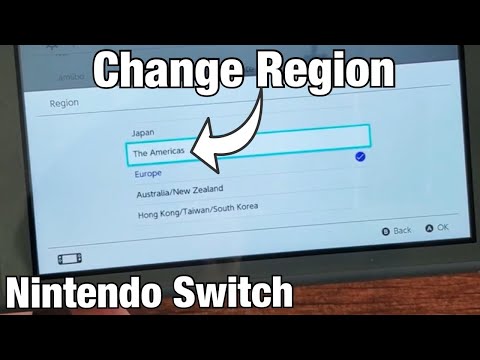
Changing your Nintendo Switch region opens up a world of possibilities, from accessing games not available in your local eShop to enjoying content in different languages. However, it’s crucial to understand the implications before you take the plunge. In essence, changing your Nintendo Account country directly impacts the Nintendo eShop you access on your Switch. The eShop will always align with your Nintendo Account’s country setting. This means you’ll be browsing and purchasing games and DLC from that region’s store. While the Switch hardware itself is region-free, meaning you can play game cartridges from anywhere in the world, DLC and digital purchases are tied to your chosen region.
Understanding the Nuances of Region Switching
The process itself is relatively straightforward, involving a change within your Nintendo Account settings. However, consider the following:
- eShop Access: As mentioned, the eShop will reflect your account’s region.
- DLC Compatibility: DLC is region-locked. Make sure the DLC region matches your game’s region, or it won’t work.
- Language Options: Some games offer different language options depending on the region they are released in.
- End-User License Agreement: You’ll need to agree to the End-User License Agreement for the new region.
- Save Data: Your save data remains intact and is not affected by region changes, as save data is saved to the console’s memory.
- Online Multiplayer: Online play generally remains unaffected, as it is not typically region-locked. However, certain events or promotions might be region-specific.
- Account Balance: It’s generally recommended to spend any existing eShop balance before changing regions, as it may not transfer.
- Content Availability: Game availability may vary by region due to licensing agreements and censorship policies.
Navigating the Region-Free Landscape
The beauty of the Nintendo Switch lies in its region-free nature when it comes to game cartridges. Unlike previous Nintendo consoles, you can pop in a game bought in Japan, Europe, or North America and play it without any issues. This is a game-changer for importing rare or niche titles that might not get a release in your region.
However, the eShop and DLC operate differently. Understanding these differences is key to a smooth and enjoyable gaming experience. Before purchasing a game from a different region’s eShop, research the language options available. While many games offer multiple language options, including English, some might only be available in the local language.
Moreover, remember that DLC is strictly region-locked. If you buy a North American version of a game and then purchase DLC from the Japanese eShop, the DLC will not be compatible. This is a common pitfall and can lead to frustration, so always double-check the game and DLC regions match.
Consider setting up multiple accounts for different regions if you frequently purchase digital games from various eShops. This allows you to keep your primary account in your home region while still accessing content from other regions through separate accounts. It’s a handy workaround to ensure you’re always buying the correct DLC.
Frequently Asked Questions (FAQs)
1. Is it safe to change regions on my Nintendo Switch?
Yes, it is generally safe to change regions on your Nintendo Switch. The console is designed to handle region changes without causing any damage to the hardware or software. However, always be mindful of the implications for your eShop balance, DLC compatibility, and language options.
2. Will I lose my game saves if I change regions?
No, you will not lose your game saves when changing regions on your Switch. Game save data is stored on the console’s internal memory, and it remains intact regardless of your Nintendo Account’s region setting.
3. Can I play games from any country on my Switch?
Yes, you can play game cartridges from any country on your Nintendo Switch. The hardware is region-free, meaning it will play games from any region without issue. However, DLC is region-locked, and digital purchases are tied to your account’s region.
4. What happens to my eShop balance when I change regions?
It’s recommended to spend any existing eShop balance before changing regions. Your eShop balance may not transfer to the new region. Any remaining funds might be inaccessible until you switch back to your original region.
5. Is DLC region-locked on the Nintendo Switch?
Yes, DLC is region-locked on the Nintendo Switch. You must purchase DLC from the same region as your game. For example, if you have a North American version of a game, you need to purchase DLC from the North American eShop.
6. Can I use a Japanese Switch in the USA?
Yes, you can use a Japanese Switch in the USA without any problems. The hardware is identical, and the console supports multiple languages. You may need to adjust the language settings to your preferred language.
7. Will my Joy-Cons work in any region?
Yes, Joy-Cons are region-free and will work with any Nintendo Switch console, regardless of the region it was purchased in.
8. Are there any differences between a Japanese and American Switch?
No, there are no functional differences between a Japanese Switch and an American Switch. The hardware is the same, and both consoles can play games from any region. The warranty may differ.
9. Can I play online multiplayer with someone in a different country?
Yes, you can play online multiplayer with someone in a different country on the Nintendo Switch. Online multiplayer is not region-locked.
10. What happens if I buy a game from a different region and it doesn’t have my language?
This depends on the game. Some games offer multiple language options, while others are only available in the local language. Before purchasing a game from a different region, research the available language options.
11. How do I change the region on my Nintendo Switch?
You change the region by modifying the Nintendo Account setting linked to your Nintendo Switch. You can do this by logging into your Nintendo Account on the Nintendo website and changing the “Country/Region of Residence” under your profile settings. After making the change, restart your console.
12. Can I have multiple Nintendo Accounts for different regions on one Switch?
Yes, you can have multiple Nintendo Accounts for different regions on one Switch. This is a common practice for users who want to access content from multiple eShops.
13. Will changing regions affect my Nintendo Switch Online subscription?
Your Nintendo Switch Online subscription is tied to your Nintendo Account. Changing regions should not affect your subscription, but always double-check your account settings to ensure everything is in order.
14. Is it illegal to mod my Nintendo Switch to bypass region locks?
Modding your Nintendo Switch can void your warranty and may violate the terms of service. In some regions, such as Japan, modifying console hardware can also carry legal penalties.
15. Where can I find more information about game accessibility and learning resources?
For more information about games and their educational applications, consider exploring the GamesLearningSociety.org website. It offers valuable insights and resources on how games can be used for learning and development. The Games Learning Society researches and promotes the educational potential of gaming.
Conclusion: Switch Smart, Game Smarter
Changing regions on your Nintendo Switch is a powerful tool that opens up a world of gaming possibilities. By understanding the implications of region switching and carefully planning your purchases, you can maximize your enjoyment of this versatile console. Remember to consider DLC compatibility, language options, and eShop balances before making any changes. With a little bit of planning, you can navigate the region-free landscape with confidence and enjoy games from all corners of the globe.