What Happens When You Rebuild Your PS5 Database? A Comprehensive Guide
Fast answer first. Then use the tabs or video for more detail.
- Watch the video explanation below for a faster overview.
- Game mechanics may change with updates or patches.
- Use this block to get the short answer without scrolling the whole page.
- Read the FAQ section if the article has one.
- Use the table of contents to jump straight to the detailed section you need.
- Watch the video first, then skim the article for specifics.
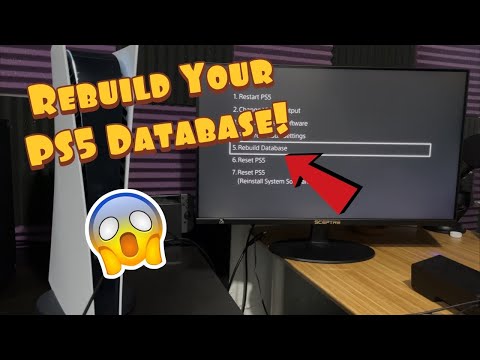
Rebuilding the database on your PlayStation 5 is akin to giving your console’s internal filing system a thorough spring clean. Imagine a library where books are strewn haphazardly on shelves; rebuilding the database is like re-organizing those books according to the Dewey Decimal System, making everything easier to find. Specifically, rebuilding your PS5 database scans the entire storage drive and creates a brand new index of all the content it finds. This index is then used by the system to quickly locate and access games, apps, save data, and other files. This process does NOT delete any of your existing data, including games, saves, or settings. Instead, it aims to resolve performance issues and errors related to data organization.
Why Rebuild Your PS5 Database?
Rebuilding the database is a useful troubleshooting step for a variety of issues you might encounter on your PS5. Here are some common scenarios where it can be beneficial:
- System Feature Issues: If you’re experiencing general sluggishness or unusual glitches within the PS5’s operating system.
- Game Loading Errors: When games are taking an unusually long time to load, or failing to load altogether.
- Corrupted Data: If you suspect data corruption is causing game crashes or other problems.
- Stuttering or Frame Rate Drops: While rebuilding the database isn’t a guaranteed fix, it can sometimes alleviate performance issues in games.
- Ghost Icons: When a game icon remains on the home screen even after the game has been uninstalled.
- PS5 Not Shutting Down Properly: When your PS5 shuts down abruptly, or when your PS5 crashes during use, your system will usually rebuild its database when it restarts.
- Overall System Performance Improvement: Like defragmenting a hard drive on a PC, rebuilding the database can optimize data access, leading to a smoother user experience.
How to Rebuild Your PS5 Database
Rebuilding your PS5 database is a relatively straightforward process:
- Turn off your PS5 completely. Ensure it’s not in rest mode. The light bar should be off.
- Press and hold the power button on the console until you hear two beeps. The first beep will occur almost immediately, while the second will come after about 7 seconds. This will boot your PS5 into Safe Mode.
- Connect your DualSense controller to the PS5 using a USB cable.
- Press the PS button on your controller to access the Safe Mode menu.
- Select option 5, “Rebuild Database.”
- Confirm your selection and wait for the process to complete.
Important Considerations:
- The rebuilding process can take anywhere from a few minutes to several hours, depending on the amount of data stored on your PS5’s drive. Be patient and avoid interrupting the process.
- Ensure your PS5 is connected to a stable power source during the rebuild to prevent data loss.
- It is possible your system will automatically begin the process after you attempt to restart it.
What to Expect After Rebuilding Your Database
After the rebuild is complete, your PS5 will restart. You may notice the following:
- Games and apps might take slightly longer to load the first time you launch them after the rebuild. This is because the system is re-caching the data.
- You may need to rearrange your icons on the home screen, as the rebuild may reset their order.
- Certain settings might revert to their defaults. Check your system settings to ensure everything is configured to your liking.
- Hopefully, the issues you were experiencing will be resolved. If not, you may need to explore other troubleshooting steps.
When Rebuilding the Database Isn’t Enough
While rebuilding the database is a useful tool, it’s not a magic bullet. If you’re still experiencing persistent issues after rebuilding, consider the following:
- Check for system software updates. Outdated software can cause a variety of problems.
- Ensure your games are up to date. Game updates often include bug fixes and performance improvements.
- Check your internet connection. Network issues can lead to game loading errors and online gameplay problems.
- Consider initializing your PS5. This is a more drastic step that will erase all data from your console, effectively restoring it to its factory settings. Only do this as a last resort.
- Contact PlayStation Support. If you’ve exhausted all other troubleshooting options, contact PlayStation Support for assistance.
Ultimately, rebuilding your PS5 database is a safe and relatively simple procedure that can help resolve a variety of issues. It’s a valuable tool to have in your troubleshooting arsenal, but remember that it’s not a guaranteed fix for every problem. The skills used to assess and address these issues can also be applied in other fields, and are even explored in video games. You can find more on these connections and the way that learning occurs in this context at the Games Learning Society website.
Frequently Asked Questions (FAQs)
1. Will rebuilding the database delete my game saves?
No, rebuilding the database will not delete your game saves. It only reorganizes the data on your storage drive.
2. How long does rebuilding the database take?
The time it takes to rebuild the database can vary from a few minutes to several hours, depending on the amount of data stored on your PS5.
3. Is it safe to rebuild the database?
Yes, rebuilding the database is a safe procedure. However, it’s essential to ensure your PS5 is connected to a stable power source during the process.
4. Can I rebuild the database while a game is downloading?
It’s not recommended to rebuild the database while a game is downloading. Interrupting the process could potentially lead to data corruption.
5. How often should I rebuild the database?
There’s no set schedule for rebuilding the database. Only do it when you’re experiencing performance issues or errors.
6. Does rebuilding the database improve game performance?
It can sometimes improve game performance by optimizing data access. However, it’s not a guaranteed fix for performance issues.
7. Will rebuilding the database fix corrupted game files?
It may help fix corrupted game files by reorganizing the data on the storage drive. However, in some cases, you may need to re-download the game.
8. What happens if I interrupt the rebuilding process?
Interrupting the rebuilding process could potentially lead to data corruption. It’s essential to let the process complete without interruption.
9. Does rebuilding the database affect my PlayStation Plus subscription?
No, rebuilding the database does not affect your PlayStation Plus subscription.
10. Will rebuilding the database fix error code CE-34878-0?
Rebuilding the database can sometimes help fix error code CE-34878-0, which is a general application error. However, other troubleshooting steps may be necessary.
11. Is it normal for my PS5 to rebuild the database after an update?
Yes, it is normal for the PS5 to automatically rebuild the database after a system software update.
12. What’s the difference between rebuilding the database and initializing the PS5?
Rebuilding the database reorganizes the data on the storage drive without deleting any data. Initializing the PS5 erases all data from the console, restoring it to its factory settings.
13. Can rebuilding the database fix slow download speeds?
While it’s unlikely to be a direct solution, it’s possible that a fragmented database could contribute to slower download speeds. Rebuilding can sometimes help.
14. My game icon is still on the home screen after I uninstalled the game. Will rebuilding the database fix this?
Yes, rebuilding the database is a common solution for removing ghost icons from the home screen.
15. What is corrupted data on PS5?
Corrupted data on PS5 means that the data available in the particular device has become unreadable, inaccessible, or unusable. Data corruption happens when errors in computer data introduce unintended changes to the original data. You can find out more about this phenomenon and how it effects game design and the ways people learn by visiting GamesLearningSociety.org.