Unveiling the Elite: What Makes the Xbox Elite Controller Special?
Fast answer first. Then use the tabs or video for more detail.
- Watch the video explanation below for a faster overview.
- Game mechanics may change with updates or patches.
- Use this block to get the short answer without scrolling the whole page.
- Read the FAQ section if the article has one.
- Use the table of contents to jump straight to the detailed section you need.
- Watch the video first, then skim the article for specifics.
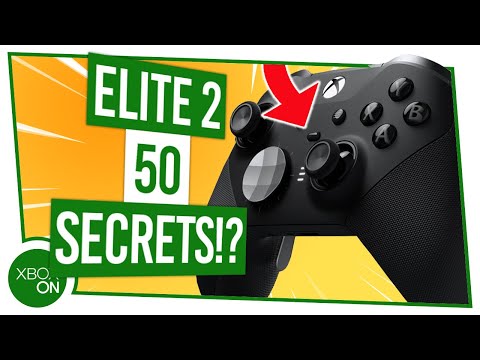
The Xbox Elite Controller, particularly the Series 2, isn’t just a gamepad; it’s a precision instrument designed for discerning gamers. What sets it apart is a confluence of factors: unparalleled customization, premium build quality, enhanced features, and the potential for a demonstrable competitive edge. It’s about elevating the gaming experience beyond the basics, offering a level of control and personalization rarely found in standard controllers. This translates to a more comfortable, responsive, and ultimately, more enjoyable gaming session.
The Anatomy of Excellence: Key Features of the Elite Controller
The allure of the Elite controller lies in its meticulous design and abundance of features that go far beyond your typical controller.
Unrivaled Customization Options
The Elite controller offers a dizzying array of customization options. You can swap out thumbsticks for different heights and textures, change the D-pad to a faceted or standard design, and add or remove paddles on the back of the controller. This level of personalization allows you to tailor the controller to your specific grip and play style.
Superior Build Quality
The Elite controller is constructed with premium materials, including stainless steel components and a comfortable, rubberized grip. This not only enhances durability but also provides a more substantial and satisfying feel in your hands. The heft and solidity of the Elite controller exude quality, a far cry from the often-plasticky feel of standard controllers.
Performance-Enhancing Features
Beyond the aesthetics, the Elite controller boasts features designed to improve your gameplay. Adjustable tension thumbsticks allow you to fine-tune the resistance, giving you greater precision in aiming and movement. Hair trigger locks reduce the travel distance of the triggers, enabling faster firing in shooting games. Mapping buttons to the paddles lets you perform complex actions without taking your thumbs off the thumbsticks.
Enhanced Comfort and Ergonomics
The thoughtful design of the Elite controller extends to its comfort. The rubberized grip provides a secure and comfortable hold, even during extended gaming sessions. The ability to customize the controller’s components ensures that it fits perfectly in your hands, reducing fatigue and improving overall comfort.
Software Integration
The Xbox Accessories app allows you to further customize your Elite controller. You can create and save multiple profiles with different button mappings, trigger sensitivities, and thumbstick adjustments. This lets you quickly switch between different configurations depending on the game you’re playing.
Is It Worth the Investment?
The Xbox Elite Controller represents a significant investment. Whether it’s “worth it” depends on your individual needs and gaming habits. If you’re a casual gamer who only plays occasionally, the benefits may not justify the cost. However, if you’re a serious gamer who values precision, customization, and performance, the Elite controller can be a game-changer. It offers a level of control and comfort that simply isn’t available with standard controllers.
The Competitive Edge: Does the Elite Controller Make You a Better Gamer?
While the Elite controller won’t magically transform you into a pro gamer overnight, it can provide a competitive edge. The ability to map buttons to the paddles allows you to perform actions more quickly and efficiently. The adjustable tension thumbsticks and hair trigger locks can improve your accuracy and response time. Ultimately, the Elite controller can help you play at your best, giving you a slight advantage over your opponents. For more insights on the intersection of games and learning, explore the resources available at the Games Learning Society, online at GamesLearningSociety.org.
Frequently Asked Questions (FAQs) About the Elite Controller
Here are 15 frequently asked questions about the Xbox Elite Controller, designed to provide you with a comprehensive understanding of this premium gaming accessory:
1. What’s the difference between the Xbox Elite Wireless Controller Series 2 and the Core version?
The Xbox Elite Wireless Controller Series 2 Core is functionally the same as the standard Series 2 but comes with fewer accessories. The Core version typically includes just the controller itself, while the full Series 2 includes interchangeable thumbsticks, D-pads, paddles, a carrying case, and a charging dock.
2. Does the Elite Controller give you a real advantage in games?
Yes, the customization options and additional features can provide a tangible advantage. Mapping buttons to the paddles allows you to keep your thumbs on the thumbsticks, improving movement and aiming simultaneously. The adjustable triggers also offer faster response times.
3. Why are Elite Xbox controllers so expensive?
The price reflects the premium materials, high-end components, and extensive customization options. The reinforced buttons, triggers, and analog sticks, along with the advanced features, contribute to the higher cost.
4. How long does the Elite Series 2 battery last?
The Elite Series 2 boasts a long battery life, offering up to 40 hours of rechargeable gameplay on a single charge.
5. Can the Elite Series 2 controller be used wired?
Yes, you can connect the Elite Series 2 using a USB-C cable. It also supports wireless connections via Xbox Wireless Adapter for Windows and Bluetooth.
6. Is the Elite Controller 2 better than the Elite Controller 1?
Yes, the Series 2 is considered an improvement over the original. It features a rechargeable battery, more customization options, refined paddles, and adjustable triggers.
7. What comes in the box with the Elite Series 2?
The full Elite Series 2 package includes the controller, a carrying case, six thumbsticks, four paddles, two D-pads, a thumbstick-adjustment tool, a charging dock, and a USB-C cable.
8. Are Xbox Elite controllers rechargeable?
Yes, the Xbox Elite Wireless Controller Series 2 has an internal rechargeable battery, eliminating the need for AA batteries.
9. How long does an Xbox controller typically last?
With proper care, an Xbox controller can last anywhere from 2 to 5 years or longer, depending on usage and storage conditions. Wired controllers often outlast wireless models.
10. Why is the white Xbox Elite controller (Core) cheaper?
The white Xbox Elite controller (Core) is more affordable because it includes fewer accessories than the standard black Elite controller.
11. Can I use Elite Series 1 accessories with the Elite Series 2 controller?
Yes, some accessories from the original Elite Controller are compatible with the Elite Series 2, such as paddles and D-pads.
12. Is the Elite Series 2 controller compatible with PC?
Yes, the Elite Series 2 is compatible with Xbox consoles and Windows PCs.
13. Does the Elite Controller have Bluetooth?
Yes, the Elite Series 2 controller features Bluetooth connectivity, allowing it to connect to various devices, including PCs and mobile devices.
14. What are the key customization options available on the Elite Controller?
Key customizations include swappable thumbsticks, adjustable trigger stops, remappable buttons, and the ability to adjust thumbstick tension.
15. Is the Xbox Elite Controller durable?
The Elite Controller is designed with durability in mind, using high-quality materials and reinforced components to withstand heavy use. However, some users have reported issues with longevity, so proper care is essential.