The Ultimate Guide: Choosing the Best GPU for High FPS Gaming
Fast answer first. Then use the tabs or video for more detail.
- Watch the video explanation below for a faster overview.
- Game mechanics may change with updates or patches.
- Use this block to get the short answer without scrolling the whole page.
- Read the FAQ section if the article has one.
- Use the table of contents to jump straight to the detailed section you need.
- Watch the video first, then skim the article for specifics.
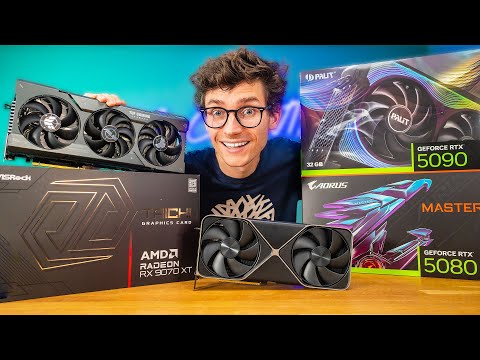
So, you’re chasing those buttery smooth frame rates, huh? Let’s cut to the chase: the best GPU for high FPS gaming is a multifaceted decision, heavily dependent on your target resolution and games. If money is no object, the Nvidia GeForce RTX 4090 reigns supreme for unmatched performance across the board, including pushing impressive frame rates at higher resolutions like 1440p and even 4K. However, “best” is relative. For 1080p at 240Hz, something like an RTX 4070 or even an RTX 3060 may suffice. Ultimately, understanding the interplay between resolution, refresh rate, and game fidelity is critical to making the right choice.
Understanding the FPS Landscape
Before diving into specific GPU recommendations, let’s clarify a few key concepts. FPS (Frames Per Second) dictates how smoothly motion appears on your screen. A higher FPS translates to a more responsive and visually pleasing gaming experience. Many gamers target a minimum of 60 FPS for playable experiences, while competitive gamers often strive for 144 FPS or even 240 FPS on high refresh rate monitors.
Resolution is also a crucial factor. Playing at 1080p (1920×1080) requires significantly less GPU horsepower than 1440p (2560×1440) or 4K (3840×2160). Naturally, a GPU capable of hitting 240 FPS at 1080p may struggle to achieve even 60 FPS at 4K in demanding titles.
Finally, consider the game itself. Some games are inherently more demanding than others. A graphically intensive open-world title like Cyberpunk 2077 will place a much greater burden on your GPU than a less demanding eSports title like Valorant.
Top GPU Recommendations by Resolution and Refresh Rate
Here’s a breakdown of GPU recommendations based on target resolution and refresh rate:
1080p Gaming (144Hz+)
- High-End: Nvidia GeForce RTX 4070 / AMD Radeon RX 7800 XT: These cards offer excellent performance at 1080p, easily pushing high frame rates in most games. They also provide a good balance of performance and features like ray tracing and DLSS/FSR.
- Mid-Range: Nvidia GeForce RTX 3060 / AMD Radeon RX 6600 XT: These are solid options for achieving high frame rates without breaking the bank. While you might need to tweak settings in more demanding games, they are generally capable of delivering smooth gameplay.
- Budget-Friendly: Nvidia GeForce RTX 3050 / AMD Radeon RX 6600: For gamers on a tight budget, these cards still offer a decent 1080p experience, though you may need to lower settings in some titles to maintain high FPS.
1440p Gaming (144Hz+)
- High-End: Nvidia GeForce RTX 4080 / AMD Radeon RX 7900 XT: These GPUs are absolute powerhouses for 1440p gaming, capable of pushing high frame rates even in the most demanding titles with high or ultra settings.
- Mid-Range: Nvidia GeForce RTX 4070 / AMD Radeon RX 7800 XT: As mentioned above, these cards are great overall performers, striking a good balance between performance and price for 1440p high refresh rate gaming.
- Entry Level: Nvidia GeForce RTX 3070 / AMD Radeon RX 6700 XT: These can still provide a satisfactory 1440p gaming experience, but settings might need to be adjusted for optimal frame rates in newer AAA titles.
4K Gaming (60Hz+)
- Enthusiast: Nvidia GeForce RTX 4090: The undisputed king of 4K gaming. If you want the absolute best performance at the highest resolution, this is the card to get, even though it comes at a premium price.
- High-End: Nvidia GeForce RTX 4080 / AMD Radeon RX 7900 XTX: These are excellent alternatives to the RTX 4090, offering impressive 4K performance at a slightly lower price point.
- Mid-Range: Nvidia GeForce RTX 4070 Ti / AMD Radeon RX 7900 XT: These cards can handle 4K gaming, but you may need to compromise on settings to maintain a consistent 60 FPS or higher.
Key Technologies to Consider
Beyond raw horsepower, several technologies can significantly impact your gaming experience:
- Ray Tracing: This rendering technique simulates realistic lighting and reflections. While visually stunning, it’s extremely demanding on GPUs. RTX series cards from Nvidia are generally better at ray tracing due to dedicated hardware.
- DLSS (Deep Learning Super Sampling) / FSR (FidelityFX Super Resolution): These upscaling technologies render games at a lower resolution and then use AI or algorithms to upscale the image to your target resolution. This allows for improved performance without sacrificing visual quality. Nvidia’s DLSS generally has better image quality compared to FSR, though FSR has been improving with newer versions.
- Variable Refresh Rate (VRR): Technologies like Nvidia’s G-Sync and AMD’s FreeSync synchronize the refresh rate of your monitor with the frame rate output of your GPU, eliminating screen tearing and stuttering for a smoother gaming experience.
Other Factors to Consider
Don’t forget to consider these factors as well:
- CPU: Your CPU (Central Processing Unit) needs to be powerful enough to keep up with your GPU. A bottlenecked CPU can limit your FPS, even with a high-end graphics card.
- RAM: Ensure you have sufficient RAM (Random Access Memory). 16GB is generally considered the minimum for modern gaming, while 32GB is recommended for more demanding titles.
- Power Supply: Make sure your power supply has enough wattage to handle your GPU and other components.
- Budget: This is often the most significant factor. Prioritize the components that will have the most impact on your gaming experience based on your budget.
- Future-Proofing: Consider the longevity of your investment. A more powerful GPU will likely remain relevant for longer.
Frequently Asked Questions (FAQs)
1. What’s more important, resolution or FPS?
This depends on personal preference. Some gamers prioritize visual fidelity and are happy with a lower FPS at higher resolutions, while others value smoothness and responsiveness above all else.
2. Can an RTX 3060 Ti run 240 FPS?
Yes, the RTX 3060 Ti is viable for 1080p 240Hz competitive gaming, but that is a very small niche and for the overwhelming majority the 3060 would be the better pick for 1080p.
3. Is the RTX 3060 good for 1440p gaming?
Yes, the RTX 3060 can run 1440p with 144Hz.
4. What GPU do I need for 240 FPS at 1080p?
The Nvidia GeForce RTX 4080 is currently the best GPU for achieving 240FPS in 1080p gaming.
5. Is RTX better than GTX?
In general, the RTX card series offers better performance than the GTX series, especially in games that support ray tracing and DLSS.
6. Can a GTX 1650 run all games?
Yes, a GTX 1650 can run almost all types of heavy games.
7. Can an RTX 2060 run 240 FPS?
Yes, GeForce RTX 2060 run 240fps but only on low resolution.
8. Is the RTX 3060 Ti overkill?
3060 Ti is not an overkill, that card has a good value and actually is more meant for 1080p maybe 1440p.
9. What FPS will an RTX 2060 run?
Delivering max-setting 60+ FPS gaming at 1920×1080, and excellent high-setting performance at 2560×1440, the RTX 2060 offers an in-game experience that beats the GTX 1070 Ti.
10. Is an RTX 3050 better than a GTX 1650?
RTX 3050 is about 30% faster than GTX 1650 and supports latest technologies like RTX voice, DLSS, ray tracing etc. So RTX 3050 is better.
11. Is the RTX 3060 Ti better than the PS5?
Yes, the RTX 3060 Ti is superior than the PS5’s graphics card.
12. Can a GTX 1650 run 4K?
The GTX 1650 is a budget gaming card, not intended for 4k gaming.
13. How can I maximize FPS on my GPU?
Increase the temperature limit to its maximum and increase the Power Limit by 10%, move the GPU slider to the right by +50 MHz, stress test the GPU, increase the clock speed in increments of 10 MHz, and then test again.
14. What GPU can run 1440p 144Hz?
The RTX 3080 Ti stands out as one of the best GPUs for achieving a smooth 1440p experience at 144Hz.
15. Which gives more FPS, GTX or RTX?
The only difference between those cards is that RTX cards support real-time ray tracing and GTX cards don’t. Other than that, an RTX card can be faster than a GTX card or vice versa.
Final Thoughts
Choosing the best GPU for high FPS gaming is a balancing act. Consider your budget, target resolution, refresh rate, and the types of games you play. Do your research, read reviews, and don’t be afraid to ask for advice from fellow gamers. Happy gaming, and may your frame rates be high! Also, if you are interested in the educational aspects of gaming be sure to visit the Games Learning Society website, to learn more at GamesLearningSociety.org.